
You searched for arthritis wrist support and immediately saw dozens of products claiming support, compression, stabilization, pain relief, comfort, adjustable fit, and thumb support. But product descriptions do not explain which features actually matter for everyday use. This guide focuses on feature evaluation and daily-use practicality, so you can choose based on your activity and support requirements. For a broader look at the FingerTipSplint range, start with arthritis wrist support options.
Table of Contents
- Why Arthritis Wrist Support Can Help
- 10 Features to Check
- Features Comparison Table
- Which Features Matter for Different Buyers
- Interactive Feature Selector
- 3D Wrist Support Infographic
- Step-by-Step Selection
- Arthritis Wrist Support for Daily Use
- How Tight Should It Be?
- Support vs Comfort Balance
- Support vs Brace vs Splint vs Sleeve
- 10 Common Buying Mistakes
- Product Guide
- Daily-Use Testing Guide
- When Support May Not Be Enough
- Doctor Advice
- Recovery and Reassessment
- 7 Quick Tips
- Interactive Buyer Checklist
- FAQ
When evaluating arthritis wrist support, focus on support level, fit, adjustability, material, breathability, wrist and thumb coverage, mobility, activity compatibility, ease of application, and care requirements. The right support should serve your activity rather than unnecessarily preventing movement.
Why Arthritis Wrist Support Can Help With Everyday Activities
Arthritis can affect how the wrist feels and functions during daily tasks. Understanding how support fits into your everyday activities helps you evaluate which features matter. The Mayo Clinic arthritis overview explains that arthritis involves joint inflammation and can cause pain, stiffness, and reduced movement.
Wrist Movement and Everyday Tasks
Typing
Wrist positioning and finger movement for keyboard use.
Writing
Pen grip and wrist stability during extended writing.
Cooking
Grip strength and wrist positioning during food preparation.
Opening containers
Twisting and gripping motions that stress the wrist.
Holding a phone
Thumb and wrist positioning during extended phone use.
Household activities
Cleaning, folding, and organizing involve repeated wrist movement.
Support vs Restriction
A support that restricts too much interferes with daily tasks. A support that provides too little does not help. The right balance depends on your activity and your needs.
Why Daily Use Requires Different Considerations Than Occasional Use
A support worn briefly for a particular task has different comfort requirements from one someone intends to use repeatedly during the day. Daily use prioritizes sustained comfort, breathability, and practicality.
10 Features to Check Before Buying Arthritis Wrist Support
1. Support Level
Light support provides flexibility with minimal restriction. Moderate support offers greater stabilization with adjustable fastening. Firmer support provides more structure, but more is not automatically better.
2. Adjustability
Adjustable straps allow you to customize the fit. Consider the fastening method, repositioning, tension adjustment, and ease of use.
3. Wrist Coverage
Coverage may be partial (specific area) or broader (covering more of the wrist). Match coverage to the area that needs support.
4. Thumb Design
Some arthritis-related discomfort may involve the thumb area. Consider thumb opening, thumb coverage, thumb mobility, and combined wrist/thumb support.
5. Material
Consider flexible fabric, elastic materials, neoprene-like materials, and structured materials. No material is universally best — it depends on your needs.
6. Breathability
Heat
A breathable material reduces heat buildup during extended wear.
Moisture
Moisture management matters for daily-use comfort.
Skin comfort
Breathable materials reduce the chance of skin irritation.
Extended use
Breathability becomes more important the longer you wear the support.
7. Fastening System
Compare hook-and-loop, elastic, pull-on, and adjustable strap systems. Focus on ease of adjustment and secure positioning.
8. Profile and Bulk
A bulky support can interfere with sleeves, keyboard use, phone handling, and household tasks. A low-profile design is usually more practical for daily use.
9. Finger Mobility
The support should allow the movements you still need to perform. A support that restricts finger movement will not be worn consistently.
10. Cleaning and Maintenance
Consider washing instructions, drying, odor and moisture management, fastening durability, and material condition.
Arthritis Wrist Support Features Comparison Table
| Feature | Why It Matters | What to Check |
|---|---|---|
| Support | Stability | Appropriate level |
| Fit | Positioning | Correct size |
| Adjustability | Customization | Adjustable fastening |
| Material | Comfort | Skin-friendly construction |
| Breathability | Extended use | Airflow and moisture handling |
| Coverage | Support area | Wrist or thumb coverage |
| Mobility | Daily tasks | Finger and thumb movement |
| Profile | Practicality | Bulk level |
| Fastening | Convenience | Easy adjustment |
| Care | Longevity | Cleaning instructions |
Which Arthritis Wrist Support Features Matter Most for Different Buyers?
For Computer Users
Prioritize low profile, comfortable wrist positioning, finger mobility, adjustability, and breathability. A support that interferes with typing will not be worn consistently.
For People Doing Household Tasks
Prioritize secure fit, mobility, easy fastening, and practical coverage. The support should stay in place during repeated hand movement.
For People Who Need More Wrist Stabilization
Consider structured support and coverage. Match the support level to your specific needs rather than assuming more restriction is always better.
For People With Thumb and Wrist Concerns
Consider combined wrist and thumb designs. For a comparison of brace types, see our guide on support, fit, and comfort for arthritis wrist braces.
For Occasional Users
Focus on easy application and convenient adjustment. A support that is simple to apply and remove is more likely to be used when needed.
Interactive Feature Selector — What Should You Prioritize?
Answer four questions to see your feature-priority profile. This is a buyer education tool, not a medical diagnostic tool.
Answer the four questions above to see your feature-priority profile.
3D Interactive Infographic — Anatomy of an Arthritis Wrist Support
The interactive 3D component explorer below shows the features of an arthritis wrist support. Click each component to see what it does and why it matters.
Wrist Support Feature Explorer
Click a component to learn what it does and why it matters when you are choosing support.
How to Choose Arthritis Wrist Support Step by Step

Arthritis Wrist Support for Daily Use
Using Wrist Support While Working at a Computer
Consider keyboard and mouse use, typing, desk positioning, finger movement, and support bulk. A low-profile support that allows finger movement is usually more practical. The support does not automatically make poor ergonomics safe.
Using Wrist Support While Using a Phone
Consider gripping, scrolling, texting, and one-handed use. A support that restricts thumb movement may make phone use difficult.
Using Wrist Support While Cooking
Consider gripping utensils, opening containers, and lifting lightweight kitchen objects. Users should remove or adjust support if it interferes with safe handling.
Using Wrist Support During Household Tasks
Consider cleaning, folding clothes, organizing, and light household tasks. A support that stays secure during repeated movement is more practical.
Using Wrist Support While Writing
Consider pen grip, wrist positioning, finger mobility, and comfort. A support that interferes with writing will not be worn consistently.
Using Wrist Support During Rest
Intended use depends on the product and individual circumstances. Follow product and clinical advice on whether the support is appropriate for rest.
How Tight Should Arthritis Wrist Support Be?
Secure vs Too Tight
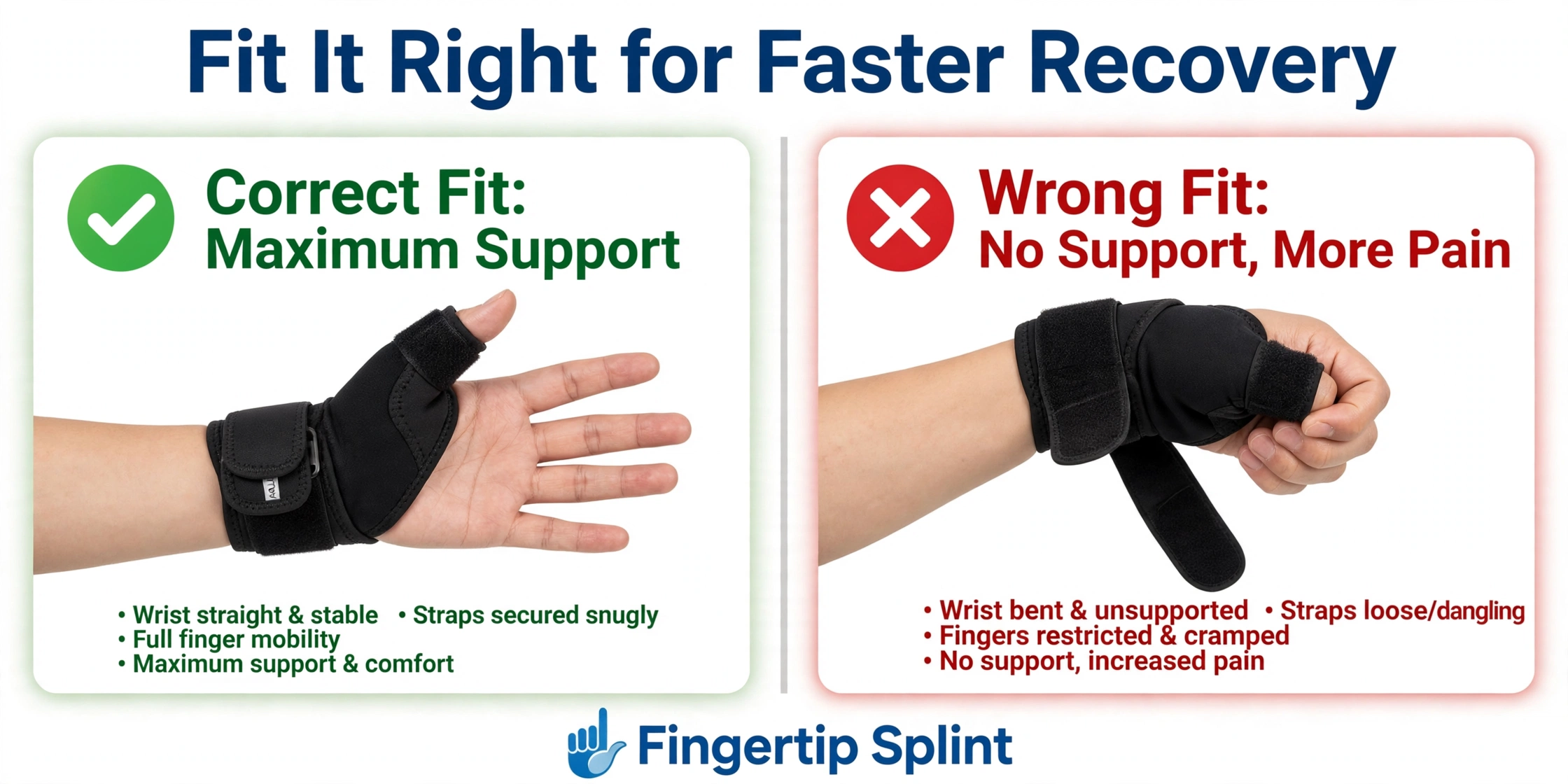
A support should remain positioned without excessive compression. Excessive tightness can cause numbness, tingling, or discoloration.
5-Point Fit Check
1. Fingers move comfortably
You should be able to open and close your hand without restriction.
2. No persistent numbness
Normal sensation should be maintained throughout wear.
3. No tingling
Tingling indicates the support is interfering with nerve function.
4. No concerning discoloration
Skin color should remain normal during wear.
5. No painful pressure points
You should not feel persistent pressure or pinching.
What to Do If the Brace Feels Too Tight
Loosen or remove the support and reassess the fit. If concerning symptoms persist, seek appropriate medical advice.
Support vs Comfort: Finding the Right Balance
Why Maximum Support Isn’t Automatically Better
More support does not automatically mean better support. An overly restrictive support may interfere with normal movement and can create pressure or discomfort if poorly fitted.
Why Maximum Flexibility Isn’t Automatically Better
Too little structure may fail to provide the desired support. A support that is too flexible may not help with the intended purpose.
The Goal: Appropriate Support
Arthritis Wrist Support vs Wrist Brace vs Splint vs Sleeve
Wrist Sleeve
A sleeve provides flexible compression and light support. It is low-profile and comfortable but does not provide structural support.
Wrist Support
A wrist support provides adjustable, structured support. It is usually appropriate when more support is needed than a sleeve can provide.
Wrist Brace
A brace provides structured support with adjustable fastening. It is often used for arthritis-related support.
Wrist Splint
A splint generally provides more stabilization and may restrict movement more. The Cleveland Clinic finger splint resource explains that different splints serve different purposes.
Which Design Fits Which General Need?
Match the product category to your support need. For a detailed look at tendon-focused support, see our guide on wrist brace for tendon support.
Common Buying Mistakes
Stronger is not always better. Match support to your activity.
What to do instead: evaluate support level for your specific needs.
Sizing varies by brand. A support that is too loose or too tight will not work.
What to do instead: measure and compare with the specific product’s chart.
Thumb coverage dramatically affects support and mobility.
What to do instead: choose thumb coverage based on whether thumb symptoms are part of your situation.
A support that traps heat will not be worn consistently.
What to do instead: consider breathability for extended wear.
A bulky support interferes with typing, mouse use, and phone handling.
What to do instead: consider a low-profile design for desk activities.
Compression and stabilization are different. A compression sleeve does not provide structural support.
What to do instead: match the product category to your support need.
Adjustable fastening allows you to customize the fit.
What to do instead: check the fastening system before buying.
The support should allow the movements you still need to perform.
What to do instead: test finger movement after fitting.
A support for rest may not be right for computer work.
What to do instead: reassess whether the support is appropriate for each activity.
A support is not a diagnosis or cure.
What to do instead: seek professional assessment for significant symptoms.
Product Guide — Arthritis Wrist & Thumb Support Brace
Use this section as a worked example of how to evaluate arthritis wrist support against the criteria in this guide. The product being evaluated is the arthritis wrist and thumb support brace from FingerTipSplint.
Arthritis Wrist & Thumb Support Brace
- Wrist coverage: Designed to provide wrist support
- Thumb coverage: Extends support to the thumb area
- Fastening and adjustability: Check the product page for adjustment details
- Support structure: Intended to provide structured support
- Everyday usability: Intended for daily activities
- Fit: Check the product page for sizing information
Features to Evaluate in This Product
Check wrist coverage, thumb coverage, fastening and adjustability, support structure, everyday usability, and fit. For buyers comparing different wrist support options, explore the arthritis wrist support buying options.
Who Might Consider This Design?
People looking for a wrist and thumb support format may find this design relevant to compare. It is not automatically appropriate for everyone with arthritis.
How to Compare It With Other Wrist Supports
Use the 10-feature checklist developed earlier. Compare coverage, adjustability, materials, and intended use across products.
Daily-Use Testing Guide
Use this five-minute practical test to evaluate whether the support works for your daily activities.
Minute 1 — Put it on
Check positioning. The support should sit where intended.
Minute 2 — Move your fingers
Check mobility. You should be able to open and close your hand comfortably.
Minute 3 — Perform a normal task
Type, hold a phone, or write. Check that the support does not interfere.
Minute 4 — Check pressure
Look for pressure points, pinching, or discomfort.
Minute 5 — Reassess
Ask: Is it still comfortable? Has it moved? Is there excessive pressure? Can I perform my task safely?
When Wrist Support May Not Be Enough
- Severe or worsening pain
- Significant swelling
- Visible deformity
- Major loss of function
- Persistent numbness or tingling
- Unusual discoloration
- Symptoms that keep worsening
- Symptoms that do not improve as expected
Changing products repeatedly is not a substitute for evaluating an underlying problem. Additional trusted resources include the AAOS arthritis of the wrist resource, the NHS arthritis page, and the MedlinePlus arthritis resource.
Doctor Advice for Choosing and Using Arthritis Wrist Support
This section is written in the tone of a practical professional checklist. It is not a diagnosis and does not replace an in-person assessment.
Correct fit
Fit is essential for both comfort and function.
Appropriate support
Support should match the situation, not be maximum by default.
Activity-specific use
The support should be appropriate for the activities you do.
Monitoring comfort
Check comfort during and after wear.
Avoiding excessive restriction
More restriction is not always better.
Professional evaluation
Persistent symptoms deserve professional assessment.
Additional trusted resources include the Cleveland Clinic thumb arthritis page, the WebMD arthritis overview, and the Healthline arthritis resource.
Recovery and Reassessment Timeline
This is a wearing and reassessment framework, not a promised healing schedule. Arthritis is not a single injury with one predictable recovery path.
First Use
Evaluate fit and comfort. Check positioning, pressure, movement, and skin response.
First Few Days of Practical Use
Evaluate whether the support works with your normal activities. Adjust or change the support if it interferes.
Ongoing Use
Reassess comfort, skin, mobility, support, and whether the brace is still appropriate.
When to Reassess With a Professional
Persistent or worsening symptoms should trigger appropriate medical evaluation.
7 Quick Tips for Everyday Arthritis Wrist Support
Interactive Buyer Checklist
Click each item to confirm. Aim to check all 10 before buying.
Frequently Asked Questions
Look for appropriate support level, correct fit, adjustability, skin-friendly material, breathability, wrist and thumb coverage as needed, finger mobility, activity compatibility, ease of application, and clear care instructions.
For a deeper look at support, fit, and comfort, see our guide on support, fit, and comfort for arthritis wrist braces.
Adjustability offers advantages: you can modify the fit, reposition the support, and adjust tension as needed. However, adjustability does not make a support appropriate for every situation.
The overall design still needs to match your needs. An adjustable support that does not provide the right support level or coverage will not be useful.
It depends on the area requiring support and the design. If thumb symptoms are part of your situation, a combined wrist and thumb design may be appropriate. If thumb symptoms are not present, a wrist-only design may be sufficient.
Confirm that the support covers the area you need supported.
Yes, provided the support allows finger mobility and does not interfere with typing or mouse use. A low-profile support is usually more practical for desk work.
Check that the support does not create pressure points during extended keyboard use. The support does not automatically make poor ergonomics safe.
It should be secure and comfortable, not excessively tight. You should be able to move your fingers comfortably, with no persistent numbness, tingling, concerning discoloration, or painful pressure points.
If the support feels too tight, loosen or remove it and reassess the fit. If concerning symptoms persist, seek appropriate medical advice.
Use depends on the product, comfort, and individual guidance. There is no universal all-day recommendation. Some people may benefit from wearing support during certain activities, while others may wear it for rest.
Follow the product instructions and professional advice. Monitor skin and sensation during wear.
A correct fit is secure, comfortable, and stable. You should be able to move your fingers normally, the support should stay in place, there should be no painful pressure, and there should be no numbness or tingling.
Check the skin after removal. Redness, pressure marks, or irritation suggest the support is too tight or not suitable.
Seek professional assessment if you have severe or worsening pain, significant swelling, visible deformity, major loss of function, persistent numbness or tingling, unusual discoloration, or symptoms that keep worsening.
Changing products repeatedly is not a substitute for evaluating an underlying problem.
Choose Based on Your Daily Life
If you have compared the support level, coverage, fit, adjustability, and daily-use requirements and you are looking for a wrist and thumb design, review the Arthritis Wrist & Thumb Support Brace and compare its characteristics against your needs.
Explore FingerTipSplint wrist support options, check the FingerTipSplint FAQ, or use the request-a-quote page for bulk or business purchasing. For medical support products, see the medical support products page.
View the Product Explore Wrist SupportFinal Takeaway: Match Features to Your Daily Life
Buying arthritis wrist support is not simply about finding the strongest brace. The better decision comes from matching the support’s features to the area you want supported, your required mobility, your daily activities, and your comfort requirements. Before you buy, identify your main activity, determine the area you need supported, compare support levels, check adjustability and materials, and test the fit.
If symptoms persist, worsen, or involve severe pain, significant swelling, deformity, numbness, or major loss of function, do not simply change supports. Seek appropriate medical evaluation. For medical support supply and distribution, see the medical support products page and the finger splint distributor page. For the full FingerTipSplint range, visit the FingerTipSplint arthritis support resources.