
Cordless Wristband EMS Microcurrent Brace: What Is It and How Is It Used?
You have seen a product called a wristband, an EMS brace, a microcurrent brace, a wrist support, or an electrical stimulation device — and you are not sure what you are actually buying. A cordless EMS microcurrent wrist brace combines a wearable wristband format with electronic stimulation components, so understanding both the physical brace and the electronic controls matters before using it. This guide explains what it is, how its parts work, how to fit and use it, what to expect, and what buyers should check first.
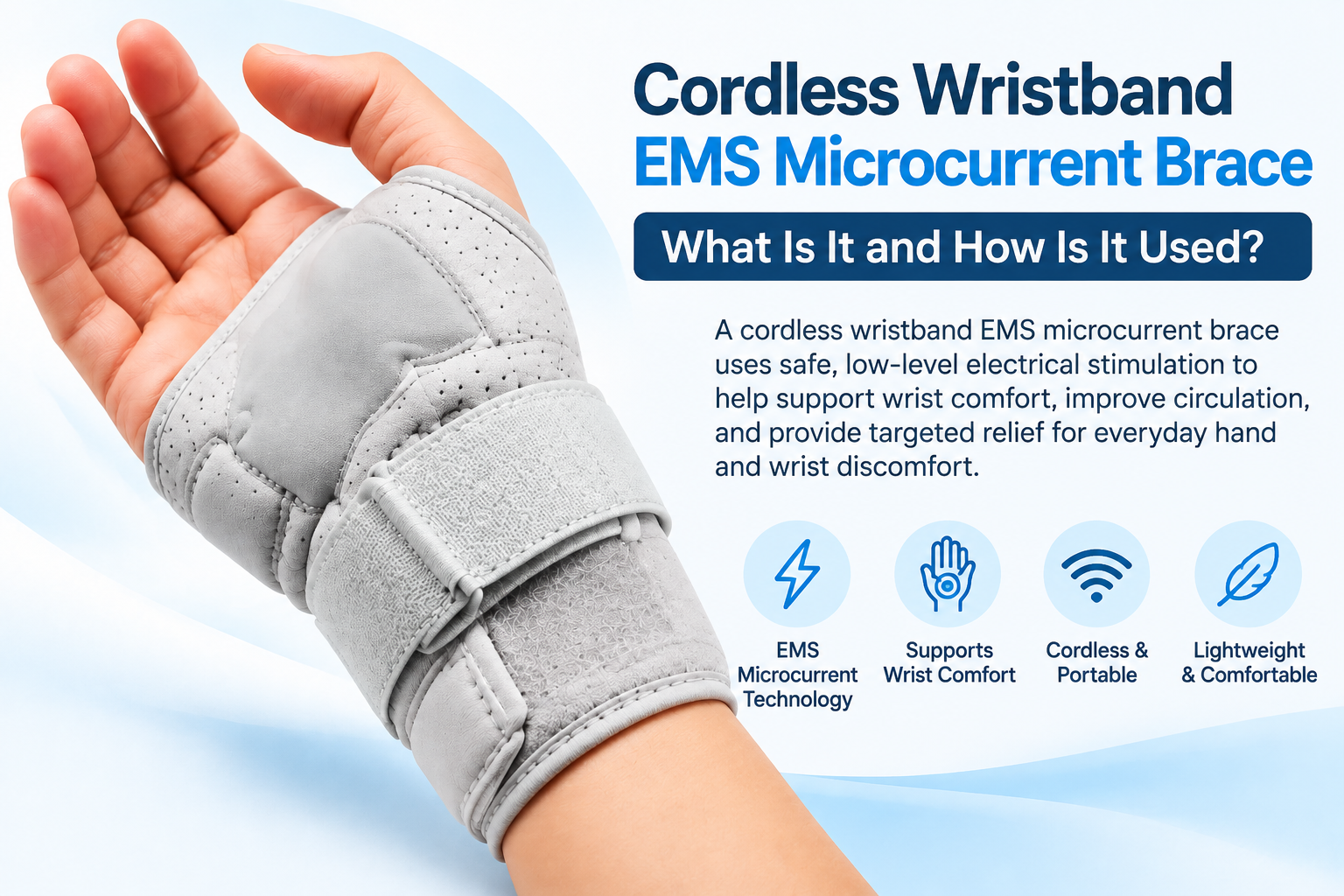
Cordless EMS microcurrent wrist brace designed for targeted wrist support and everyday use
What This Guide Covers
- Quick Answer
- What Is a Cordless Wristband EMS Microcurrent Brace?
- EMS vs Microcurrent vs TENS
- How It Differs From a Regular Wrist Brace
- 3D Interactive: Anatomy of a Cordless EMS Wristband
- Main Components: What Each Part Does
- How the Device Works — Simple Explanation
- Interactive: Follow a Session
- How to Put the Cordless Wristband On
- What Should the Device Feel Like?
- Interactive: How Does It Feel?
- Intensity and Settings
- How Long Should You Use It?
- What to Expect During Early Use
- Everyday Use and Practical Considerations
- Cordless Advantage
- How to Evaluate the Cordless Wristband Before Buying
- Product Spotlight
- Practical Advantages of a Cordless Format
- Common Mistakes
- Who Should Consider This Type of Product?
- Interactive: What Are You Actually Looking For?
- What Would a Healthcare Professional Want You to Check?
- Safety and Contraindication Considerations
- Quick Tips
- FAQ
- Conclusion
Quick Answer: What Is a Cordless Wristband EMS Microcurrent Brace?
A cordless wristband EMS microcurrent brace is a wearable wrist device that combines a wristband-style design with electronic stimulation components. Its use generally involves fitting the band correctly, positioning the contact areas as instructed, powering the device, selecting the appropriate setting, and monitoring comfort throughout the session.
If you want the broader category context first, the reference EMS microcurrent wrist brace explained covers features, benefits, and everyday-use education. This article focuses specifically on what the device is and how to use it.
What Is a Cordless Wristband EMS Microcurrent Brace?
This is the foundational section. The term combines several concepts, and understanding each one clarifies what the product actually is. Each word describes a different aspect of the device.
Cordless
From a user’s perspective, “cordless” means no external wired controller and fewer cables during use. The electronics are integrated into the wearable format, making the device more portable. However, do not automatically assume a specific battery architecture — check the product specifications for the actual power system.
Wristband
The wearable form factor. The device wraps around the wrist like a band, positioning the electronic components and contact areas around the wrist area. The wristband format integrates the device into a wearable design.
EMS
Electrical muscle stimulation (EMS) generally refers to electrical impulses intended to stimulate muscles. The specific technology used in a given product depends on the manufacturer’s design. Check the product specifications for what the device actually uses.
Microcurrent
“Microcurrent” generally refers to very low-level electrical current. However, product terminology and technology vary. Some manufacturers use “microcurrent” to describe a specific current range; others use it more loosely. Check the manufacturer’s specifications to understand what the term means for a specific product.
Important: Buyers often assume that EMS, microcurrent, and TENS are automatically interchangeable terms. They are not. Each term describes a different electrical stimulation concept. Product terminology should always be checked against the manufacturer’s specifications rather than inferred from the marketing name.
EMS vs Microcurrent vs TENS
This is a common source of buyer confusion. Understanding the general differences between these terms helps you interpret what a specific product actually uses.
| Term | General Concept | Buyer Question |
|---|---|---|
| EMS | Electrical stimulation associated with muscle activation | What does this device actually specify? |
| Microcurrent | Very low-level electrical current | What current or output does the manufacturer state? |
| TENS | Electrical stimulation commonly used in pain-management devices | Is this actually a TENS device? |
Important: Do not assume that all three terms describe the same technology. Product terminology should be checked against the manufacturer’s specifications rather than inferred from the marketing name. For a deeper look at how the device works, the reference how a cordless EMS wrist brace works covers the mechanism in detail.
How It Differs From a Regular Wrist Brace
A cordless EMS microcurrent wrist brace and a conventional wrist brace share some similarities — both are wearable. But their design and functionality differ. Understanding the difference helps you evaluate whether the device matches what you are looking for.
Conventional Wrist Brace
Usually focuses primarily on physical support, coverage, positioning, compression, and restriction or control of movement. The brace’s function is mechanical — it provides structural support.
EMS / Microcurrent Wrist Device
May combine a wearable wristband with electronic components, contact or electrode areas, controls, a power source, and stimulation settings. The device includes both mechanical and electronic elements.
| Feature | Conventional Wrist Brace | EMS / Microcurrent Wrist Device |
|---|---|---|
| Wearable structure | Yes | Yes |
| Physical support | Depends on design | Depends on design |
| Electrical stimulation | No | Device-dependent |
| Controls | Usually none | Usually present |
| Power source | No | Required |
| Contact or electrode area | No | Device-dependent |
| Fit | Important | Important |
| User setup | Simple | Usually more involved |
Important: Do not assume that the electronic device automatically provides better support. The mechanical support characteristics depend on the specific design. The electronic components add a different function — they do not replace the mechanical support function.
Anatomy of a Cordless EMS Wristband: 3D Interactive
This interactive shows the key components of a cordless EMS wristband. Tap each component to see what it contributes.
Interactive 3D: Anatomy of a Cordless EMS Wristband
Tap each component to explore its role
1. Wristband
The main wearable band that wraps around the wrist. The wristband determines fit, positioning, stability, and skin contact. A properly fitted wristband helps maintain the intended contact between the device and the wrist area.
Verify the exact components against the specific product’s specifications.
Main Components: What Does Each Part Do?
Each component of the cordless EMS wristband contributes to how the device functions. Understanding what each part does helps you use the device correctly.
Wristband
Determines fit, positioning, stability, and skin contact. The band holds the electronic components and contact areas in position around the wrist. A well-fitted band helps maintain contact during use.
Control System
Manages power, mode selection, intensity, and session control. The specific controls depend on the product. Only the controls that are confirmed for the specific product should be described.
Contact / Electrode Areas
The areas that make contact with the skin to deliver the intended stimulation. Proper positioning matters — contact areas need to sit where the manufacturer intends for the device to function as designed.
Power System
Provides the electrical power required for operation. Cordless operation means the power source is integrated into the device. Check the product specifications for how the device is powered or charged.
Adjustment System
How the band stays positioned during use. Different products use different adjustment systems — straps, closures, or elastic elements. The adjustment system affects how the device fits and stays in place.
How the Device Works — Simple Explanation
This section explains the user experience without becoming overly technical. The five-step sequence describes how a typical session flows.
Important: The exact operating sequence depends on the specific device. Always follow the manufacturer’s instructions. This five-step sequence illustrates the general concept, not a universal operating procedure.
Interactive: Follow a Session
Click each step to see practical guidance. This is an educational tool — always follow the specific device’s instructions.
Follow a Session
Click each step to see practical guidance.
- Where should the device sit? Follow the manufacturer’s instructions for wrist position.
- Check that the wristband is centered on the wrist area according to the product instructions.
- Confirm the contact areas are positioned where the manufacturer intends.
- Do not force the wristband into a position that is not described by the manufacturer.
How to Put the Cordless Wristband On
This is one of the most practical sections. Fitting the wristband correctly is essential for the device to function as intended. The exact procedure depends on the specific product, so always follow the manufacturer’s instructions. The steps below describe the general process.
What Should the Device Feel Like?
This is a very important buyer question. The sensation experienced during use depends on several factors — and it is not the same for everyone.
What Affects Sensation
- Device technology
- Setting or intensity level
- Contact quality with the skin
- Skin characteristics
- Individual sensitivity
- Product design
Important
Do not assume the device should “always feel like X.” Sensation varies. Follow the manufacturer’s guidance. Stop using the device and seek appropriate advice if you experience unexpected or concerning sensations.
Interactive: How Does It Feel?
Select a sensation level to understand what it might indicate. This is an educational tool, not a diagnostic scale.
How Does It Feel?
Select a sensation level to see what it might indicate.
Some devices may produce a mild or barely noticeable sensation at certain settings. This is not automatically a problem — check the manufacturer’s guidance for expected sensations at each setting. If the device is intended to produce a specific sensation and does not, review the setup instructions.
Important: Comfort is not a race toward the highest intensity. Follow the device’s instructions and do not continue a setting that causes pain or concerning symptoms.
Intensity and Settings
Intensity and settings require careful treatment. This is one of the most common areas where users make mistakes.
Do not assume maximum intensity equals maximum benefit. Higher intensity is not automatically better. Follow the manufacturer’s guidance for appropriate settings.
What to Keep in Mind
- Start according to manufacturer instructions
- Increase only as directed
- Do not use settings simply because they feel stronger
- Do not change multiple settings simultaneously without understanding them
- Keep track of what setting was comfortable
- Do not continue a setting that causes pain or concerning symptoms
Why This Matters
The purpose of adjustable settings is to allow the device to be used comfortably and appropriately for the user. Settings are not a measure of effectiveness. Follow the manufacturer’s guidance for your specific device.
How Long Should You Use It?
This section avoids inventing a universal treatment schedule. The appropriate duration of use depends on the specific device and the individual situation.
1. Manufacturer Instructions
The manufacturer’s instructions describe the recommended session duration for the specific device.
2. Device-Specific Specifications
Different devices have different recommended session durations and usage patterns.
3. Individual Medical Circumstances
If a healthcare professional has provided specific guidance, follow that guidance.
If the product itself provides a session duration, follow that exact information. If you have a specific medical situation, follow the guidance of your healthcare professional regarding appropriate use of the device. Do not assume a universal usage schedule applies to every product or every situation.
What to Expect During Early Use
This is a device-use timeline, not a guaranteed recovery timeline. The early use stages describe what to focus on during the initial period.
First Use
Focus on:
- Correct positioning
- Learning the controls
- Skin and contact check
- Comfort
Early Sessions
Focus on:
- Understanding settings
- Consistent setup
- Monitoring skin and sensation
Ongoing Use
Focus on:
- Following product instructions
- Reassessing comfort
- Avoiding inappropriate use
- Seeking professional advice if symptoms persist or worsen
Important: This is a device-use timeline, not a guaranteed recovery timeline. Device use does not guarantee a specific outcome. Follow the manufacturer’s instructions and professional guidance where applicable.
Everyday Use and Practical Considerations
An electronic stimulation device is not automatically suitable for continuous use during every activity. This section covers practical considerations for everyday use.
Possible Situations
- Working at a desk
- Studying
- Traveling
- Resting
- Moving around the house
Special Caution
Tasks involving water, machinery, driving, heavy physical activity, or situations where distraction could create risk should be discussed according to the manufacturer’s instructions. Do not use the device in situations where the instructions say it is not appropriate.
Cordless Advantage
The cordless format is a practical design characteristic. It offers convenience compared to devices with external cables. But it is important to understand what “cordless” does — and does not — mean.
No External Cable
Less cable management during use. The device does not require an external wired controller connected during operation.
Wearable Format
Can be easier to position than a larger device in some situations. The wristband format integrates the components around the wrist.
Portable
Easier to move between locations. The compact form may be simpler to store and transport than larger equipment.
Important: “Cordless” describes the format — it does not automatically mean more effective. The device’s effectiveness depends on its intended use, specifications, and how it is used according to the manufacturer’s instructions.
How to Evaluate the Cordless Wristband Before Buying
This is a major section. Before purchasing a cordless wristband EMS microcurrent brace, evaluate the following aspects of the product.
10-Point Product Evaluation Checklist
Click each item as you review it. Use the checklist as a comparison framework.
Product Spotlight: What Buyers Should Look At
After understanding the framework, here is a specific product to examine. The Cordless Wristband EMS Microcurrent Brace is one example of a cordless wristband device. Evaluate it using the 10-point checklist above — not by its name alone.
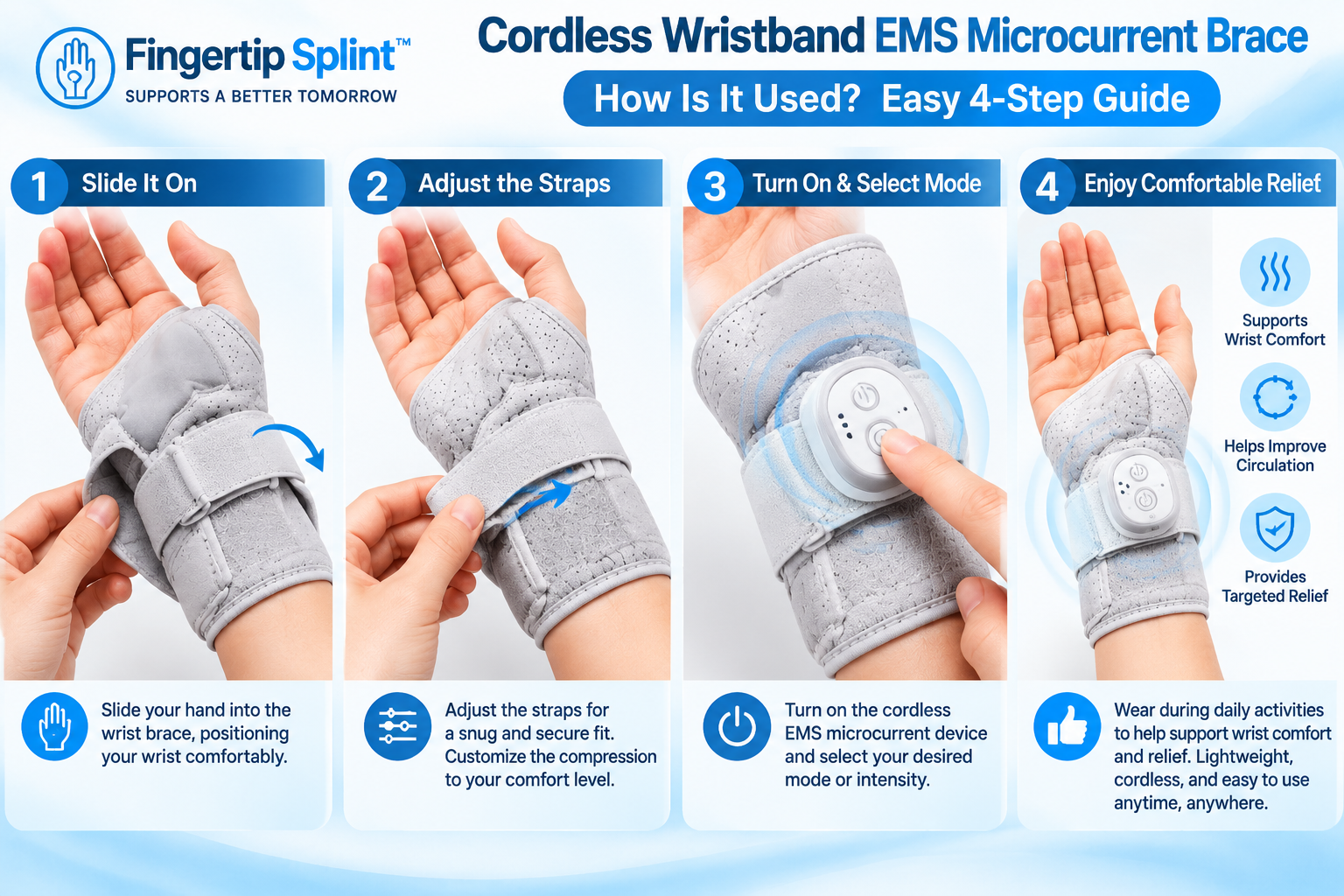
Cordless Wristband EMS Microcurrent Brace
- Cordless wearable format
- Wristband-style design
- EMS / microcurrent technology
- Electronic controls
- Adjustable fit
Applying the 10-Point Framework to This Product
Technology
Review what the manufacturer specifies about the technology. Check the product page for specific information about EMS, microcurrent, or the electrical stimulation approach used.
Controls and Power
Review what settings are available and how the device is powered or charged. Check the product specifications for these details.
Contact System and Fit
Review where the stimulation or contact areas are located and what wrist sizes are supported. Follow the manufacturer’s sizing instructions.
Material and Adjustability
Review what materials contact the skin and how the wristband stays in place. Check the adjustment system described.
Care and Instructions
Review care instructions and whether setup and usage instructions are clear. Follow the manufacturer’s guidance for cleaning and storage.
Safety Information
Review whether contraindications and warnings are provided. Follow the manufacturer’s safety information carefully.
If you’re specifically researching a cordless wristband format rather than a conventional support brace, you can review the Cordless Wristband EMS Microcurrent Brace and compare its listed specifications with the checklist above. For readers comparing a broader range of wrist and finger support options, exploring the FingerTipSplint shop helps put the wristband in the context of other support formats.
Practical Advantages of a Cordless Wristband Format
These are practical advantages of the format — not medical claims. Always distinguish product characteristics from medical outcomes.
Portability
The cordless format may be convenient for moving between locations. There is no external controller or cable to manage during use.
Simplified Setup
Fewer external components can make the wearable format straightforward to set up compared to devices with separate controllers.
Wearable Design
The wristband format integrates the device around the wrist. This is a design characteristic — not a medical benefit.
Adjustable Positioning
A properly fitted band can help maintain intended contact. Follow the manufacturer’s fitting instructions for best results.
User-Controlled Sessions
Depending on the device, users may have control over settings. Follow the manufacturer’s guidance for appropriate settings.
Compact Form
The design may be easier to store and transport than larger equipment. This is a practical characteristic of the format.
Common Mistakes
These mistakes come up frequently when people use cordless EMS wristbands. Avoiding them improves the experience and reduces the risk of problems.
Electronic devices shouldn’t be used purely based on appearance.
Check: read the manufacturer’s instructions before first use.
Different terms describe different electrical stimulation concepts.
Check: the manufacturer’s specifications for what the device actually uses.
Contact and position matter for how the device functions.
Check: the correct contact positioning per the manufacturer’s instructions.
Stronger isn’t automatically better.
Check: start at the manufacturer’s recommended setting.
The wristband shouldn’t be treated like a compression competition.
Check: secure fit without excessive pressure.
Check the skin before and after use.
Check: for redness, irritation, or unusual changes.
Especially water, driving, machinery, and vigorous activity.
Check: the manufacturer’s intended-use instructions.
The product name isn’t a diagnosis.
Check: whether professional assessment is appropriate.
A wearable device shouldn’t delay appropriate medical assessment when symptoms are concerning.
Check: seek appropriate professional advice for persistent or worsening symptoms.
Don’t rely solely on marketing images.
Check: the product’s actual specifications and instructions.
Who Should Consider This Type of Product?
This section is neutral. Different people come to this product category for different reasons.
Adults Researching Wearable Wrist Technologies
Some people are interested in understanding how wearable electronic devices work and whether a cordless wristband format matches their preferences.
General Buyers Comparing Wrist Devices
Others are comparing different types of wrist devices — conventional braces, sleeves, and electronic formats — before deciding which category to explore further.
People Interested in Portable Stimulation Formats
Some readers are specifically interested in portable, cordless formats that don’t require external cables or controllers during use.
Buyers Who Want to Understand Cordless Device Design
Others are researching the design characteristics of cordless wearable devices — how the wristband, controls, and contact system work together.
Important: People with a specific diagnosed condition should follow their healthcare professional’s advice about whether an electrical stimulation device is appropriate. This article does not recommend the device for any specific condition. A wearable device should not be treated as a diagnosis or a universal solution.
Interactive: What Are You Actually Looking For?
This decision tree helps confused buyers clarify what type of product they are actually looking for.
What Are You Actually Looking For?
Select the option that best matches your search.
What Would a Healthcare Professional Want You to Check?
This section is written with an EEAT (Experience, Expertise, Authoritativeness, Trustworthiness) perspective. It does not provide individualized medical advice, but it explains what a healthcare professional might consider.
Why Are You Considering the Device?
Understanding the reason for considering a device helps clarify whether it is appropriate.
What Symptoms Are Present?
The type and location of symptoms affects the appropriate approach.
Has the Underlying Problem Been Assessed?
A device should not substitute for understanding the underlying issue.
Is Electrical Stimulation Appropriate?
A professional can help determine whether electrical stimulation is appropriate for a specific situation.
Are There Contraindications?
Some people may not be appropriate candidates for electrical stimulation devices.
Is the Device Being Used According to Manufacturer Instructions?
Proper use following instructions is important for device safety and function.
Does the Fit Allow Correct Contact?
Fit affects contact and device function.
Is the Device Causing Unexpected Symptoms?
If the device causes unexpected symptoms, stop using it and seek appropriate advice.
EMS microcurrent wristband technology — understand the device before use and always follow manufacturer guidance
Safety and Contraindication Considerations
Electrical stimulation devices have specific safety considerations. This section explains the general framework. Always verify against the manufacturer’s specific instructions and warnings.
Stop using the device and seek appropriate professional advice if use causes:
- Significant or persistent pain
- Skin injury
- Unusual swelling
- Marked irritation
- Concerning numbness or tingling
- Other unexpected symptoms
Important: Electrical stimulation devices may have situations where they are inappropriate or require professional guidance. Follow the manufacturer’s contraindications and instructions. If you have specific health concerns, consult an appropriate healthcare professional before using an electrical stimulation device.
For general information about wrist and hand conditions, see the Mayo Clinic overview of carpal tunnel syndrome. For broader hand and wrist anatomy information, the Cleveland Clinic hand anatomy resource provides useful context. For an orthopedic perspective, the AAOS hand and wrist conditions library is a widely referenced resource. For general public health information about wrist and hand symptoms, the NHS hand pain guidance offers a practical overview. Additional medical reference information is available through MedlinePlus hand injuries and disorders. For clinical and anatomy-focused context, Johns Hopkins Medicine hand conditions provides further reading. General educational context is also available through WebMD’s overview of carpal tunnel syndrome and Healthline’s general wrist and hand information. For peer-reviewed literature, NCBI PubMed Central hosts open-access research where appropriate. For regulatory information about medical devices, see the FDA medical devices overview.
Important: This article does not provide individualized medical advice. Always consult an appropriate healthcare professional regarding your specific situation, and always follow the manufacturer’s contraindications and instructions.
7 Things to Check Before Your First Session
Frequently Asked Questions
A cordless wristband EMS microcurrent brace is a wearable wrist device that combines a wristband-style design with electronic stimulation components. “Cordless” describes the format — no external wired controller during use. “EMS” generally refers to electrical muscle stimulation, and “microcurrent” generally refers to very low-level electrical current. However, product terminology varies, so buyers should check the specific manufacturer’s specifications to understand what each term means for a specific product. The device includes both physical wearable components and electronic controls.
The general use sequence involves fitting the wristband according to the manufacturer’s instructions, ensuring the contact areas are positioned correctly, powering the device, selecting the appropriate setting, and monitoring comfort throughout the session. Always follow the manufacturer’s specific instructions, because the exact procedure depends on the device. Do not assume the operating procedure from appearance alone. Begin at the manufacturer’s recommended setting rather than maximum intensity.
No — the terms are not automatically interchangeable. EMS (electrical muscle stimulation) generally refers to electrical impulses intended to stimulate muscles. Microcurrent generally refers to very low-level electrical current. TENS generally refers to electrical stimulation commonly used in pain-management devices. Product terminology varies, so buyers should check the manufacturer’s specifications rather than inferring the technology from the marketing name. Different devices may use different technologies even if they use the same descriptive terms.
Sensation depends on the device technology, the setting or intensity level, contact quality with the skin, individual sensitivity, and the product design. There is no universal “correct” sensation for all devices. Follow the manufacturer’s guidance for expected sensations at each setting. Stop using the device and seek appropriate advice if you experience unexpected or concerning sensations, including pain, significant discomfort, or skin reactions.
The wristband should be secure enough to maintain the intended contact between the device and the skin, without being excessively tight. Excessive pressure can cause discomfort and may interfere with the device’s function. Follow the manufacturer’s fitting instructions. The wristband should not be treated like a compression competition. If the fit is uncomfortable or if the device shifts during use, reassess the positioning according to the manufacturer’s instructions.
Suitability depends on the product instructions and the activity. An electronic stimulation device is not automatically suitable for continuous use during every activity. Activities involving water, machinery, driving, heavy physical activity, or situations where distraction could create risk require particular caution. Follow the manufacturer’s intended-use instructions for what activities are appropriate. Do not use the device in situations where the instructions say it is not appropriate.
Stop using the device and seek appropriate professional advice if use causes significant or persistent pain, skin injury, unusual swelling, marked irritation, concerning numbness or tingling, or other unexpected symptoms. Also seek professional advice if symptoms are not improving, if you have an unexplained wrist problem, if you are unsure whether electrical stimulation is appropriate for your situation, or if you have a specific medical condition that may affect device use. A wearable device should not delay appropriate medical assessment when symptoms are concerning.
Conclusion: Understand the Device Before You Use It
The most important thing about a cordless EMS microcurrent wristband isn’t simply that it is cordless or electronically controlled. Buyers should understand exactly what the device is, how its contact and control system works, how it should be fitted, what its instructions say, and whether its intended use matches their needs.
This guide has covered what a cordless EMS microcurrent brace is, how its components work, how to fit and use it, what to expect, and what buyers should check before purchasing. The goal has been to provide a foundational product-use framework — not to declare one device universally better than another.
Understand the Device Before You Use It
If you are comparing cordless wristband technology, start with the product specifications rather than the marketing name. Review the device’s design, controls, fit, intended use, and instructions before deciding whether it matches what you’re looking for. The Cordless Wristband EMS Microcurrent Brace is one example to evaluate using the framework in this guide.
Review the Cordless WristbandNeed information about other wrist and hand support products? Explore the FingerTipSplint shop. For general questions, see the FingerTipSplint FAQ. For B2B inquiries, see the medical finger splint supplier page or request a quote.