
Finger Extension Splint Guide: Features, Fit and Everyday Use
The right splint is more than just a finger holder. If you are searching for a finger extension splint, you may be wondering: what features should I look for? How should it fit? Should it feel tight? Can I type while wearing it? Can I write? How do I adjust it? What happens if it slips? This guide answers those practical questions. A useful finger extension splint needs to be considered as a combination of design, positioning, fit, adjustability, comfort, and intended use — not simply as a device that holds a finger straight.
What This Guide Covers
- Quick Answer
- What Is a Finger Extension Splint?
- Key Features to Understand
- 3D Interactive: Anatomy of a Splint
- How Should It Fit?
- Interactive: Finger Splint Fit Check
- Finger Splint Sizing Guide
- How to Adjust a Finger Extension Splint
- Comfort and Pressure Points
- Using a Finger Splint During Everyday Activities
- Interactive: Activity Explorer
- Dynamic vs Static: Quick Reference
- Materials and Maintenance
- Common Problems and Troubleshooting
- More Support Isn’t Always Better
- Product Spotlight
- What to Discuss With a Healthcare Professional
- Interactive: Feature Finder
- Quick Fit Checklist
- Quick Tips
- FAQ
- Conclusion
Quick Answer: What Should You Look for in a Finger Extension Splint?
Look for fit, appropriate finger or joint coverage, adjustability, support structure, comfort, materials, intended movement, and ease of everyday use. The “right” feature set depends on the purpose of the splint rather than simply maximizing support.
If you want the foundational mechanism explanation first, the reference Dynamic Finger Extension Splint: What Is It and How Does It Work? covers that in detail. This article focuses on the practical questions — features, fit, adjustment, comfort, and everyday use.
What Is a Finger Extension Splint?
A finger extension splint is a support device designed to help position or support a finger toward extension, depending on its construction and intended purpose. The term “extension” refers to the straightening direction of the finger — the opposite of flexion, which is bending.
Extension splints differ substantially. Understanding the design categories helps clarify what to look for.
Static Extension Splints
Designed around a relatively fixed structure. Their primary purpose is to maintain a particular position or limit movement at the supported area.
Dynamic Extension Splints
Incorporate a mechanical element that interacts with movement. The design is built around the relationship between the finger and the applied support.
Adjustable Extension Splints
Allow positioning or tension to be modified. Adjustability is a separate characteristic from dynamic vs static.
Rigid and Flexible Designs
Support structures range from rigid to semi-rigid to flexible. The appropriate level depends on the intended function.
For a full comparison of the two main design approaches, the reference Dynamic vs Static Finger Splints: What’s the Difference? covers the topic in detail.
Key Features Buyers Should Understand
This is the main buyer-education section. Each feature contributes to how the device fits, feels, and functions. Understanding them helps you evaluate specific products.
Feature 1 — Support Structure
The support structure provides the physical framework of the splint. It may be rigid, semi-rigid, or flexible. Some designs include reinforced areas for additional stability. The structure influences how the device positions the finger and how much movement is possible.
Feature 2 — Adjustment System
The adjustment system may include straps, fastening points, tension adjustment, or positioning adjustment. Adjustability is useful only when it produces a secure and comfortable fit. More adjustment options do not automatically mean a better device — the adjustment needs to be appropriate for the intended use.
Feature 3 — Finger Coverage
Does the device support one segment, one joint, multiple joints, or most of the finger? The appropriate coverage depends on the intended function. More coverage is not automatically better — a device that covers more than necessary may interfere with movement or comfort.
Feature 4 — Extension Mechanism
For dynamic models, the extension mechanism may include elastic elements, spring mechanisms, tension components, or directional support. The exact mechanism varies between products. Understanding which component creates the movement-supporting behavior is an important part of evaluating a dynamic design.
Feature 5 — Fastening
Fastening systems may include hook-and-loop systems, adjustable straps, or closures. Consider ease of putting on and removing, as well as whether the fastening stays secure during movement.
Feature 6 — Material
Materials affect flexibility, breathability, durability, skin contact, and cleaning requirements. Consider whether the material is appropriate for the intended use and whether the manufacturer provides care instructions.
Key principle: The “right” feature set depends on the purpose of the splint rather than simply maximizing support. For a broader look at extension-support concepts, the reference Dynamic Finger Splints Explained: Understanding Extension Support covers the topic in detail.
Anatomy of a Finger Extension Splint: 3D Interactive
This interactive shows the key components of a finger extension splint. Tap each component to see what it contributes.
Interactive 3D: Anatomy of a Splint
Tap each component to see what it contributes
1. Finger
The finger is the structure the splint is designed to support. Its position and anatomy influence how the device functions. The specific finger involved affects the dimensions and design of the splint.
Educational illustration only. Actual splint mechanisms vary by product design.
How Should a Finger Extension Splint Fit?
Fit is the most important practical factor. A good fit should generally be secure, appropriately positioned, comfortable, stable during intended use, and free from unnecessary pressure.
Signs of a Good Fit
- Secure without being excessively tight
- Appropriately positioned on the intended finger
- Comfortable during intended use
- Stable during movement
- Free from unnecessary pressure
Signs of a Poor Fit
- Slipping or excessive movement of the splint
- Rubbing or pressure points
- Excessive tightness
- Numbness or tingling
- Significant discoloration
- Persistent pain
Important: A tight splint is not automatically a well-fitted splint. Fit is about appropriate positioning and support — not maximum tightness. Follow the manufacturer’s instructions for the specific product.
For a deeper look at how adjustment and positioning interact with movement, the reference How an Adjustable Finger Extension Splint Supports Finger Movement covers the topic in detail.
Interactive: Finger Splint Fit Check
Answer the five questions below to check your splint fit. This is an educational tool, not a medical diagnostic test.
Finger Splint Fit Check
Finger Splint Sizing Guide
Sizing is foundational to fit. Different products use different sizing systems, so always use the manufacturer’s sizing instructions. Sizing may involve finger circumference, finger width, finger length, joint location, or device-specific measurements.
Important: Always use the manufacturer’s sizing instructions because sizing systems differ between products. Do not assume that your usual ring size corresponds to a splint size.

Correct fit involves appropriate positioning, secure fastening without excessive tightness, and comfort during intended use. Always follow the manufacturer’s sizing and adjustment instructions for the specific product.
How to Adjust a Finger Extension Splint
This is a practical step-by-step guide. The exact adjustment procedure depends on the specific product, so always follow the manufacturer’s instructions. The steps below describe the general process.
Comfort and Pressure Points
Comfort is highly relevant to real-world users. It affects whether the device can be worn as intended. Understanding common pressure areas helps identify fit issues.
Common Pressure Areas
- Around joints
- Under straps
- Along edges
- Between support components
- Areas where the device rubs during movement
Comfort Is Not Just About Softness
A device can be soft but poorly positioned. A rigid device can be comfortable if appropriately fitted for its intended purpose. Comfort depends on fit and positioning — not just material softness.
Using a Finger Splint During Everyday Activities
This is what makes this article different from technical pages. Everyday usability depends on the device design, fit, and intended use. The sections below describe considerations — not guarantees.
Typing
Typing involves repeated small finger movements. Consider finger range of motion, keyboard contact, splint width, and interference with neighboring fingers. A device that adds bulk or restricts movement may affect typing comfort. The key question is whether the device allows the movement needed for keyboard use.
Writing
Writing involves controlled finger movement and grip. Consider grip, finger positioning, device bulk, and comfort. Some devices may interfere with pen grip; others may allow it. The appropriate consideration depends on the device design and the activity requirements.
Phone Use
Using a phone requires fine motor control. Consider touchscreen access, grip, and finger positioning. Some devices may allow the movements needed for tapping and swiping; others may not.
Studying
Studying often involves prolonged sitting and desk activities. Consider comfort during extended sessions and whether the device stays securely positioned. Periodic fit checks are useful.
Light Household Tasks
Light household tasks may involve a range of finger movements. Consider whether the device stays securely positioned and whether the activity is appropriate for the underlying condition and the device’s intended use.
Sleeping
Do not universally recommend overnight use. Whether a particular device should be worn during sleep depends on its instructions and intended use. Some devices may be designed for overnight wear; others may not. Follow the manufacturer’s instructions and professional guidance where applicable.
Interactive: Activity Explorer
Select an activity to see movement, fit, and comfort considerations. This is an educational tool, not a medical recommendation.
Activity Explorer
Choose an activity to see relevant considerations.
- Movement: Consider finger range of motion and whether the device allows the movements needed for keyboard use.
- Fit: Consider splint width and interference with neighboring fingers.
- Comfort: Consider comfort over extended sessions and whether the device stays securely positioned.
- Check: Follow the manufacturer’s instructions and reassess fit if discomfort occurs.
Dynamic vs Static: A Quick Reference
This is a compact reference. For the full comparison, see the dedicated article linked below.
| Question | Dynamic | Static |
|---|---|---|
| Movement | May interact with movement | Usually more restrictive |
| Position | Directional or adjustable, depending on design | Relatively fixed |
| Mechanism | May include tension, spring, or elastic component | Usually simpler structure |
| Adjustability | Varies | Varies |
| Everyday movement | Depends on design | Depends on restriction |
For a detailed comparison, the reference Dynamic vs Static Finger Splints: What’s the Difference? covers the trade-offs in more depth.
Materials and Maintenance
Materials affect how the device feels, how long it lasts, and how it should be cared for. Understanding material questions helps buyers evaluate specific products.
Material Questions to Ask
- Is it skin-friendly?
- Is it breathable?
- Is it flexible?
- Is it washable?
- Does the manufacturer provide cleaning instructions?
Care Practices
- Follow manufacturer cleaning instructions
- Allow appropriate drying
- Inspect straps regularly
- Inspect support components
- Check for wear
- Do not modify the device unless instructions permit it
Common Problems and Troubleshooting
These problems come up frequently. Understanding possible causes helps users address them appropriately.
Possible factors: incorrect size, incorrect positioning, loose fastening, or unsuitable design.
Check: sizing, positioning, and fastening per the manufacturer’s instructions.
Do not simply tighten or force it into position. Excessive pressure may cause discomfort.
Check: whether the fit and positioning are appropriate for the device.
Check contact areas and follow care instructions. Persistent irritation warrants reassessment.
Check: contact areas, cleaning, and fit.
A support device can naturally alter how the finger interacts with everyday tasks.
Check: whether the device is functioning as intended and whether the activity is appropriate.
Stop and verify the product specifications rather than improvising.
Check: whether the product is designed for the intended finger and use.
Persistent pain, numbness, tingling, or discoloration should not be ignored.
Check: remove the splint and seek appropriate guidance if symptoms persist.
More Support Isn’t Always Better
A buyer may assume that more rigid, tighter, and more coverage equals better support. This assumption is not always accurate.
Key principle: Support needs depend on purpose. Too much restriction can interfere with movement, while excessive tightness can cause discomfort. Look for appropriate support, not maximum support.
This is an important trust-building point. A device that provides more support than necessary may not be more useful — it may simply be more restrictive or less comfortable. The appropriate level of support depends on the intended function and the specific situation.
Product Spotlight: An Adjustable Dynamic Design to Consider
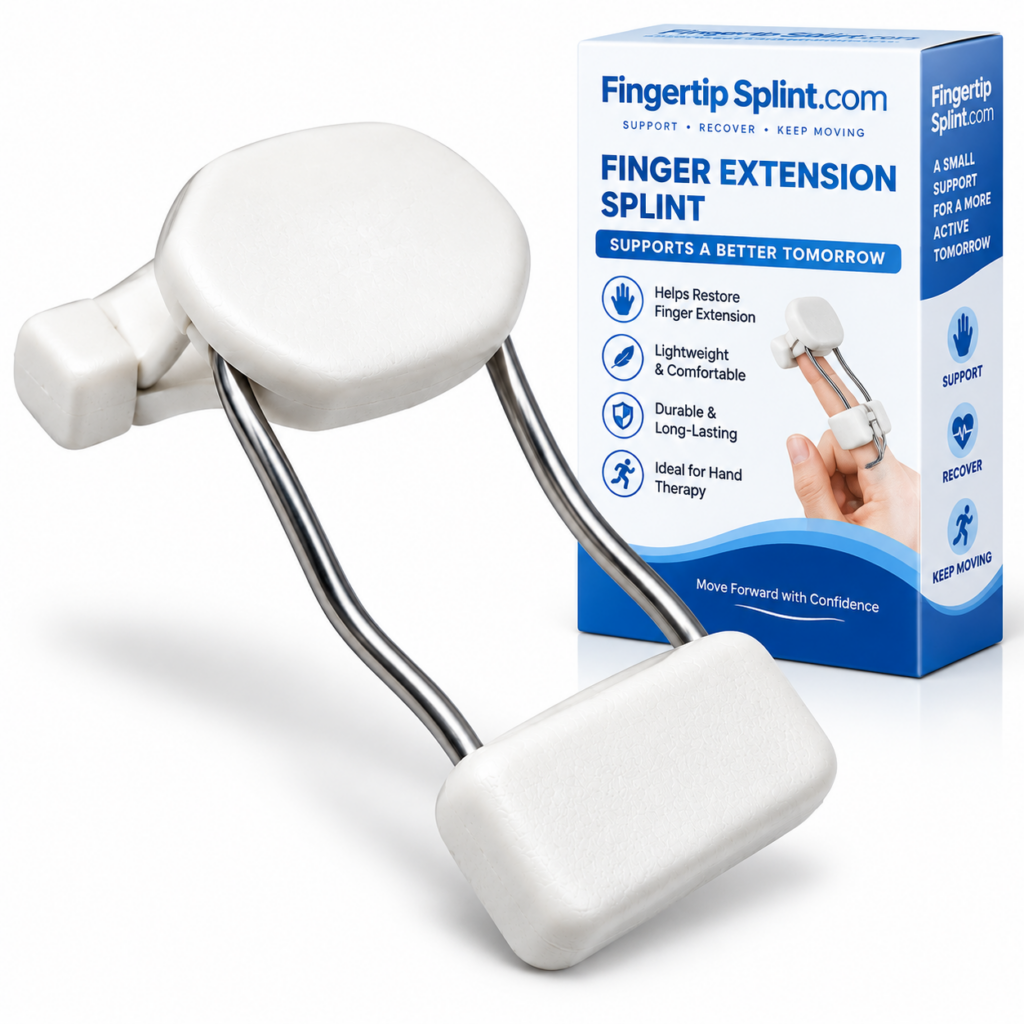
After understanding the features, fit, and everyday considerations, here is a specific product to examine. The Dynamic Finger Extension Splint – Adjustable Finger Rehabilitation Trainer for Joint Support is one example of an adjustable dynamic finger-extension design.
Dynamic Finger Extension Splint
- Adjustable design
- Extension-oriented structure
- Dynamic construction
- Finger support format
- Rehabilitation-oriented product positioning
Feature → Benefit Breakdown
Adjustable Design
Feature: Adjustable construction.
Benefit: Allows fit and positioning adjustments according to the product’s instructions.
Extension-Oriented Structure
Feature: Extension-oriented design.
Benefit: Designed around finger extension support.
Dynamic Construction
Feature: Dynamic design.
Benefit: Relevant for readers comparing dynamic and static approaches.
Finger Support Format
Feature: Targeted finger support.
Benefit: Designed for targeted finger support rather than generic hand coverage.
For a buyer-focused guide, the reference What to Consider When Choosing a Dynamic Finger Splint covers selection criteria in more detail.
What Should You Discuss With a Healthcare Professional?
This section is written with an EEAT (Experience, Expertise, Authoritativeness, Trustworthiness) perspective. It does not provide individualized medical advice, but it does explain what a healthcare professional may discuss.
Which finger is involved?
The specific finger affects the dimensions and design of the appropriate splint.
Which joint is affected?
Different joints have different movement characteristics. The joint involved affects how a splint should interact with the finger.
What movement is limited?
Understanding which movement is limited helps determine what type of support may be appropriate.
What movement should be preserved?
The appropriate level of movement depends on the underlying problem and treatment plan.
Is there swelling?
Significant swelling can affect fit and may warrant professional assessment.
Is there an injury?
The presence and nature of an injury affect the appropriate approach.
Is there numbness or tingling?
Numbness or tingling may indicate nerve involvement and should be assessed professionally.
How long should the device be used?
The duration of use depends on the underlying problem and treatment plan.
Does the device need professional fitting?
Some situations may benefit from professional fitting. A professional can help determine what is appropriate for the specific situation.
Warning Signs That Warrant Professional Assessment
- Severe or worsening pain
- Significant swelling
- Visible deformity
- Major loss of movement
- Persistent numbness or tingling
- Concerning skin or circulation changes
- Symptoms that are not improving
For general information about finger injuries and hand conditions, see the Mayo Clinic overview of finger injuries. For broader hand anatomy and condition information, the Cleveland Clinic hand anatomy resource provides useful context. For an orthopedic perspective, the AAOS hand and wrist conditions library is a widely referenced resource. For general public health information, the NHS hand pain guidance offers a practical overview. Additional medical reference information is available through MedlinePlus hand injuries and disorders. For clinical and anatomy-focused context, Johns Hopkins Medicine hand conditions provides further reading. General educational context is also available through WebMD’s overview of finger injuries and Healthline’s general finger injury information. For peer-reviewed literature, NCBI PubMed Central hosts open-access research where appropriate. For a broader orthopedic reference, Orthobullets provides structured clinical summaries.
Important: This article does not provide individualized medical advice. Always consult an appropriate healthcare professional regarding your specific situation.
Interactive: What Matters Most in Your Finger Splint?
Select the features that matter for your situation. This tool provides a product-comparison checklist — it does not replace professional advice.
Feature Finder
Quick Fit Checklist
Before using a finger extension splint, check the following. Click each item to mark it as reviewed.
Quick Tips
Frequently Asked Questions
A finger extension splint is a support device designed to help position or support a finger toward extension, depending on its construction and intended purpose. Extension refers to the straightening direction of the finger. Different designs serve different purposes — some are oriented toward maintaining a relatively fixed position, while others are built around interacting with movement. The exact function depends on the specific device.
A good fit should generally be secure, appropriately positioned, comfortable, and stable during intended use. It should be free from unnecessary pressure. Signs of a poor fit include slipping, rubbing, pressure points, excessive tightness, numbness, tingling, significant discoloration, or persistent pain. A tight splint is not automatically a well-fitted splint. Follow the manufacturer’s instructions for the specific product.
A splint should be secure but not excessively tight. More tension is not automatically better. Excessive tightness can cause discomfort, pressure, rubbing, and poor tolerance. The goal is an appropriate fit that keeps the device positioned correctly without creating pressure points or restricting circulation. Follow the manufacturer’s adjustment instructions carefully. If you experience numbness, tingling, or significant discoloration, reassess the fit and seek guidance if symptoms persist.
It depends on the specific splint design and your situation. Typing involves repeated small finger movements. Consider finger range of motion, keyboard contact, splint width, and interference with neighboring fingers. Some devices may allow the movement needed for keyboard use; others may not. The key question is whether the device allows the movements required for typing and whether typing is appropriate for the underlying condition. Check the product documentation and follow professional guidance where applicable.
Whether a particular device should be worn during sleep depends on its instructions and intended use. Some devices may be designed for overnight wear; others may not. Do not assume that any finger splint can be worn during sleep. Follow the manufacturer’s instructions and professional guidance where applicable. If you are unsure, ask a healthcare professional before wearing the splint overnight.
Always use the manufacturer’s sizing instructions because sizing systems differ between products. Sizing may involve finger circumference, finger width, finger length, joint location, or device-specific measurements. Do not assume that your usual ring size corresponds to a splint size. Measure according to the manufacturer’s instructions, compare your measurements to the sizing chart, select the appropriate size, adjust according to the instructions, and recheck the fit.
Speak with a healthcare professional if the underlying problem is not known, if you are unsure whether this type of support is appropriate, if the device does not fit correctly, if you are unsure about adjustment, or if symptoms are not improving. Also seek professional assessment for severe or worsening pain, significant swelling, visible deformity, major loss of movement, persistent numbness or tingling, or concerning skin or circulation changes. A support product does not diagnose or treat a medical condition on its own.
Conclusion: Evaluate Features, Fit, and Everyday Use Together
A finger extension splint is more than just a finger holder. A useful device needs to be considered as a combination of design, positioning, fit, adjustability, comfort, and intended use. Understanding the features, fit, and everyday considerations helps buyers evaluate specific products and use them appropriately.
This guide has covered what a finger extension splint is, the key features buyers should understand, how it should fit, how to adjust it, comfort and pressure points, everyday use, materials and maintenance, common problems, and the important principle that more support is not always better. It has also provided interactive tools to help readers check fit, explore activities, and identify the features that matter for their situation.
Explore Adjustable Finger Extension Support
If you are comparing finger extension splints, review the product specifications, fit considerations, and adjustment features before deciding whether the design matches your needs. The Dynamic Finger Extension Splint – Adjustable Finger Rehabilitation Trainer for Joint Support is one example of an adjustable dynamic finger-extension design.
View the Dynamic Finger Extension SplintNeed information about other finger support products? Explore the FingerTipSplint shop. For general questions, see the FingerTipSplint FAQ. For B2B inquiries, see the medical finger splint supplier page or request a quote.