
Finger Straightening Support: Understanding Dynamic Splint Designs
A finger that does not naturally rest or move into the desired position can make ordinary activities feel difficult. A dynamic splint may be designed to provide directional support toward extension while still allowing some movement, depending on its construction. The key idea is that dynamic splints can differ considerably in how they create and deliver straightening support. This guide explains how different dynamic designs approach finger-straightening support — and what design features affect positioning, movement, fit, and comfort.
What This Guide Covers
- Quick Answer
- What Is Finger Straightening Support?
- What Makes a Splint “Dynamic”?
- 3D Interactive: How Designs Provide Support
- How Dynamic Designs Create Straightening Support
- Types of Dynamic Splint Designs
- Interactive: Explore the Dynamic Design
- How Direction of Support Matters
- Tension: How Much Is Appropriate?
- Interactive: Tension Meter
- Finger Alignment and Fit
- Dynamic Straightening Support vs Immobilization
- Can a Dynamic Splint Still Allow Finger Movement?
- Everyday Activity Section
- Interactive: Activity Selector
- Product Spotlight
- Product Design Breakdown
- Common Mistakes
- Recovery & Reassessment Framework
- Who Might Research This Type of Splint?
- What Should You Ask a Healthcare Professional?
- Interactive: Design Finder
- Quick Tips
- FAQ
- Conclusion
Quick Answer: How Do Dynamic Splint Designs Provide Finger Straightening Support?
Dynamic splints are designed around movement. Straightening support can come from directional tension or support applied by the device. Different designs use different mechanical components — elastic elements, springs, straps, or semi-rigid structures. Fit and alignment determine how that support interacts with the finger.
If you want the foundational mechanism explanation first, the reference dynamic finger splint designs covers the topic in detail. This article focuses specifically on how different dynamic designs create straightening support.
What Is Finger Straightening Support?
To understand how dynamic designs provide straightening support, it helps to first clarify what the term means. Finger straightening support involves three concepts working together.
Finger Straightening
Generally refers to movement toward a more extended or straightened position at a finger joint. It describes the direction of movement, not a promise of a specific outcome.
Support
Means the device helps maintain, guide, or influence positioning rather than necessarily forcing the joint into a position. Support is about interaction, not force.
Dynamic Support
Introduces the movement component. The mechanism is built around interacting with movement rather than simply holding a fixed position.
Important distinction: Straightening support is not the same as forced correction. The device influences positioning or movement — it does not guarantee that a finger will become straight. The effect depends on the specific device, fit, and underlying circumstances.
What Makes a Splint “Dynamic”?
Dynamic designs may incorporate a range of mechanical components. Understanding these helps clarify why dynamic splints differ from each other.
Possible Dynamic Components
- Elastic components
- Springs or spring-like elements
- Adjustable tension
- Straps
- Anchoring points
- Support platforms
- Directional pulling elements
- Flexible or semi-rigid structures
Two Important Distinctions
Dynamic ≠ automatically adjustable. A device can have dynamic characteristics without offering extensive user adjustment.
Adjustable ≠ automatically dynamic. An adjustable strap or fastening system alone does not make a splint dynamic.
For a deeper explanation of the dynamic mechanism, the reference how dynamic extension support works covers the concept in detail.
How Dynamic Splint Designs Provide Straightening Support: 3D Interactive
This interactive shows the components involved in dynamic straightening support. Tap each component to see what it contributes.
Interactive 3D: Components of Dynamic Support
Tap each component to explore its role
1. Finger
The finger is the structure the splint is designed to support. Its position and anatomy influence how the device functions. The specific finger involved affects the dimensions and design of the splint.
Anchor → Dynamic Component → Directional Support → Finger Position
How Dynamic Designs Create Straightening Support
This is the main technical section. The mechanism can be described in stages, though the exact behavior depends on the specific device.
Important: Different products use different mechanisms. The stages above illustrate the general concept, not a universal mechanism. Not every dynamic splint works the same way.
Types of Dynamic Splint Designs
This is where dynamic splints differ most clearly from each other. Dynamic is not one design — it is a category of designs that create directional support in different ways. The five design types below illustrate the range.
Design A — Elastic-Tension Design
Elastic-tension designs use elastic material to provide directional support. The elastic component can stretch or change shape as the finger moves, applying support in a specific direction.
Characteristics
- Flexibility
- Tension that can change with position
- Movement accommodation
- Adjustability varies
- Fit considerations
What to Inspect
Check how the elastic component is anchored, how tension is set, and whether the material stays secure during movement. Follow manufacturer instructions for adjustment.
Design B — Spring-Assisted Design
Spring-assisted designs use a spring or spring-like component to provide directional force. The spring mechanism applies support in a specific direction based on its construction.
Characteristics
- Controlled force
- Mechanical structure
- Alignment matters
- Adjustment varies
- Potential pressure points
What to Inspect
Check how the spring component is positioned, how the mechanism contacts the finger, and whether pressure points form. Do not modify spring components unless manufacturer instructions specifically allow it.
Design C — Strap-and-Anchor Design
Strap-and-anchor designs use straps and anchor points to establish the direction of support. The straps hold the device in position while the anchor points determine how support is applied.
Characteristics
- Positioning through straps
- Fastening that affects support
- Tension adjustment
- Stability considerations
- Ease of fitting
What to Inspect
Check how the straps attach, how easily the device can be put on, and whether the anchor points stay secure. Fit affects how the support functions.
Design D — Semi-Rigid Support + Dynamic Component
Semi-rigid designs use a relatively stable support structure working together with a dynamic element. This is useful because readers may assume that a dynamic splint must be completely flexible — but that is not the case.
Characteristics
- Stable support structure
- Dynamic element that interacts with movement
- Positioning that may be more consistent
- Adjustment varies
- Fit considerations
What to Inspect
Check how the semi-rigid structure interacts with the dynamic component, how the support contacts the finger, and whether the structure is appropriate for the intended use.
Design E — Adjustable Dynamic Design
Adjustable dynamic designs allow positioning or tension to be modified. Adjustability can matter for different finger sizes, positioning, comfort, movement requirements, and user-specific fitting.
Why Adjustability Matters
- Different finger sizes
- Positioning preferences
- Comfort considerations
- Movement requirements
- User-specific fitting
Important
Adjustment should follow the manufacturer’s instructions and, where appropriate, professional guidance. More adjustment does not automatically mean better support.
Interactive: Explore the Dynamic Design
Select a design type to see how support is generated and what to inspect. This is an educational tool, not a product recommendation.
Explore the Dynamic Design
Click each design to see how it provides straightening support.
- Primary component: Elastic material
- How support is generated: The elastic component stretches or changes shape as the finger moves, applying support in a specific direction.
- Movement characteristics: Movement accommodation depends on the elastic material and how it is anchored.
- Adjustment possibilities: Varies — check the manufacturer’s instructions.
- Fit considerations: The elastic must contact the finger appropriately for support to function as intended.
- What to inspect: Anchoring, tension setting, material security during movement.
How Direction of Support Matters
Force direction and contact points matter considerably in dynamic straightening support. The same device can function differently depending on how it is aligned with the finger.
Poor Alignment
Appropriate Alignment
Important: This section does not claim that a particular configuration treats a particular medical condition. It explains the mechanical principle of alignment and contact. Appropriate alignment depends on the specific device and situation.
Tension: How Much Is Appropriate?
This is one of the most important practical questions about dynamic straightening support. The answer is not “more tension is better.”
Too Little
- Device may not provide intended support
- May move or slip
- Positioning may not be maintained
Appropriate
- Stable positioning
- Comfortable during use
- Intended support direction maintained
Too Much
- Excessive pressure
- Discomfort
- Numbness or tingling
- Circulation concerns
- Skin irritation
Key principle: More tension is not automatically more effective. The goal is appropriate positioning and support according to the device instructions — not maximum tightness.
Interactive: Tension Meter
Move the slider below to explore the conceptual relationship between tension and support. This is an educational visualization, not a recommendation for any specific device.
Tension Concept Explorer
Finger Alignment and Fit
Fit directly affects how straightening support functions. Several factors influence how the support feels and works.
Factors That Influence Fit
- Finger size
- Joint location
- Splint orientation
- Strap placement
- Contact points
- Movement range
Fit Check
- ✓ Stable
- ✓ Comfortable
- ✓ Correctly positioned
- ✓ No excessive pressure
- ✓ No numbness or tingling
- ✓ No concerning discoloration
- ✓ Movement behaves as intended for the device
Key principle: “Tight” and “well-fitted” are not interchangeable. A well-fitted splint is secure and appropriately positioned — not one that produces excessive pressure.
For a detailed look at fit and features, the reference finger extension splint fit guide covers the topic in more detail.
Dynamic Straightening Support vs Immobilization
This comparison clarifies how dynamic straightening support differs from immobilizing support. Neither category is universally appropriate for every finger problem.
| Feature | Dynamic Straightening Support | Immobilizing Support |
|---|---|---|
| Primary design concept | Directional support around movement | Restriction or stabilization |
| Movement | May allow controlled movement | Usually limits movement |
| Mechanical components | May include tension elements | Often simpler or fixed |
| Adjustment | Depends on design | Depends on design |
| Goal | Support positioning or movement | Maintain a more fixed position |
| Fit | Critical | Critical |
For a detailed comparison, the reference dynamic vs static finger splints covers the trade-offs in more depth.
Can a Dynamic Splint Still Allow Finger Movement?
This is a common question. Dynamic designs are generally built around some interaction with movement, but the actual amount and direction of movement depend on several factors.
Factors That Affect Movement
- Device design
- Joint being supported
- Adjustment
- Positioning
- Intended use
Avoid Assuming
Do not assume that “dynamic” means “you can move normally.” Dynamic describes the design approach — it does not guarantee a specific amount of movement. The movement allowed depends on the specific device.
For a deeper look at how movement and support interact, the reference adjustable finger extension support covers the topic in detail.
Everyday Activity Section
Design characteristics affect how a dynamic splint interacts with everyday activities. The considerations below are educational — they do not imply that every dynamic splint should be worn during every activity.
Typing
Consider bulk, range of motion, strap interference, and comfort during extended sessions.
Writing
Consider grip, finger positioning, and whether the device interferes with pen grip.
Using a Phone
Consider fine motor control, touchscreen access, and grip stability.
Studying
Consider prolonged wear comfort and whether the device stays securely positioned during desk work.
Light Household Tasks
Consider stability, movement demands, and whether the activity is appropriate for the device’s intended use.
Handling Small Objects
Consider fine motor control and whether the device allows the movements required for the task.
Interactive: Activity Selector
Select an activity to see what to consider. This is an educational tool, not a medical recommendation.
Activity Selector
Choose an activity to see relevant considerations.
- Bulk: Consider whether the device adds bulk that affects keyboard use.
- Range of motion: Consider whether the device allows the movements needed for typing.
- Strap interference: Consider whether straps interfere with neighboring fingers.
- Comfort: Consider comfort over extended sessions.
- Stability: Consider whether the device stays securely positioned during use.
Product Spotlight: An Adjustable Dynamic Design to Examine
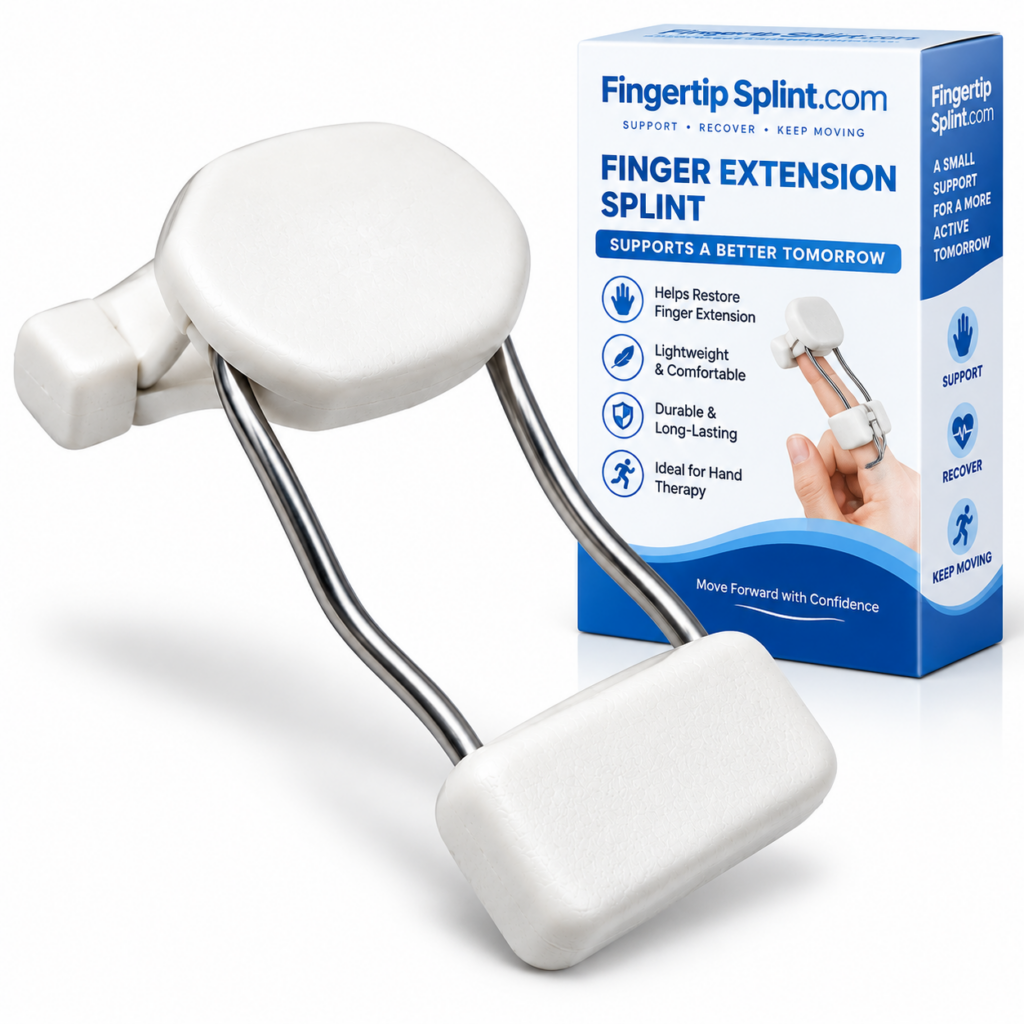
After understanding how dynamic designs provide straightening support, here is a specific product to examine. The Dynamic Finger Extension Splint – Adjustable Finger Rehabilitation Trainer for Joint Support is one example of an adjustable dynamic design. It is presented as a design to examine — not as “the best splint for everyone.”
Dynamic Finger Extension Splint
- Dynamic extension-oriented design
- Adjustable structure
- Finger support and positioning
- Rehabilitation-oriented product positioning
- Fastening and adjustment system
Evaluating the Product Using the Design Framework
Dynamic Extension-Oriented Design
The product is described as having a dynamic finger-extension design. This places it in the dynamic-support category, where the design is oriented toward interacting with movement.
Adjustable Structure
The adjustable construction allows positioning or tension to be modified according to the product’s instructions. Note: adjustability is a separate characteristic from dynamic vs static.
Finger Support
The product is designed for targeted finger support. The specific finger and joint coverage depend on the product design.
Fastening and Adjustment
Review the fastening and adjustment system described on the product page. Check how the adjustment works and whether it stays secure.
Fit Considerations
Review the sizing and fit information provided. Compare your measurements against any stated range before relying on adjustment. Follow the manufacturer’s instructions carefully.

Correct fit involves appropriate positioning, secure fastening without excessive tightness, and comfort during intended use. Always follow the manufacturer’s sizing and adjustment instructions for the specific product.
Product Design Breakdown
This annotated breakdown shows the key design areas to inspect when evaluating a dynamic straightening splint. Use it as a checklist when reviewing product information.
1. Support Structure
The physical framework that provides positioning. Its shape and rigidity affect how the splint holds the finger.
2. Adjustment Point
Where positioning or tension can be modified. Adjustment changes how the device sits on the finger.
3. Finger Contact Area
Where the device interfaces with the finger. Contact areas determine how force is distributed.
4. Dynamic Component
The mechanism that creates movement-supporting behavior. May be elastic, spring-like, or tension-based.
5. Fastening Area
Where the device is secured. The fastening system affects how easily the device can be put on and whether it stays secure.
6. Direction of Support
The direction in which the mechanism applies support. This is determined by the design and how the device is positioned.
Common Mistakes With Dynamic Straightening Splints
These mistakes come up frequently. Avoiding them improves the experience.
Dynamic splints vary considerably in how they create support.
Check: the specific product’s design and documentation.
More tension is not automatically more effective. Excessive tension can cause discomfort.
Check: follow the manufacturer’s adjustment instructions.
Poor alignment can lead to uneven contact and uncomfortable pressure.
Check: positioning and alignment after adjustment.
Appearance does not tell you whether the device fits or functions appropriately.
Check: sizing instructions and product specifications.
Persistent pressure points can cause discomfort and skin irritation.
Check: contact areas and skin condition during wear.
Dynamic designs can still guide or limit movement.
Check: what movement the specific device is designed to support or restrict.
A splint is a support device, not a diagnosis or a substitute for assessment after a significant injury.
Check: whether professional assessment is appropriate.
Numbness, tingling, significant discoloration, or persistent pain should not be ignored.
Check: remove the splint and seek appropriate guidance if symptoms persist.
Recovery & Reassessment Framework
Because recovery depends on the underlying problem, this section provides a staged reassessment framework rather than a week-by-week healing timeline.
Stage 1 — Understand the Intended Support
What is the device designed to do? Understand the direction of support, the intended finger and joint, and the design characteristics before use.
Stage 2 — Initial Fitting
Check position, contact, and comfort. Follow the manufacturer’s fitting instructions and confirm the splint is positioned correctly.
Stage 3 — Intended Use
Use according to instructions or professional guidance. Note any changes in comfort or positioning.
Stage 4 — Functional Reassessment
Consider comfort, movement, and practical use. Review movement, symptoms, and device fit.
Stage 5 — Adjustment or Review
Adjust only as appropriate, or seek professional guidance. Determine whether continued use remains appropriate.
Remember: There is no universal week-by-week timeline for everyone using a dynamic straightening splint. Recovery depends on the underlying issue, severity, treatment plan, and individual response.
Who Might Research This Type of Splint?
This section is informational rather than diagnostic. Different people come to this topic for different reasons.
Finger Positioning Support
Some people are looking for support that helps position the finger in a particular way.
Extension-Oriented Support
Others are specifically interested in extension-oriented support designs.
Adjustable Finger Support
Some readers want a device that can be adjusted for positioning or fit.
Rehabilitation Equipment
Some people are researching rehabilitation-oriented finger support products.
Movement-Oriented Splint Designs
Others are interested in designs that interact with movement rather than restricting it.
Alternatives to More Restrictive Support
Some readers are looking for alternatives to designs that restrict movement more substantially.
Important: Suitability depends on the person’s specific situation. This article is educational and does not diagnose or prescribe. Appropriate support depends on the underlying problem, finger involved, desired positioning, and professional recommendations where applicable.
What Should You Ask a Healthcare Professional?
This section is written with an EEAT (Experience, Expertise, Authoritativeness, Trustworthiness) perspective. It does not provide individualized medical advice, but it does explain what to discuss with a healthcare professional.
1. Which joint needs support?
The specific joint affects the appropriate design and fit.
2. Is movement appropriate?
Understanding whether movement should be permitted or restricted helps determine the appropriate approach.
3. What direction should the support provide?
The direction of support affects how the device interacts with the finger.
4. How much adjustment is appropriate?
Adjustment levels depend on the specific device and situation.
5. How long should the device be used?
The duration of use depends on the underlying problem and treatment plan.
6. What symptoms mean I should stop using it?
Numbness, tingling, significant discoloration, or persistent pain warrant reassessment.
7. Is another type of splint more appropriate?
Professional assessment can help determine whether a dynamic, static, or another form of support is appropriate for the specific situation.
Warning Signs That Warrant Professional Assessment
- Severe or worsening pain
- Significant swelling
- Visible deformity
- Major loss of movement
- Persistent numbness or tingling
- Concerning skin or circulation changes
- Symptoms that are not improving
For general information about finger injuries and hand conditions, see the Mayo Clinic overview of finger injuries. For broader hand anatomy and condition information, the Cleveland Clinic hand anatomy resource provides useful context. For an orthopedic perspective, the AAOS hand and wrist conditions library is a widely referenced resource. For general public health information, the NHS hand pain guidance offers a practical overview. Additional medical reference information is available through MedlinePlus hand injuries and disorders. For clinical and anatomy-focused context, Johns Hopkins Medicine hand conditions provides further reading. General educational context is also available through WebMD’s overview of finger injuries and Healthline’s general finger injury information. For peer-reviewed literature, NCBI PubMed Central hosts open-access research where appropriate. For a broader orthopedic reference, Orthobullets provides structured clinical summaries.
Important: This article does not provide individualized medical advice. Always consult an appropriate healthcare professional regarding your specific situation.
Interactive: Design Finder
Select what matters most to you to see which design characteristics to investigate. This is an educational selector, not a medical diagnostic tool.
What Matters Most?
Quick Tips
Quick Fit Checklist
Before using a dynamic straightening splint, check the following. Click each item to mark it as reviewed.
Frequently Asked Questions
Finger straightening support refers to a splint design intended to assist or influence movement toward finger extension. In a dynamic design, mechanical components can interact with finger movement to provide an extension-oriented force. The exact movement and support characteristics depend on the device’s construction, fit, and adjustment. Straightening support is not the same as forced correction — it describes an intended direction of support, not a guaranteed outcome.
A dynamic splint supports finger extension by applying directional support through its mechanical components. Depending on the design, this may involve elastic elements, springs, tension components, straps, or anchor points. As the finger moves, the dynamic component can change its behavior, applying support in the intended direction. The exact support characteristics depend on the specific device. Fit and alignment determine how that support interacts with the finger.
No — dynamic splints are a category of designs, not one design. Different dynamic splints use different combinations of elastic elements, springs, tension components, straps, anchor points, and support structures. Some designs are semi-rigid with a dynamic element; others are more flexible. The way support is generated and delivered varies considerably between products. This is why comparing designs matters when evaluating a dynamic splint.
No universal claim can be made. The effect depends on the specific device design, positioning, adjustment, and the underlying situation. Dynamic splints are designed to provide directional support and interact with movement — not to guarantee that a finger will become straight. Straightening support is not the same as forced correction. The appropriate use and expected effect depend on the device and the individual circumstances.
No. More tension is not automatically more effective. Excessive tension can create discomfort, pressure, numbness or tingling, circulation concerns, and skin irritation. The goal is appropriate positioning and support according to the device instructions — not maximum tightness. Follow the manufacturer’s adjustment instructions carefully. If you experience concerning symptoms, reassess the fit and seek guidance if symptoms persist.
Dynamic designs are generally built around some interaction with movement, but the actual amount and direction of movement depend on the device design, the joint being supported, the adjustment, the positioning, and the intended use. Dynamic does not mean “you can move normally.” The movement allowed depends on the specific device. If you are unsure how much movement should be permitted or restricted, professional guidance can help clarify.
Seek professional advice if there is a significant injury, visible deformity, severe or worsening pain, major swelling, numbness or tingling, or substantial loss of movement. Also seek guidance if symptoms are not improving, if you are uncertain about whether movement should be restricted or permitted, if you are unsure which joint is affected, or if you experience concerning symptoms from the device (such as numbness, tingling, significant discoloration, or persistent pain). Professional assessment can help determine whether a dynamic, static, or another form of support is appropriate for the specific situation.
Conclusion: Dynamic Splints Are a Category, Not a Single Design
Dynamic splints are not one design — they are a category of designs that can create directional support in different ways. Elastic-tension designs, spring-assisted designs, strap-and-anchor designs, semi-rigid designs with a dynamic component, and adjustable dynamic designs each approach straightening support differently. Understanding these design variations helps buyers and users evaluate specific products, use them appropriately, and recognize when professional guidance may be appropriate.
This guide has covered what finger straightening support is, what makes a splint dynamic, how dynamic designs create straightening support, the different design types, how direction and tension affect support, fit and alignment, the difference between dynamic straightening support and immobilization, everyday activities, and how to reassess use. The goal has been to help readers understand the range of dynamic designs — not to recommend a universal “best” splint.
Explore the Adjustable Dynamic Finger Extension Design
Compare the product’s design, adjustability, support structure, and fit considerations against the framework in this guide. The Dynamic Finger Extension Splint – Adjustable Finger Rehabilitation Trainer for Joint Support is one example of an adjustable dynamic design.
View Finger Extension SplintNeed information about other finger support products? Explore the FingerTipSplint shop. For general questions, see the FingerTipSplint FAQ. For B2B inquiries, see the medical finger splint supplier page or request a quote.