
Two trigger finger braces may look similar, but one has a knob, one has straps, one has different padding, and each provides a different level of support. Does the knob actually matter, or is it just a design feature? This buying guide explains what the knob does, which brace features matter, and how to compare designs before you buy. For a broader look at the FingerTipSplint ecosystem, start at the FingerTipSplint homepage.
Table of Contents
- What Is a Trigger Finger Brace?
- Knob Design Explained
- 8 Features Worth Comparing
- 3D Knob Design Explorer
- Support Levels Explained
- How to Evaluate Fit
- Adjustable vs Fixed Braces
- Materials and Comfort
- Is the Brace Too Tight?
- Step-by-Step Application
- Recovery and Reassessment
- 10 Buying Mistakes
- Buyer Comparison Table
- Product Guide
- Brace vs Finger Straightener
- Buyer Decision Tool
- Doctor Advice
- 7 Quick Tips
- FAQ
Compare the brace’s intended finger, support position, adjustment mechanism, knob design, sizing, comfort, material, mobility, closure security, and intended use. A knob can provide an adjustment mechanism, but the usefulness of any design depends on how well the brace fits and maintains its intended position.
What Is a Trigger Finger Brace?
A trigger finger brace is a support device designed to help position the finger, provide stability, or manage movement during daily activities. The terminology can be confusing: brace, splint, and support are sometimes used interchangeably, but they do not always mean the same thing.
Brace vs Splint vs Support
Brace
Usually refers to a support device that may be adjustable, semi-rigid, or structured. Often designed for ongoing use.
Splint
Typically refers to a device designed for more specific positioning or stabilization, often used during recovery from injury.
Support
A broader term covering everything from flexible sleeves to structured braces. The least specific of the three.
What a Brace Is Designed to Do
A trigger finger brace is designed to provide positioning, support, stability, and movement management. It is not designed to cure trigger finger or replace professional assessment. The Mayo Clinic trigger finger diagnosis and treatment guidance notes that splinting can help rest the tendon, while the Cleveland Clinic trigger finger overview describes splinting as one part of conservative management.
Why Product Design Matters
A brace is only useful for its intended purpose if it fits, stays positioned, provides the intended support, and remains tolerable to wear. Two braces can look similar but function very differently depending on these factors.
Knob Design Explained: What Does the Knob Actually Do?
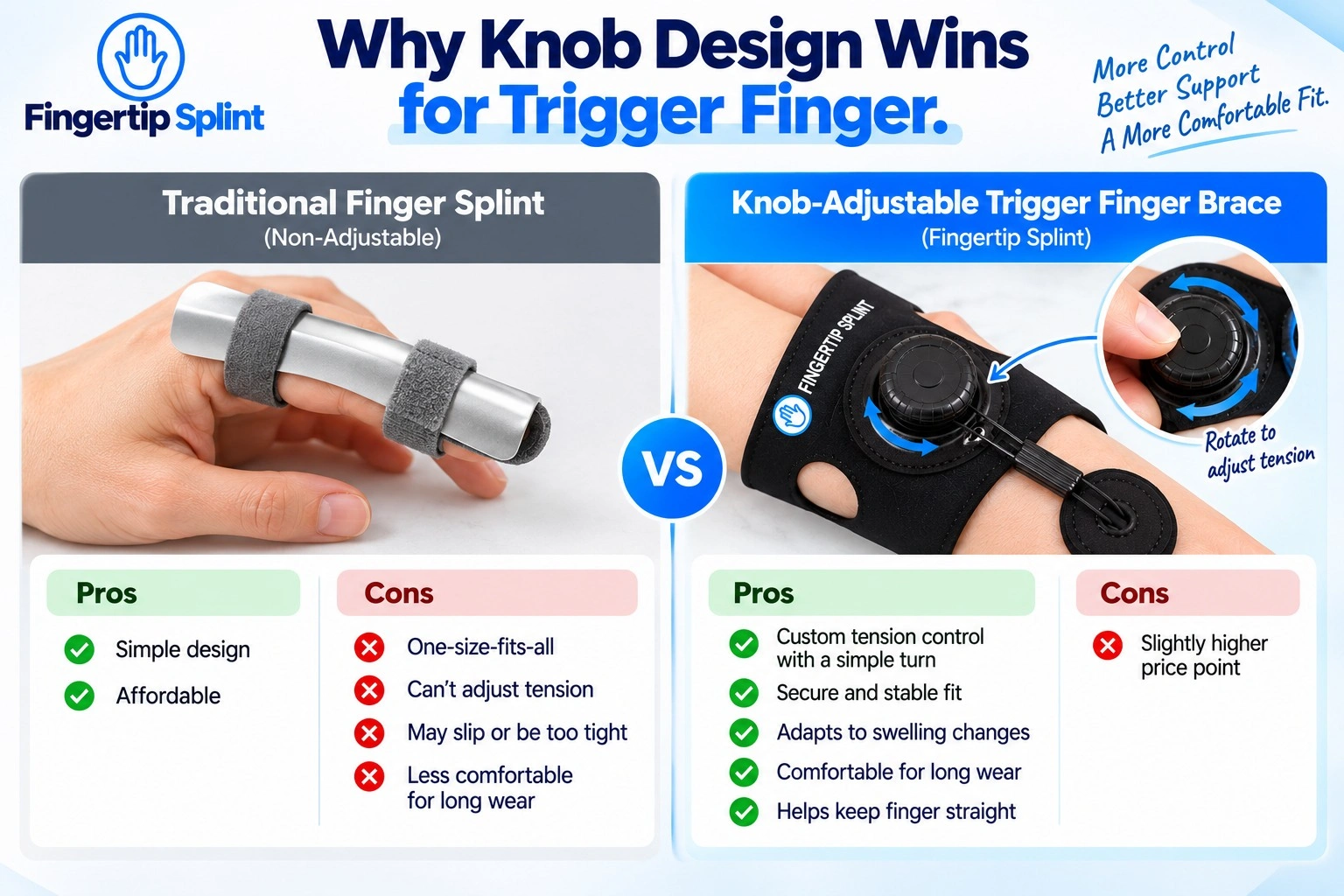
This is the signature section of this guide. The knob on a trigger finger brace is an adjustment or control component. Depending on the actual product design, it may allow you to fine-tune the fit, modify the tension, or adjust the support position within the manufacturer’s intended range.
The Basic Function of a Brace Knob
The knob is a control mechanism. Instead of adjusting a strap by hand, you turn or manipulate the knob to change the fit or tension. The specific function depends on the design. Some knobs adjust strap tension; others modify the position of a support element. The key question is whether the knob provides useful control for your finger and your situation.
Knob vs Traditional Strap Adjustment
| Feature | Knob-Based Design | Traditional Strap |
|---|---|---|
| Adjustment method | Knob or control mechanism | Strap or fastener |
| Fine adjustment | Product-dependent | Product-dependent |
| Ease of adjustment | Depends on design | Depends on design |
| Position control | Depends on construction | Depends on construction |
| User learning curve | May require familiarization | Often familiar |
| Comfort | Depends on placement | Depends on pressure distribution |
What Makes a Good Knob Design?
Easy to operate
The knob should be straightforward to turn or adjust without excessive force.
Secure
The knob should hold its setting during wear and not loosen unexpectedly.
No unnecessary pressure
The knob should not create pressure points against the finger or hand.
Doesn’t interfere with activity
The knob should not catch on clothing or interfere with daily tasks.
Allows appropriate adjustment
The adjustment range should be useful for your finger size and needs.
Remains stable after adjustment
Once set, the knob should maintain its position during use.
What a Knob Does NOT Automatically Mean
A knob is a feature, not a guarantee of quality. A well-designed strap brace may outperform a poorly designed knob brace. The important question is whether the overall design matches your finger and your needs.
8 Trigger Finger Brace Features Worth Comparing
1. Knob and Adjustment Mechanism
Evaluate ease of adjustment, control, stability, position, and comfort. A good adjustment mechanism should be straightforward to use, hold its setting during wear, and not create pressure points. If you want a deeper look at how adjustment affects fit, see our guide on how to choose the right fit for an adjustable trigger finger brace.
2. Support Structure
Look at the structured frame, support area, positioning, and stability. The support structure determines where the brace applies support and how it maintains that support during movement.
3. Finger Compatibility
Check whether the brace is intended for the index, middle, ring, or little finger. Do not assume one brace works equally well on every finger. Finger circumference and functional demand differ.
4. Sizing
Consider finger circumference, product size range, manufacturer measurements, and adjustment range. Sizing varies by brand and finger. Follow the specific product’s guidance rather than guessing.
5. Material
Compare characteristics such as flexibility, rigidity, padding, breathability, and skin-contact surface. The right material keeps you comfortable during the intended wear period without causing irritation.
6. Closure System
Compare straps, hook-and-loop fastening, adhesive elements, and knob-based adjustment. Each closure type has trade-offs. The right closure is the one that provides a secure, comfortable fit for your finger and activity.
7. Mobility
Ask whether the finger can move as intended, whether the design interferes with grip, and whether the brace remains positioned during normal movement. A brace that unnecessarily restricts movement will not be worn consistently.
8. Profile and Daily Usability
Typing and computer work
A low-profile design with finger freedom is usually more practical.
Writing and studying
Grip and finger mobility matter for holding a pen or pencil.
Phone use
Thumb and finger movement for scrolling, tapping, and swiping.
Household tasks
Cooking, cleaning, and lifting involve moisture and repeated hand use.
Work activities
Assembly work, craft work, or repetitive gripping may require a different design.
General daily use
Everyday tasks where the brace should not interfere with normal function.
3D Interactive Knob Design Explorer
The interactive 3D component explorer below breaks down the parts of a knob-adjustable trigger finger brace. Click each component to see what it does and why it matters.
Knob-Adjustable Brace Component Explorer
Click a component to learn what it does and why it matters when you are buying.
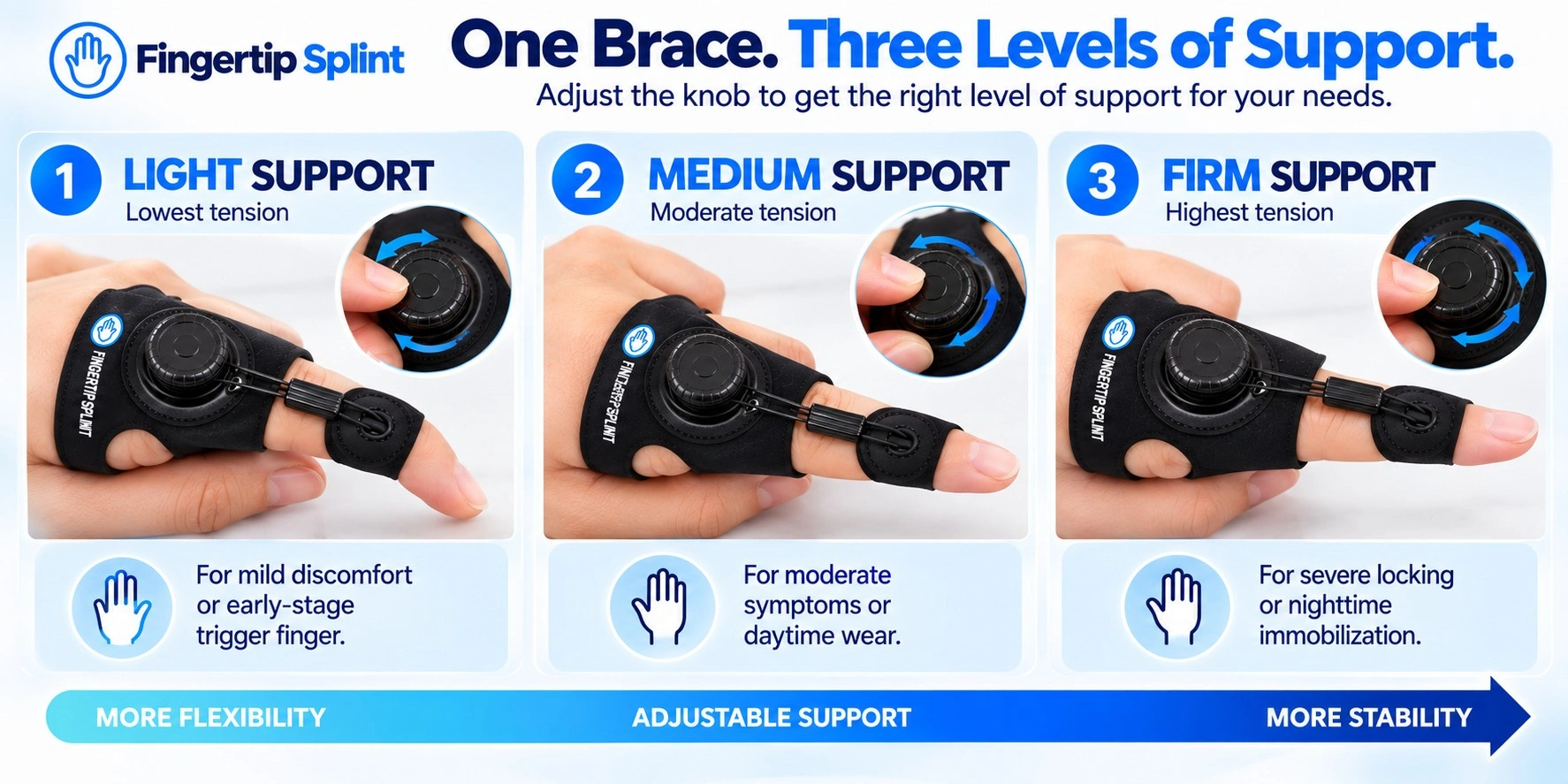
Trigger Finger Brace Support Levels Explained
Flexible Support
Flexible support designs provide coverage and light support while allowing more movement. They are often appropriate for mild or intermittent discomfort, activity-based support, or situations where mobility is a priority.
Structured Support
Structured designs provide more substantial positioning and stability. They are often appropriate for situations where more movement control is needed. Greater structural support is not automatically better — it depends on the intended purpose and professional guidance.
Immobilization vs Support
Supporting a finger and completely immobilizing a finger are not necessarily the same thing. A support brace helps maintain an appropriate position or limits aggravating movement. An immobilization splint restricts movement more substantially. These serve different purposes, and the right choice depends on your situation.
How to Evaluate the Fit of a Trigger Finger Brace
Fit is practical and specific. Use these six checks before and after purchase.
Check the correct finger
Confirm the brace is designed for the finger you need to support.
Check the support position
The support area should align with the joint or region that needs support.
Check the size range
Compare your measurement with the specific product’s size chart.
Adjust gradually
Do not tighten the brace as much as possible right away. Increase tension in small steps.
Check comfort
Look for pressure points, pinching, or edge irritation before extended wear.
Recheck after movement
A brace can feel fine when stationary but uncomfortable during activity.
Adjustable vs Fixed Trigger Finger Braces
| Feature | Adjustable Brace | Fixed Brace |
|---|---|---|
| Adjustment | Available | Limited or none |
| Fit customization | Usually greater | Usually lower |
| Setup | May require adjustment | Often simpler |
| Support position | Adjustable depending on design | Predefined |
| User control | Higher | Lower |
| Complexity | Potentially higher | Potentially simpler |
When Adjustable Design May Be Useful
If you need to fine-tune the fit, if your finger size changes, or if you want more control over the support level, an adjustable design can be beneficial.
When Simplicity May Be Preferred
A fixed brace has no adjustment learning curve and may be quicker to apply. It is not automatically inferior. The right choice depends on your situation.
Trigger Finger Brace Materials: What Should Buyers Check?
Padding
Padding can matter for comfort and pressure distribution. A padded contact surface reduces the chance of pressure points forming during extended wear.
Breathability
Heat, sweat, moisture, and extended wear all affect comfort. A breathable material allows some airflow through the construction, which can reduce heat buildup during long wear.
Flexibility
Material flexibility affects movement. A more flexible material allows more movement, while a more rigid material provides more structural support. The right balance depends on your intended use.
Structural Components
The support structure needs to match the product’s intended function. A structured frame provides more support; a flexible frame allows more movement.
How to Know if the Brace Is Too Tight
Appropriate Fit
- Secure placement
- Comfortable contact
- Properly positioned support area
- No concerning pressure symptoms
Too Loose
- Sliding during activity
- Repeated repositioning needed
- Loss of intended support position
Too Tight
- Numbness
- Tingling
- Significant discoloration
- Increasing pain
- Excessive pressure
Why “More Tightness = More Support” Is Wrong
Excessive tightness does not improve support. It creates new problems: pressure points, numbness, tingling, and skin irritation. A brace that is too tight will not be worn consistently, and it may cause symptoms worse than the original problem.
Step-by-Step Trigger Finger Brace Application Guide
Recovery Timeline — Use Reassessment Instead of Guesswork
This is a reassessment framework, not a promised healing schedule. Trigger finger recovery varies considerably depending on the individual and the situation.
Stage 1 — Initial Setup
Focus on correct positioning, comfort, skin response, and secure fit. If the brace does not stay in place or causes pressure points, address that first.
Stage 2 — Early Reassessment
Check fit, comfort, symptoms, and function. Ask whether the brace is helping and whether adjustments are needed.
Stage 3 — Activity Reassessment
Consider whether ordinary activities remain difficult or symptoms persist. Adjust the wearing schedule as needed based on guidance.
Stage 4 — Professional Review
If symptoms are severe, worsening, persistent, or associated with concerning signs, professional assessment becomes more important.
10 Trigger Finger Brace Buying Mistakes
A knob is a feature, not a guarantee of quality. The overall design matters.
What to check: support structure, fit, materials, and intended use.
A brace sized for one finger may not fit another comfortably.
What to check: confirm the intended finger before buying.
Sizing varies by brand and finger.
What to check: measure and compare with the specific product’s chart.
Excessive pressure does not improve support and can create new symptoms.
What to check: secure and comfortable, not tight.
A brace can cover the finger without supporting the right joint.
What to check: confirm the support area aligns with the intended joint.
More restriction is not always more appropriate.
What to check: match the support level to your situation.
Pressure points, rough edges, and irritation matter for consistent wear.
What to check: padding, edges, and material before extended use.
A brace that interferes with work or hobbies will not be worn consistently.
What to check: whether the brace allows the tasks you need to do.
Different fingers, activities, and needs may require different designs.
What to check: match the brace to your specific situation.
Symptoms that persist or worsen deserve professional assessment.
What to check: don’t simply buy a stronger brace.
Buyer Comparison Table — What Actually Matters?
| Buyer Question | What to Check |
|---|---|
| Does it fit my finger? | Size and compatibility |
| Can I adjust it? | Knob or closure mechanism |
| Will it stay in position? | Support structure and fastening |
| Is it comfortable? | Padding and material |
| Can I perform daily tasks? | Profile and mobility |
| Is it suitable for my intended use? | Product instructions |
| Can I adjust it easily? | Control mechanism |
Product Guide — FingerTipSplint Adjustable Trigger Finger Brace With Knob
Use this section as a worked example of how to evaluate a knob-adjustable trigger finger brace against the criteria in this guide. The product being evaluated is the FingerTipSplint Adjustable Trigger Finger Brace with Knob.
Fingertip Splint Adjustable Trigger Finger Brace with Knob
- Adjustable design: Knob-based adjustment for fine fit tuning
- Knob mechanism: Designed for controlled adjustment within the intended range
- Support structure: Intended to help maintain the intended finger position
- Finger compatibility: Check the product page for specific finger compatibility
- Fit: Check the product page for sizing and application guidance
- Application: Follow the manufacturer’s instructions for correct placement
- Daily usability: Low-profile design intended for everyday support
How the Knob Fits Into the Overall Design
Do not isolate the knob as the only selling point. Evaluate the entire system: knob + support structure + fit + contact area + closure + mobility. The knob is one component of a complete design, and its usefulness depends on how well the other components work together.
Who Should Compare This Product?
Readers looking for an adjustable finger-support design may find this product worth evaluating. It is not universally appropriate for every finger or situation. Match the product’s design to your specific needs before purchasing.
Before You Order
Check the product dimensions, finger compatibility, sizing guidance, materials, instructions, and intended use. For buyers comparing different finger support options, explore the finger splint and support products. For clinics and healthcare supply purchasing, see the medical finger splint supplier page. For distribution inquiries, see the finger splint distributor page.
Trigger Finger Brace vs Finger Straightener
These terms are sometimes used interchangeably, but they are not identical categories.
Brace
A brace focuses on support and positioning characteristics. It is designed to help maintain an appropriate finger position or provide structural support during daily activities.
Straightener
A straightener is a broader category that may include devices designed to encourage a more extended finger position. Not every straightener is appropriate for trigger finger, and not every trigger finger brace would be described as a straightener.
Why Buyers Shouldn’t Treat the Terms as Identical
The design, support level, and intended use differ. If you are specifically considering a straightener for bent fingers, see our guide on adjustable finger straighteners for bent fingers. That article covers the bent-finger/straightener product-selection intent.
Interactive Buyer Decision Tool — What Is Your Main Priority?
Select your priority and we will show you what to look for. This is a shopping decision tool, not a medical recommendation.
- Ease of turning or adjusting
- Stability after adjustment (does it hold its setting?)
- Precision of control
- Comfort (does the knob create pressure points?)
- Whether the knob interferes with daily tasks
Doctor Advice — What Should You Actually Look For?
This section is written in the tone of a practical professional checklist. It is not a diagnosis and does not replace an in-person assessment.
Fit comes before marketing claims
A brace that does not fit will not provide the intended support regardless of how it is described.
Support should match the intended purpose
Match the support level to your situation and professional guidance.
Comfort matters
A brace that is uncomfortable will not be worn consistently.
Monitor skin and sensation
Watch for numbness, tingling, discoloration, or irritation.
Don’t ignore persistent symptoms
Symptoms that persist or worsen deserve professional assessment.
Understand that “best” is contextual
There is no universal best brace. The right brace depends on your finger, your situation, and your needs.
Additional trusted resources include the AAOS OrthoInfo trigger finger page, the ASSH trigger finger resource, the MedlinePlus trigger finger page, the NHS trigger finger page, the WebMD trigger finger overview, and the Healthline trigger finger resource.
7 Quick Buying Tips
Frequently Asked Questions
The knob on a trigger finger brace is an adjustment or control component. Depending on the actual product design, it may allow you to fine-tune the fit, modify the tension, or adjust the support position within the manufacturer’s intended range.
The specific function depends on the design. Some knobs adjust strap tension; others modify the position of a support element. The key question is whether the knob provides useful control for your finger and your situation. A knob is one component of the overall design — it should not be evaluated in isolation.
Not automatically. “Better” depends on fit, adjustment, support, comfort, and intended use. A well-designed strap brace may outperform a poorly designed knob brace. A knob is a feature, not a guarantee of quality.
The right choice depends on your finger, your situation, and your needs. Evaluate the entire design — knob, support structure, fit, materials, and closure — before assuming one design is superior.
A correct fit is secure and comfortable, positions the support area correctly, and does not create numbness, tingling, discoloration, or increasing pain. The brace should stay in place without sliding excessively and allow appropriate movement for its design.
Measure according to the manufacturer’s instructions, compare with the size chart, position the brace correctly, adjust gradually, and recheck after wear. If you cannot confirm these, the fit needs adjustment.
It should be secure and comfortable, not excessively tight. You should be able to wear it for the intended period without numbness, tingling, significant discoloration, or increasing pain. Excessive tightness is not better support — it creates new problems.
If concerning symptoms occur, remove the brace and reassess the fit rather than tightening it further. If symptoms persist, seek appropriate medical advice.
This depends on the specific design and manufacturer instructions. Some braces can be adjusted while worn; others require removal for adjustment. Follow the product’s instructions for correct adjustment.
If the brace is difficult to adjust while worn, check whether it needs to be removed for adjustment or whether a different design would be more practical for your needs.
Daytime suitability depends on the product design, intended use, and your individual circumstances. A low-profile brace that allows finger mobility may be practical for daytime wear. A more structured brace may be more appropriate for nighttime use or specific recovery situations.
Follow the product’s instructions and your healthcare professional’s guidance on wearing schedule.
There is no universal duration. Wear time depends on the underlying issue, product instructions, and professional advice. Reassess based on symptoms and function rather than assuming a fixed number of days or weeks.
If symptoms persist, worsen, or interfere with function, seek professional evaluation rather than continuing to self-treat. The Mayo Clinic trigger finger diagnosis and treatment guidance notes that treatment depends on symptom severity and duration.
Compare the Features Before You Buy
You now have the checklist: knob design, fit, support, material, mobility, and intended use. Use those criteria to evaluate the FingerTipSplint Adjustable Trigger Finger Brace with Knob before ordering.
Explore the finger splint and support products, check the finger splint FAQs, or use the request-a-quote page for bulk or business purchasing. For medical finger splint supply, see the medical finger splint supplier page.
View the Product Explore Finger SupportConclusion: A Better Fit Starts With Better Questions
The right trigger finger brace is the one that fits your finger, supports the intended area, adjusts within a useful range, and can actually be worn during the activities you do. Before you buy, measure the specific finger, check the manufacturer’s sizing guidance, confirm the support position and adjustment mechanism, and verify that the brace stays comfortable during the intended wearing period.
If symptoms persist, worsen, or involve locking that does not resolve, deformity, severe pain, numbness, or loss of function, do not simply buy a stronger brace. Seek appropriate medical evaluation. For medical finger splint supply and distribution, see the medical finger splint supplier page and the finger splint distributor page. For the full FingerTipSplint range, visit the FingerTipSplint homepage.