
Thumb Splint Fit Guide: Understanding Adjustability and Comfort
A thumb splint can have useful features, but if it does not fit correctly, the wearer may experience slipping, excessive pressure, discomfort, unwanted movement, or difficulty using the hand normally. Adjustability is useful only when it is used appropriately. This guide teaches you how to evaluate and optimize the fit of a thumb splint — whether you are considering one or already using one.
What This Guide Covers
- Quick Answer
- What Makes a Good Thumb Splint Fit?
- Fit Starts With Correct Size
- Understanding Adjustability
- How Tight Should It Be?
- Pressure Points and Comfort
- Thumb Positioning
- Fit vs Range of Motion
- Step-by-Step Fitting Guide
- The 30-Second Fit Check
- Loose vs Appropriate vs Tight
- Adjustability and Different Hand Shapes
- Fit During Everyday Activities
- When Fit Changes During the Day
- Common Fitting Mistakes
- Product Spotlight
- Product Fit Walkthrough
- Interactive Fit Check Tool
- What Healthcare Professionals Consider
- Fit Maintenance
- Quick Fit Checklist
- 7 Quick Comfort Tips
- FAQ
- Conclusion
Quick Answer: How Should a Thumb Splint Fit?
A thumb splint should fit securely enough to remain in its intended position without creating excessive pressure or unnecessary discomfort. Check that the thumb is positioned appropriately, the fastening system is secure, and the device does not cause concerning symptoms. Always follow the manufacturer’s sizing, fitting, and adjustment instructions.
If you still need the foundational explanation of what a thumb support splint is and how it works, the reference Adjustable Thumb Support Splint: What Is It and How Does It Work? covers that ground. This article focuses specifically on how to evaluate and optimize fit.
What Makes a Good Thumb Splint Fit?
Proper fit involves multiple characteristics. Reducing “good fit” to tightness alone is a common mistake that leads to discomfort and other problems. Understanding the components of fit helps you evaluate whether a splint is actually working for you.
1. Stability
The splint should stay reasonably positioned during intended use. If it slides or shifts significantly, stability is not adequate.
2. Contact
The product should sit against the intended areas rather than constantly shifting. Even contact is more comfortable than concentrated pressure.
3. Comfort
The material and fastening should not create unnecessary pressure. Comfort that holds up during activity is a better signal than comfort at first touch.
4. Position
The thumb should sit according to the product’s intended design. Correct positioning ensures the splint provides the coverage and support it was designed to provide.
5. Usable Movement
The design should allow whatever movement is intended for that product and activity. Movement restrictions should match the design.
6. Adjustability
The wearer should be able to make appropriate fit changes according to manufacturer instructions. Adjustment works within the product’s intended range.
Key insight: A good fit involves all these characteristics working together. If one is off — the splint slips, or creates pressure, or restricts movement unnecessarily — the overall fit is not working as well as it could.
Fit Starts With the Correct Size
Adjustment cannot completely compensate for choosing an inappropriate size. Correct sizing is the foundation of good fit, and the manufacturer’s sizing chart is the primary guide.
What to Measure and Check
- Manufacturer sizing chart
- Thumb measurements
- Hand measurements where applicable
- Size ranges listed by the manufacturer
- Measuring instructions provided
- Comparison of measurements with product specifications
Key Principle
Adjustability fine-tunes fit; it does not necessarily replace correct sizing. If a product requires the extreme end of its adjustment range to fit, you are probably one size off.
Different manufacturers may use different sizing systems. A “medium” from one brand may correspond to a “small” or “large” from another. Always check the specific product’s sizing chart rather than relying on general size assumptions.
Understanding Adjustability
An adjustable system allows the wearer to modify fit or positioning after the product is on the hand. Understanding what adjustment can and cannot change helps you use it appropriately.
What Adjustability Can Change
- Strap tension
- Product positioning
- Contact against the hand
- Stability during movement
- Comfort
- Fit around different hand shapes
What Adjustability Cannot Change
- The fundamental size of the device
- The underlying purpose of the splint
- Whether the design is appropriate for a particular medical situation
- The structural characteristics of the product
Important distinction: Adjustability is a design feature that allows fit modification. It does not make a product medically appropriate for every situation, and it does not eliminate the need for correct sizing.
The mechanism reference How an Adjustable Thumb Splint Provides Flexible Support explains how adjustability interacts with support and movement in more depth.
How Tight Should a Thumb Splint Be?
This is one of the most common questions about thumb splints. The answer is that secure is not the same as painfully tight. The goal is an appropriate fit — secure positioning without excessive pressure.
Interactive: Three Fit States
Tap each state to see what to watch for
TOO LOOSE
Sliding and shifting
APPROPRIATE
Secure and comfortable
TOO TIGHT
Excessive pressure
Appropriate Fit
Secure positioning during intended movement. Comfortable contact with the hand. Intended adjustment maintained. No concerning pressure symptoms. Movement remains practical for the intended activity. This is the target — not the tightest fit, but the fit that works.
Too Loose — Signs
- Slides around during movement
- Poor positioning
- Repeated readjustment needed
- Reduced practical usefulness
Appropriate — Signs
- Secure positioning
- Comfortable contact
- Intended adjustment maintained
- No concerning pressure symptoms
Too Tight — Warning Signs
- Significant discomfort
- Numbness or tingling
- Concerning discoloration
- Increasing pressure
If you experience numbness, tingling, significant discoloration, or increasing discomfort, remove the splint and reassess. Persistent symptoms warrant professional advice.
A universal pressure measurement is not provided here because fit varies by product, anatomy, and intended use. Follow the manufacturer’s instructions for the specific product.
Pressure Points and Comfort
Where discomfort occurs can indicate the type of fit issue. Understanding common pressure areas helps you identify what to check.
Thumb base
Side of thumb
Palm
Wrist area
Strap edges
Seams
Closure points
Comfort Check Table
| What You Notice | What to Recheck |
|---|---|
| Device slides | Position and adjustment |
| Local pressure | Strap or contact point |
| Skin rubbing | Position and material contact |
| Thumb feels restricted | Product positioning and design |
| Repeated readjustment | Fit, size, or fastening |
Important: Discomfort in one location can indicate a positioning, sizing, material, or adjustment issue. A particular symptom does not always have one specific cause. Check each factor rather than assuming a single solution.
Thumb Positioning
Positioning matters to fit because the splint is designed to sit in a specific way on the thumb and hand. A correctly sized device can still fit poorly if positioned incorrectly.
What to Check
- Thumb alignment within the support area
- Placement of the base of the thumb
- Strap location
- Whether material is twisted
- Whether the splint sits as designed
Signs of Poor Positioning
- Coverage not matching the intended area
- Straps sitting in uncomfortable places
- Material twisted or bunched
- Thumb not aligned with the design
Correctly positioned vs poorly positioned is often easier to feel than to describe. If the splint does not sit where the manufacturer’s instructions indicate, reposition it before adjusting tension.
Fit vs Range of Motion
Fit and movement are connected, but they are not the same thing. A product can feel secure and fit comfortably while still intentionally limiting certain movements depending on its construction.
What Fit Involves
How the splint sits on the hand — stability, contact, comfort, positioning. Fit is about how the device meets your hand and stays in place during use.
What Movement Involves
How the design allows or limits thumb movement. Movement depends on the product’s construction, not just on how it fits. An adjustable design may permit useful movement while maintaining support.
Important: This guide does not prescribe a specific amount of thumb movement. The right amount depends on your activity, the product’s design, and your needs. What matters is that the splint allows the movement appropriate to its intended design.
Step-by-Step Thumb Splint Fitting Guide
This is general product-use guidance, not a medical treatment protocol. Follow the manufacturer’s instructions for the specific product you are using.
Important: Fit can feel different after several minutes of activity. What seems comfortable at first may need re-evaluation once you begin moving your hand. Recheck rather than assuming the initial fit will hold.
The 30-Second Fit Check
This five-question check can be run in under a minute and helps identify fit issues before they affect your activity.
30-Second Fit Check
Answer each question for your current fit.
If something feels wrong, don’t simply tighten it further. Check positioning, adjustment, and sizing. If concerning symptoms are present, remove the splint and seek appropriate advice.
Loose vs Tight vs Appropriate Fit
The three fit states provide a practical framework for evaluating whether your splint is working as intended.
Thumb Splint Fit: Find the Balance
Tap each state to see what to watch for
TOO LOOSE
Splint shifts or slides
APPROPRIATE FIT
Secure positioning + comfortable contact
EXCESSIVELY TIGHT
Pressure, discomfort, or concerning symptoms
Appropriate Fit
Secure positioning during intended movement. Comfortable contact with the hand. Intended coverage maintained. No concerning pressure symptoms. Movement remains practical for the activity. This is the target — not the tightest fit, but the fit that works.
Adjustability and Different Hand Shapes
Hands differ in size, shape, thumb proportions, and palm dimensions. Adjustability can allow a product to be fine-tuned within its intended size range — but it has limits.
Hand size
Hand shape
Thumb proportions
Palm dimensions
Joint locations
Skin and material interaction
Important: Adjustable does not mean one size necessarily fits everyone. Adjustment works within a specific range. If your hand dimensions fall outside that range, adjustment will not produce a proper fit.
Fit During Everyday Activities
Fit is activity-dependent. A splint that fits well while sitting still may need re-evaluation once you begin using your hand. This section shows what to check during common activities.
Writing
Check whether the splint remains comfortable while holding a pen. Thumb positioning and material thickness at the pen contact point matter.
Typing
Consider thumb movement and contact with the keyboard. A splint that shifts or interferes with key contact may not be practical for typing.
Smartphone Use
Observe whether the thumb can perform the movements required. Coverage and profile affect touchscreen interaction.
Reading
Check whether holding a book or tablet changes pressure points. Grip changes may shift the splint.
Light Household Activities
Check whether the product stays positioned during normal movement. Grip changes and object handling may reveal fit issues that are not apparent at rest.
The purpose of this section is not to say the splint is suitable for every activity, but to teach how to evaluate fit during your intended activity. The activity-specific reference Thumb Support Splints Explained: Features, Fit and Everyday Uses covers activity considerations in more depth.
When Fit Changes During the Day
Fit is not only a first-application consideration. Perceived comfort can change throughout the day. Understanding why helps you respond appropriately.
What Can Change Fit
- Prolonged use
- Activity level
- Hand position
- Moisture
- Repeated movement
- Swelling or changes in the hand
How to Respond
- Follow the product’s instructions for adjustment
- Reassess the adjustment rather than automatically tightening
- Check positioning if the splint has shifted
- Consider whether the activity is affecting fit
If fit changes are accompanied by persistent or significant symptoms, seek professional advice. Do not simply tighten the splint repeatedly to compensate.
Common Thumb Splint Fitting Mistakes
These mistakes come up repeatedly. Avoiding them improves fit and comfort.
More pressure isn’t automatically better. Excessive tightness can cause discomfort and other concerns.
Check: adjust for appropriate fit, not maximum pressure.
Adjustment has limits. Correct size is the foundation of good fit.
Check: measure and compare to the manufacturer’s sizing chart.
A correctly sized device can still fit poorly if positioned incorrectly.
Check: reposition before adjusting tension.
If the design has multiple adjustment points, follow the manufacturer’s instructions.
Check: adjust according to the product’s instructions.
Don’t assume discomfort simply means the splint needs to be tightened.
Check: whether the issue is positioning, sizing, or adjustment.
Consider the intended activity. Fit can change during movement.
Check: fit during the activity you will actually perform.
Numbness, tingling, significant discoloration, or increasing discomfort should not be ignored.
Check: remove the splint and seek appropriate advice if symptoms persist.
Adjustment works within a range built around a base size.
Check: whether your hand dimensions fall within the product’s intended range.
Product Spotlight: Adjustable Thumb Support Splint
After understanding the fit principles, here is a specific product to examine. The Adjustable Thumb Support Splint is one option if customizable fit and thumb-focused support are among your priorities.
Adjustable Thumb Support Splint
- Adjustable design for fine-tuning fit
- Thumb-focused coverage and positioning
- Support-oriented construction
- Full product specifications available on the product page
Fit Considerations to Check on the Product Page
Adjustability
Check how the adjustment works, what changes when adjusted, and whether the adjustment stays secure during movement.
Coverage
Review the coverage area. Confirm the splint covers the specific thumb and hand area intended by its design.
Sizing
Review the sizing information. Compare your measurements against the stated range before relying on adjustment.
Construction
Review the listed materials, inner surface description, and edges. Confirm the construction suits your comfort and activity needs.
For the broader buying framework, the reference Choosing a Thumb Support Splint: What Should You Consider? covers the decision framework in more depth. For the complete purchasing resource, see Adjustable Thumb Support Splint: A Complete Buyer’s Guide.
Product Fit Walkthrough
This image shows how the splint is positioned. Use it to check the key fit areas.
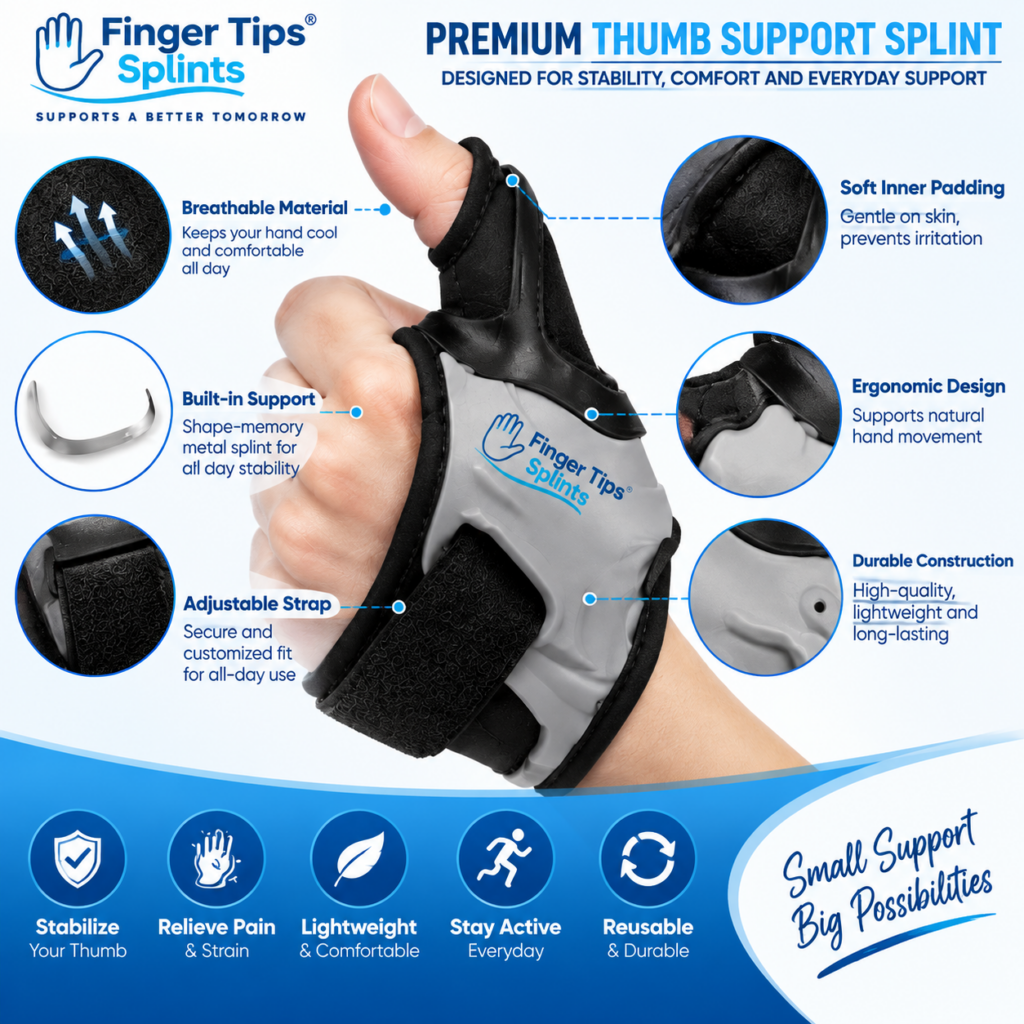
Where the Thumb Sits
The splint is shaped so the thumb sits in the intended support area. Check that your thumb aligns with the design after application.
Where Adjustment Occurs
The adjustment mechanism modifies the fit within the product’s intended range. Check that the adjustment stays secure during movement.
How the Product Contacts the Hand
The contact areas determine comfort. Check that the inner surface sits smoothly against the skin without pressure points.
Covered Areas
The covered areas determine which parts of the thumb and hand receive support. Confirm coverage matches your intended purpose.
Interactive Fit Check Tool
Answer six questions to see fit-related considerations. This is educational guidance, not a medical assessment.
Fit Check Tool
Tap each item that applies to your current fit.
Check items to see fit-related considerations.
What Healthcare Professionals Consider When Assessing Splint Fit
This section presents general principles. It does not claim that a doctor has personally endorsed a specific product.
What May Be Considered
- The reason for using the device
- The area being supported
- Positioning
- Movement requirements
- Comfort
- Skin condition
- Circulation-related concerns
- Duration of use
Important Note
Online fitting guidance cannot replace individualized clinical assessment. If a splint has been prescribed, follow the guidance provided. If symptoms are significant or persistent, seek appropriate professional advice.
Seek appropriate professional assessment if there is: significant or worsening pain, major swelling, visible deformity, persistent numbness or tingling, significant loss of movement, concerning discoloration, symptoms that persist despite appropriate use, or a significant injury.
For authoritative general information about thumb, hand, and wrist conditions, the following resources provide evidence-based content:
- Mayo Clinic for condition overviews and patient education.
- WebMD for general thumb and hand concern overviews.
- Healthline for practical wellness information.
- AAOS OrthoInfo for orthopedic guidance from specialists.
- NHS guide on hand pain for UK-based clinical guidance.
- MedlinePlus hand injuries and disorders for a broad reference library.
- Cleveland Clinic for clear patient-oriented explanations.
- Johns Hopkins Medicine for clinical and research-based perspectives.
- FDA for regulatory context on medical devices.
- NIH for research-based health information.
These resources provide general information and do not replace individualized advice from a qualified healthcare professional.
Thumb Splint Fit Maintenance
Fit is not only about the first application. Regular maintenance helps ensure the splint continues to fit as intended over time.
Inspect straps
Check fastening condition
Clean per manufacturer instructions
Check material condition
Look for stretching or deformation
Recheck sizing / fit after wear
Store properly to maintain shape and function
Practical note: A damaged or stretched splint may no longer provide the same fit. Replacing it may be more practical than trying to compensate through adjustment. Follow the manufacturer’s care and replacement guidance.
Quick Fit Checklist
Before using your thumb splint, check each item.
Before Each Use
Tap each item to confirm it for the splint you are using.
7 Quick Comfort Tips
Frequently Asked Questions
A thumb splint should fit securely enough to remain in its intended position without creating excessive pressure or unnecessary discomfort. It should maintain intended coverage, feel comfortable against the skin, and allow the movement appropriate to its design. Fit involves stability, contact, comfort, positioning, usable movement, and appropriate adjustability — not tightness alone.
Neither. A thumb splint should fit securely but not tightly. A loose fit slides and shifts; an excessively tight fit creates pressure and can cause numbness, tingling, or discoloration. The goal is an appropriate fit — secure positioning without excessive pressure. If you experience concerning symptoms, remove the splint and reassess rather than tightening further.
Start with correct positioning, then adjust gradually according to the manufacturer’s instructions. Check that the splint stays in place during intended movement, that the fastening is secure without excessive pressure, and that there is no uncomfortable rubbing. If the fit still feels wrong, check whether the issue is positioning, sizing, or adjustment — rather than simply tightening further.
Slipping can have several causes: incorrect size, incorrect positioning, insufficient adjustment for the movement level, or material that does not grip well for your activity. Before assuming the size is wrong, check the adjustment level, verify the position, and consider whether the product’s design matches your activity. Do not simply tighten as a default — that may create pressure problems rather than solving the slipping.
Discomfort can indicate a positioning issue, a sizing issue, a material or edge issue, or an adjustment issue. Check where the discomfort occurs — pressure at a specific point may indicate a strap or contact issue; general discomfort may indicate a sizing or positioning issue. Rather than tightening, reassess the fit and follow the manufacturer’s guidance. If discomfort persists or is accompanied by numbness, tingling, or discoloration, seek appropriate advice.
Yes, when used within the product’s intended range. Adjustment can help fine-tune positioning and contact, which can improve comfort and stability for users whose hand dimensions fall within the product’s size and adjustment range. However, adjustability does not replace correct sizing, and it cannot compensate for a fundamentally wrong size or an unsuitable design for a specific situation.
Remove the splint and reassess the fit. Numbness or tingling can indicate excessive pressure. Do not simply tighten the splint further. Check positioning, sizing, and adjustment. If symptoms persist after removing the splint, or if they recur when the splint is worn, seek appropriate professional advice. Persistent numbness or tingling should not be ignored.
Fit Is a Balance, Not a Tightness Test
A good thumb splint fit balances secure positioning, usable movement, and comfort without relying on excessive tightness. Understanding how to evaluate and optimize fit helps you get more from any thumb splint you choose. Correct Size → Correct Position → Appropriate Adjustment → Secure Fit → Comfort Check → Movement Check → Reassess
The Bottom Line on Thumb Splint Fit
A thumb splint fit comes down to one principle: secure positioning, usable movement, and comfort without excessive tightness. Fit is not simply about how tight the strap is. It involves stability, contact, comfort, positioning, movement, and appropriate adjustability working together. If any one of these is off, the overall fit is not working as well as it could.
The framework in this guide — Correct Size → Correct Position → Appropriate Adjustment → Secure Fit → Comfort Check → Movement Check → Reassess — works across products and situations. Starting with correct sizing and positioning, then adjusting gradually, then reassessing during activity produces better outcomes than tightening until the splint feels secure.
If you want to continue exploring within this cluster, the mechanism article How an Adjustable Thumb Splint Provides Flexible Support covers how adjustability works, and the buyer guide Choosing a Thumb Support Splint: What Should You Consider? covers the selection framework. For a wider reference, explore the full FingerTipSplint blog library.
This article is for general information only and is not a substitute for professional medical advice. Always consult a qualified healthcare provider for diagnosis and treatment of any medical condition.