
Thumb Support Splints Explained: Features, Fit and Everyday Uses
If you have looked at thumb support products online and felt confused by the options — adjustable straps, different coverage areas, flexible versus structured designs — this guide answers those questions in plain language. Understand the features, understand the fit, then understand how it fits into daily life. Product labels can vary, so the actual construction, fit, coverage, and intended use matter more than terminology alone.
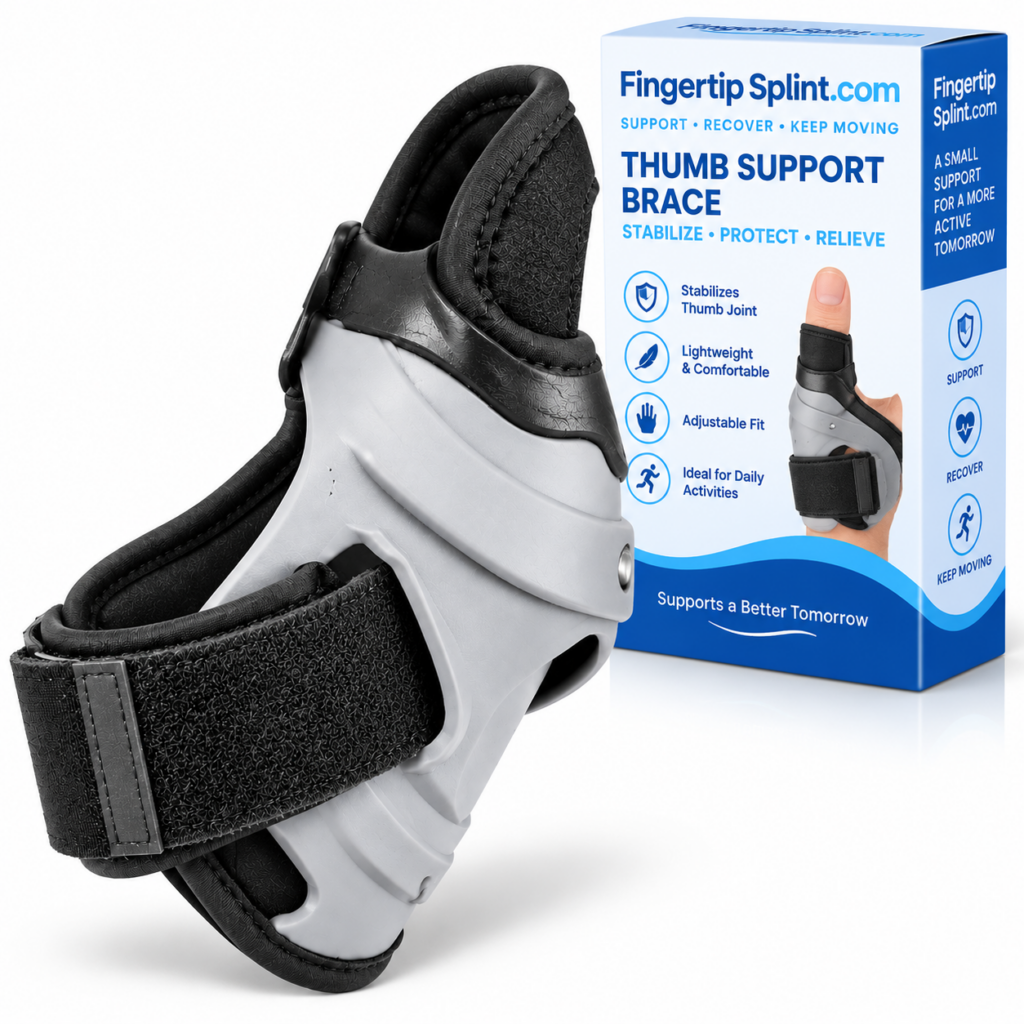
What This Guide Covers
- Quick Answer
- What Are Thumb Support Splints?
- Key Features Explained
- 3D Interactive: Anatomy of a Splint
- How Fit Affects Comfort and Support
- Understanding Thumb Coverage
- Flexibility vs Structure
- Adjustability and Positioning
- Everyday Uses
- A Day With a Thumb Support Splint
- How to Check Your Fit
- Step-by-Step Fit and Use
- Common Mistakes
- Thumb Support vs Other Designs
- Who Might Consider This Product
- What Healthcare Professionals Want You to Consider
- Product Spotlight
- Interactive: Feature Explorer
- Quick Tips
- FAQ
- Conclusion
Quick Answer: What Are Thumb Support Splints?
Thumb support splints are wearable devices designed to support or position the thumb. Different designs vary in coverage, structure, flexibility, adjustment, and fastening. Fit matters because a support should remain appropriately positioned without unnecessary pressure or interfering excessively with intended movement.
If you still need the foundational definition of how an adjustable thumb support splint works at a mechanical level, the reference Adjustable Thumb Support Splint: What Is It and How Does It Work? covers that ground. This article assumes you understand the basic category and now want to evaluate features, fit, and practical everyday use.
What Are Thumb Support Splints?
Several terms are used interchangeably in consumer product descriptions: thumb support, thumb splint, thumb brace, and adjustable thumb support. These labels overlap, and the differences between them are not always clear from the name alone.
Thumb Support
A broad term for products intended to provide support around the thumb. May include flexible sleeves, structured braces, and rigid splints.
Thumb Splint
Usually refers to a more structured support device, though product terminology varies between manufacturers.
Thumb Brace
Often used interchangeably with support or splint in consumer product descriptions. The construction determines the actual function.
Adjustable Thumb Support
A design that allows some aspect of the fit or positioning to be modified after application.
Thumb Protector
A term sometimes used for coverage-focused designs. Not automatically protective equipment against hazards.
Flexible Support
A design that prioritizes movement and comfort over structural rigidity. Movement characteristics depend on the specific construction.
Important principle: Don’t judge a support by its name alone. Look at its actual construction, coverage, adjustability, and intended use. Two products with the same label can be constructed very differently.
Thumb Support Splints: Key Features Explained
Understanding the features helps you evaluate any specific product. Each feature serves a purpose, and each one affects how the product behaves in practice. This section explains what each feature is, what it means, and why it matters.
Feature 1: Adjustability
Adjustability is the feature that allows the wearer to modify fit or positioning after the product is on the hand. It is what separates an adjustable splint from a fixed design. The adjustment mechanism may involve a strap, an overlapping material section, a hook-and-loop closure, or a manufacturer-specific design.
What It Means
Adjustability gives the wearer a way to fine-tune the fit within the product’s intended range. This can help accommodate small variations in hand size and shape.
Why It Matters
Fingers and thumbs vary in size, and a design that fits one person may not fit another without adjustment. Adjustability provides more flexibility, but it does not mean the product fits every hand.
Important limits: Adjustable does not mean universal. Adjustment works within a range built around a base size. Excessive tightening is not the goal — an appropriate fit is what matters. The reference How an Adjustable Thumb Splint Provides Flexible Support explains the mechanism in more detail.
Feature 2: Coverage
Coverage refers to which part of the thumb and hand the splint covers. Different products are designed to cover different areas. Understanding coverage helps match the product to your needs.
Thumb-Only Coverage
Focuses on the thumb itself. May allow more hand movement but provide less overall stability.
Thumb + Palm Coverage
Extends onto the palm for additional stability. May affect hand movement more than thumb-only designs.
Base-of-Thumb Coverage
Focuses on the joint area where the thumb connects to the hand. Coverage in this area can affect how the thumb moves.
Feature 3: Flexibility
Flexibility refers to how the product behaves during movement. There is an important distinction here between material flexibility and overall device flexibility.
Material Flexibility
The material may bend and conform to the hand. A soft, stretchy material can be more comfortable against the skin.
Overall Device Flexibility
The product’s overall construction may still limit certain movement even if the material itself is flexible. A soft material with a structured frame may restrict more than a fully flexible design.
This distinction matters because a buyer might assume that a soft material means more movement. In practice, the structural design determines how the splint behaves during use.
Feature 4: Support Structure
The support structure is the part of the splint that provides its physical support characteristics. It may be soft, semi-structured, or rigid depending on the design. Different structures suit different purposes.
What Structure Can Affect
- Positioning of the thumb
- Stability during movement
- How much movement is allowed
- Bulk and profile of the product
- Comfort during extended wear
What Structure Does Not Determine
- Whether the product treats a medical condition
- Whether the product replaces professional care
- Whether the product provides hazard protection
- Whether the product fits every hand
Feature 5: Fastening
The fastening system keeps the splint in position. Different products use different fastening approaches — straps, closures, adjustable sections, and attachment points. The specific mechanism affects how easy the splint is to put on, adjust, and remove.
When evaluating a product, check that the fastening is described clearly in the listing. If the fastening system is not explained, that is a limitation. A well-described fastening system tells you how the product will behave in daily use.
Feature 6: Material and Inner Surface
The material and inner surface affect comfort significantly. Users should consider softness, breathability, skin contact, moisture behavior, seams, and edges. A product with a comfortable outer material but rough inner surface or poorly placed seams may cause discomfort during extended wear.
Note: Claims like “hypoallergenic” or “medical-grade” should not be assumed unless verified by the manufacturer. Look for specific material information rather than general descriptors.
Feature 7: Profile and Bulk
Profile refers to how bulky the splint is. A lower-profile design may be more practical for some activities — especially those involving fine finger movement like typing or writing. However, lower profile is not universally better. A more structured design may be appropriate for situations where positioning is prioritized.
Anatomy of a Thumb Support Splint: 3D Interactive
This interactive shows the six key components of a thumb support splint. Tap each component to see what it contributes to how the product works.
Interactive 3D: Feature Anatomy
Tap each component to see what it does
Coverage
Which part of the thumb and hand the splint covers. Coverage is a physical property set by the product’s design and cannot be extended by adjustment. Different products cover different areas — thumb-only, thumb and palm, or base-of-thumb. Match coverage to your intended purpose.
All components work together. A splint that performs well on most components but poorly on one may still be the wrong choice for your situation.
How Fit Affects Comfort and Support
Fit is one of the most important factors in how a thumb support splint performs. Size and fit are not exactly the same thing. A product can be technically the correct size and still feel wrong because of placement, hand shape, thumb position, adjustment, coverage, movement, or construction.
Placement on the hand
Hand shape variation
Thumb position
Adjustment level
Coverage alignment
Movement behavior
Fit Evaluation Checklist
Tap each item as you confirm it.
Interactive: The Three Fit Zones
Tap each zone to see what to watch for
TOO LOOSE
Slipping and shifting
APPROPRIATE
Stable and comfortable
TOO TIGHT
Excessive pressure
Appropriate Fit
Stable positioning during intended movement. Comfortable contact with the hand. Intended coverage maintained. Movement remains practical for the intended activity. No obvious excessive pressure. This is the target — not the tightest fit, but the fit that works.
For a deeper look at fit, the reference Thumb Splint Fit Guide: Understanding Adjustability and Comfort covers this topic in more detail.
Understanding Thumb Coverage
Coverage is a major source of buyer confusion. Many people assume more coverage means more support, but the relationship is not that simple. Coverage affects how the splint contacts the hand, how it behaves during movement, and how it feels during daily use.
| Design Consideration | What to Examine |
|---|---|
| Minimal coverage | May allow more movement but provide less overall structural contact |
| Moderate coverage | Balance of coverage and usability for many everyday activities |
| Extended coverage | May provide more structural contact but can affect movement and dexterity |
| Adjustable coverage/position | Depends on actual design — check how repositioning affects coverage |
Flexibility vs Structure
Flexibility and structure represent different design priorities. Flexible designs prioritize movement; more structured designs prioritize positioning. Neither is universally better — the right choice depends on what the splint needs to do.
| Flexible Design | More Structured Design |
|---|---|
| Greater movement potential | Greater movement restriction may occur |
| Often lower profile | May be bulkier |
| Can suit routine activities | May suit situations where positioning is prioritized |
| Fit still matters | Fit still matters |
Both designs require correct fit to function as intended. A flexible splint that slips during activity is not more useful than a structured one that fits properly — and a structured splint that creates excessive pressure is not more useful than a flexible one that fits well.
Adjustability and Positioning
Adjustability allows the wearer to modify fit or positioning after application. This is useful for fine-tuning and for adjusting the splint between activities. Understanding what adjustability can and cannot do helps you evaluate specific products.
Each step depends on the previous one. Adjusting the splint changes how the material contacts the hand, which changes the fit, which changes positioning, which affects how movement feels. This chain explains why adjusting a splint sometimes changes more than expected.
Everyday Uses: How a Thumb Support Splint Fits Into Daily Life
Different activities place different demands on the thumb. Understanding the activity → thumb demand → feature to consider helps match a splint to your routine.
Typing
Typing involves repeated thumb movement, especially for the space bar. Keyboard and mouse interaction also place the thumb in specific positions. A low-profile design that allows thumb movement may work better than a bulkier design that restricts or interferes with key contact.
Writing
Writing places the thumb in a specific grip position. The splint’s thickness at the contact point and how it behaves during sustained grip affect comfort. A design that changes how the pen is held noticeably may be less practical for writing.
Smartphone Use
Tapping, swiping, and holding the phone all involve the thumb. Coverage around the thumb tip and the splint’s profile can affect touchscreen interaction. If the splint interferes with thumb-to-screen contact, check the coverage area and thickness.
Studying
Studying combines writing, typing, page turning, and phone use. The splint needs to work across multiple demands rather than excelling at one. Comfort over extended sessions matters more than peak performance in any single activity.
Office Work
Office work combines keyboard, mouse, paperwork, and phone use. The splint needs to stay stable through repetitive hand movements. Comfort over a full workday and ease of adjustment between tasks matter more than in short-duration activities.
Travel
Travel places practical demands on a splint. Portability, storage, cleanliness, and maintaining appropriate fit while traveling all matter. A splint that is easy to put on, adjust, and clean is more useful for travel.
Light Household Activities
Light household activities involve grip changes, handling objects, and everyday routines. The splint should stay positioned through these changes and remain comfortable during use.
Important: A normal thumb support should not automatically be considered protection from heat, chemicals, sharp objects, heavy impact, or workplace hazards unless specifically rated for those hazards by the manufacturer.
A Day With a Thumb Support Splint
This interactive timeline shows how a splint might be evaluated through a typical day. Tap each point to see what to check.
Interactive: A Day With a Thumb Support Splint
Tap each point in the day to see what to check
MORNING
Apply and check
WORK
Repeated tasks
SMARTPHONE
Thumb use
HOUSEHOLD
Grip changes
EVENING
Remove and check
Morning
Activity: Apply the splint.
Thumb movement: Gentle range of motion.
Feature to consider: Positioning and adjustment.
Fit check: Confirm it sits where intended without excessive pressure.
How to Check Your Fit
Checking the fit is a practical routine that can be completed in under a minute. It prevents most fit problems from affecting daily activities.
If concerning symptoms occur — discomfort, numbness, tingling, or significant discoloration — remove the splint and seek appropriate professional advice rather than continuing to wear it.
Step-by-Step Fit and Use Guide
This is a product-use orientation, not a treatment protocol. Follow the manufacturer’s instructions for the specific product you are using.
Common Mistakes
These mistakes come up repeatedly when people choose and use thumb support splints. Avoiding them improves the experience and reduces the chance of fit-related problems.
A visually attractive design does not automatically mean the fit is appropriate.
Check: the construction, coverage, and fit information.
Adjustment range has limits built around a base size.
Check: the size range and adjustment range.
More pressure isn’t automatically better support.
Check: adjust for appropriate fit, not maximum pressure.
A support that interferes excessively with intended activity may not be practical for that activity.
Check: how the splint behaves during the activity you do most.
The device should be understood according to its actual coverage, not just its name.
Check: which thumb and hand areas are covered.
Always follow the manufacturer’s sizing information.
Check: measure and compare to the sizing chart.
Different designs have different characteristics.
Check: whether the product’s intended design matches your needs.
Some situations require professional assessment rather than changing the splint.
Check: seek appropriate advice for significant or persistent symptoms.
Thumb Support vs Other Designs
Thumb support splints are one category among several. Understanding how they compare to other support designs helps clarify whether this type of product is appropriate for your situation.
| Design Type | Typical Characteristic | Consider When |
|---|---|---|
| Flexible thumb sleeve | Soft, flexible, low profile | Everyday coverage and movement are priorities |
| Adjustable thumb splint | Structured support with adjustable fit | Positioning and fit flexibility are priorities |
| Rigid thumb splint | Structured, limited movement | Positioning is prioritized and movement restriction is appropriate |
| Thumb wrap | Fabric wrap with adjustable tension | Flexible coverage and simple positioning are needed |
If you are comparing different support categories in more depth, the reference Adjustable Thumb Splint vs Finger Support: What’s the Difference? covers the trade-offs.
Who Might Consider This Type of Product?
An adjustable thumb support splint may appeal to people who prioritize certain characteristics. This is a preference-based list, not a medical recommendation.
Researching thumb-support products
First-time thumb splint buyers
Comparing thumb support designs
Interested in adjustable fit
Wanting to understand features before purchasing
Looking for support during everyday activities
This article cannot determine whether a specific medical condition requires a particular splint. People with significant injury, deformity, severe or worsening pain, substantial swelling, major movement loss, persistent numbness or tingling, or symptoms that aren’t improving should seek appropriate professional medical evaluation.
What Healthcare Professionals Want You to Consider
This section does not claim that a doctor personally endorsed a specific product. It presents evidence-based principles that apply to thumb support products generally.
Correct Fit
A splint should fit appropriately — secure but not tight. Correct fit is essential for the product to function as intended.
Intended Purpose
Different products serve different purposes. Match the product’s design to your specific needs.
Movement Requirements
Consider how much movement you need. A support that restricts movement excessively may not be practical.
Avoid Excessive Tightness
Tightness is not a measure of support. Excessive pressure can cause discomfort and other issues.
Product Instructions
Follow the manufacturer’s instructions for positioning, adjustment, wear time, and care.
Symptoms That Need Evaluation
Significant injury, deformity, severe or worsening pain, substantial swelling, major movement loss, persistent numbness or tingling, or symptoms that aren’t improving warrant professional evaluation.
For authoritative information about thumb, hand, and wrist conditions and treatments, the following resources provide evidence-based content:
- Mayo Clinic for condition overviews and patient education.
- WebMD for general thumb and hand concern overviews.
- Healthline for practical wellness information.
- AAOS OrthoInfo for orthopedic guidance from specialists.
- NHS guide on hand pain for UK-based clinical guidance.
- MedlinePlus hand injuries and disorders for a broad reference library.
- Cleveland Clinic for clear patient-oriented explanations.
- Johns Hopkins Medicine for clinical and research-based perspectives.
- FDA for regulatory context on medical devices.
- NIH for research-based health information.
These resources provide general information and do not replace individualized advice from a qualified healthcare professional.
Product Spotlight: Adjustable Thumb Support Splint
After understanding the features and fit considerations, here is a specific product to examine. The Adjustable Thumb Support Splint is one option if customizable fit and adjustable positioning are among your priorities.
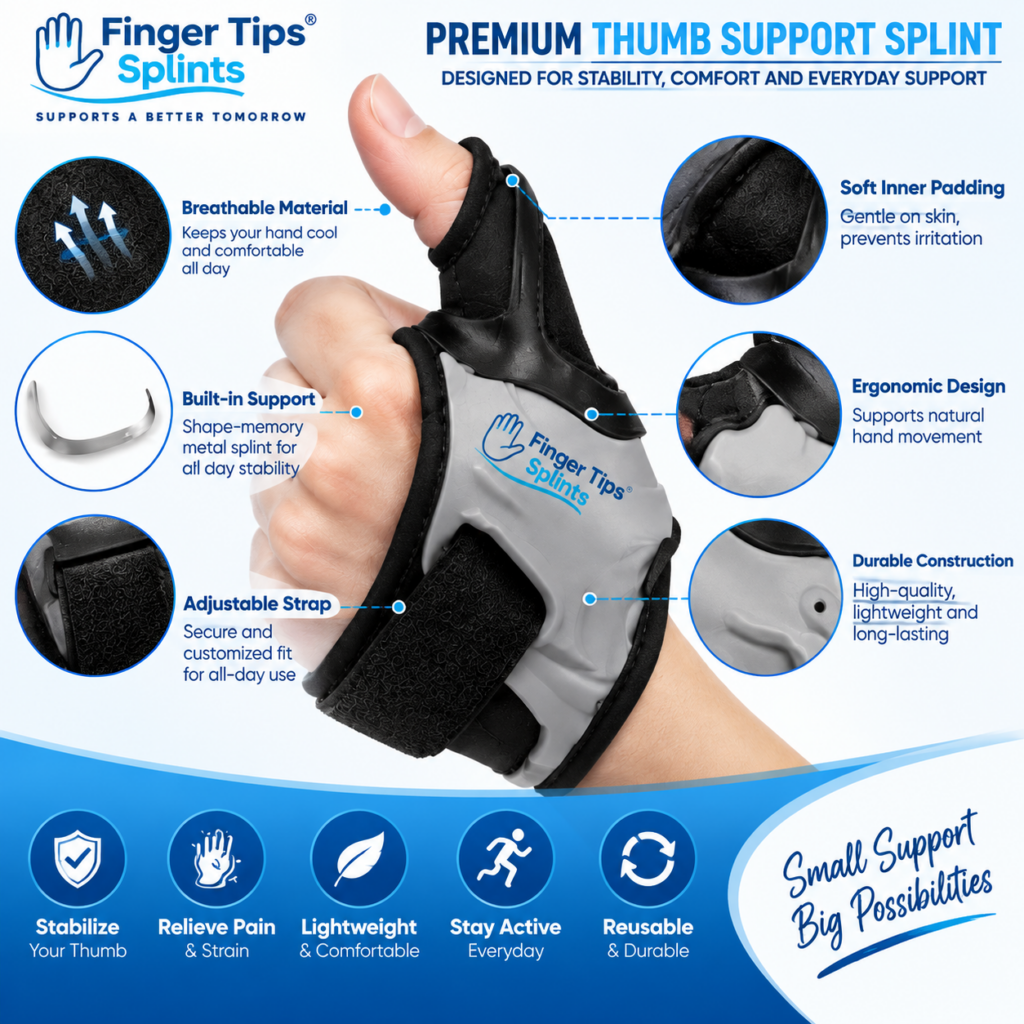
Adjustable Thumb Support Splint
- Adjustable design for customizable fit
- Thumb-focused support construction
- Designed for thumb coverage and positioning
- Full product specifications available on the product page
Applying the Framework to the Product
Design
Review the visible construction of the splint. Check the support body, coverage area, and adjustment mechanism on the product page.
Adjustability
Check how the adjustment works, what changes when adjusted, and whether the adjustment stays secure during movement.
Coverage
Review the coverage area. Confirm the splint covers the specific thumb and hand area intended by its design.
Everyday Use
Consider how the splint’s characteristics match your activities. Review the care instructions and any other product information.
For more context on how adjustable designs compare to other options, the reference Why Choose an Adjustable Thumb Support Splint for Daily Activities? covers the daily-use advantages.
Interactive: Which Thumb Splint Feature Matters Most?
Different readers prioritize different features. Tap the option that matches your priority to see what to focus on.
Feature Explorer
Tap your priority to see what to focus on
FIT
Fit priority
COMFORT
Feel priority
EVERYDAY USE
Practical priority
COMPARING
Design priority
READY TO BUY
Product priority
Fit Priority
Start with the “How Fit Affects Comfort and Support” section and the Three Fit Zones slider. Check the adjustment range and sizing information on the product page. Remember that fit is not tightness — an appropriate fit is secure but comfortable.
For readers who want to compare specific buying considerations in more detail, the reference What to Look For When Buying an Adjustable Thumb Splint covers the buying process step by step.
Quick Tips
Frequently Asked Questions
Consider adjustability, coverage, flexibility, support structure, fastening, material, inner surface, and profile. Each feature affects how the splint behaves in practice. The features that matter most depend on your priorities and activities. Look for specific product information about each feature rather than relying on general marketing language.
A thumb support splint should fit securely enough to stay in its intended position without creating excessive pressure or unnecessarily restricting movement. It should maintain the intended coverage, feel comfortable against the skin, and allow the movement appropriate to its design. Tightness is not a measure of support. If concerning symptoms occur, remove the splint and seek appropriate advice if symptoms persist.
No. Adjustable splints work within a specific range built around a base size. While adjustable designs accommodate small variations in hand size more flexibly than fixed-size products, they still have limits. A hand significantly outside the product’s size and adjustment range will not fit properly. Always check the manufacturer’s sizing information and use adjustment to fine-tune within the product’s intended range.
Not automatically. More coverage means more of the thumb and hand are covered by the product, but it does not necessarily mean better support. More coverage can affect movement, dexterity, and comfort. The appropriate amount of coverage depends on the product’s intended design and your specific purpose. Match coverage to what you need the splint to do.
Movement depends on the specific product’s design. A flexible splint may allow significant movement; a more structured splint may allow less. The splint should allow the movement appropriate to its intended design. If movement feels uncomfortable or the splint shifts during normal activity, check the fit or consider whether the product’s design matches your situation.
Suitability depends on the splint’s characteristics and the specific activity. A splint with appropriate coverage, comfortable material, secure fit, and enough movement for the activity is more likely to be suitable. Match the splint to the activity you do most and check its behavior during that activity before relying on it for extended use.
Seek professional advice if you have significant injury, visible deformity, severe or worsening pain, substantial swelling, major loss of movement, persistent numbness or tingling, significant discoloration, or symptoms that are not improving. Also seek advice if a specific type of support has been recommended. A consumer thumb splint is not a substitute for professional medical assessment or prescribed medical support.
Understand the Features, Then Choose the Product
Thumb support splints differ in adjustability, coverage, flexibility, structure, and material. Understanding what each feature does and how fit affects comfort helps you evaluate specific products with confidence. Features → Fit → Coverage → Movement → Everyday Use
The Bottom Line on Thumb Support Splints
Thumb support splints vary in adjustability, coverage, flexibility, structure, fastening, material, and profile. Understanding each feature helps you evaluate specific products. Fit is one of the most important factors — a support that does not fit appropriately will not function as intended. Coverage should match purpose, movement should remain practical for your activity, and the splint should feel secure but not tight.
The right product for you depends on what you need it to do, which activities you perform most, and how much movement you require. There is no single design that suits every situation. Matching the product’s characteristics to your needs is the most useful approach.
If you want to continue exploring within this cluster, the foundational reference Adjustable Thumb Support Splint: What Is It and How Does It Work? covers the mechanism in detail, and the buyer’s guide Adjustable Thumb Support Splint: A Complete Buyer’s Guide covers the selection process. For a wider reference, explore the full FingerTipSplint blog library.
This article is for general information only and is not a substitute for professional medical advice. Always consult a qualified healthcare provider for diagnosis and treatment of any medical condition.