
Dynamic Finger Extension Splints: A Complete Guide for Buyers
There are many products described using terms such as dynamic finger splint, finger extension splint, finger support, rehabilitation splint, and finger straightening support. But the terminology alone does not tell a buyer whether a particular design matches their needs. This is the complete buyer pillar — the guide a reader can start with when they know they need to research dynamic finger extension splints but don’t yet know what features or differences matter. It walks through understanding, identifying, comparing, evaluating, measuring, fitting, adjusting, using, inspecting, and purchasing.
What This Complete Guide Covers
- Quick Answer
- What Is a Dynamic Finger Extension Splint?
- How Dynamic Splints Differ
- 3D Interactive: Buyer Map
- Types of Dynamic Finger Extension Splints
- Interactive: Explore the Design
- Key Features Buyers Should Compare
- Fit & Sizing: The Most Important Buying Check
- Interactive: Fit Before You Buy
- Support & Tension
- Adjustable vs Fixed Dynamic Designs
- Comfort & Contact Points
- Materials & Construction
- Everyday-Use Considerations
- Interactive: Everyday Use Selector
- Product Specification Checklist
- Product Comparison Matrix
- Common Buyer Mistakes
- Product Spotlight
- Questions to Ask Before You Buy
- Interactive: Dynamic Splint Buyer Guide
- When Professional Guidance Matters
- Quick Buyer Tips
- FAQ
- Conclusion
Quick Answer: What Should Buyers Know About Dynamic Finger Extension Splints?
Buyers should evaluate the intended finger or joint, the dynamic mechanism, extension support, sizing, adjustability, contact points, comfort, materials, intended use, and manufacturer instructions. Terminology alone does not indicate whether a design matches a buyer’s needs — comparing specifications does.
If you want the foundational explanation first, the reference what a dynamic finger extension splint is and how it works covers that in detail. This guide is the broad starting point for researching the entire purchase.
What Is a Dynamic Finger Extension Splint?
This section provides the basic terminology. For a full explanation, see the foundational article linked above.
Dynamic
The design interacts with movement rather than simply holding a finger in one fixed position.
Finger Extension
Refers to movement toward a more extended or straightened position.
Splint
A support device designed to help position, stabilize, protect, or otherwise support a body part, depending on its design.
For a deeper explanation of the mechanism, the reference Dynamic Finger Extension Splint: What Is It and How Does It Work? covers the topic in detail.
How Dynamic Finger Extension Splints Differ
Dynamic splints vary across several design variables. Understanding these helps buyers see why two products with similar names can function very differently.
Extension Mechanism
What physically creates the extension-oriented support — elastic, spring-like, or another component.
Tension System
How the mechanism generates and controls force. Tension is not the same as support.
Support Structure
The physical framework that contacts and positions the finger. May be rigid, semi-rigid, or flexible.
Anchor Points
Where the dynamic component connects. Anchor placement affects how force is transmitted.
Straps
How the device is secured. Strap design affects fit, comfort, and stability.
Adjustability
What can be modified. Adjustable does not automatically mean better or more appropriate.
Finger Coverage
How much of the finger the device covers. Coverage should match the product’s stated design.
Materials
What the device is constructed from. Materials affect flexibility, durability, and comfort.
Intended Use
What the device is designed to do. Intended use affects every other design variable.
Dynamic Finger Extension Splint Buyer Map: 3D Interactive
This interactive shows the eight checkpoints buyers should understand before purchasing. Tap each checkpoint to explore what to check.
Interactive 3D: Buyer Map
Tap each checkpoint to explore
1. Finger & Joint
Which finger is the device designed for, and which joint or area does it support? Never assume that a splint designed for one finger automatically fits or functions appropriately on another. Finger dimensions and joint positions differ between fingers.
Understand the Design Before You Buy
Types of Dynamic Finger Extension Splints
Dynamic finger extension splints can be classified by design characteristics. Rather than claiming rigid categories, this section describes the common design approaches buyers will encounter.
A. Elastic Dynamic Designs
Elastic dynamic designs use elastic elements to provide directional support. The elastic component can stretch or change shape as the finger moves, applying support in a specific direction.
Characteristics
- Flexibility
- Tension that can change with position
- Movement accommodation
- Adjustability varies
- Contact points matter
What to Inspect
Check how the elastic component is anchored, how tension is set, and whether the material stays secure during movement. Follow manufacturer instructions for adjustment.
B. Spring-Assisted Designs
Spring-assisted designs use a spring or spring-like component to provide directional force. The spring mechanism applies support in a specific direction based on its construction.
Characteristics
- Mechanical support
- Directional force
- Adjustment varies
- Alignment matters
- Potential pressure points
What to Inspect
Check how the spring component is positioned, how the mechanism contacts the finger, and whether pressure points form. Do not modify spring components unless manufacturer instructions specifically allow it.
C. Strap-and-Anchor Designs
Strap-and-anchor designs use straps and anchor points to establish the direction of support. The straps hold the device in position while the anchor points determine how support is applied.
Characteristics
- Fastening that affects support
- Positioning through straps
- Anchor points determine direction
- Adjustability varies
- Stability considerations
What to Inspect
Check how the straps attach, how easily the device can be put on, and whether the anchor points stay secure. Fit affects how the support functions.
D. Semi-Rigid + Dynamic Designs
Semi-rigid designs use a relatively stable support structure working together with a dynamic element. This is useful for buyers who assume that “dynamic” means completely flexible — but that is not the case.
Characteristics
- Stable support structure
- Dynamic element that interacts with movement
- Positioning that may be more consistent
- Adjustment varies
- Fit considerations
What to Inspect
Check how the semi-rigid structure interacts with the dynamic component, how the support contacts the finger, and whether the structure is appropriate for the intended use.
E. Adjustable Dynamic Designs
Adjustable dynamic designs allow positioning or tension to be modified. Adjustability can matter for different finger sizes, positioning, comfort, movement requirements, and user-specific fitting.
Adjustability Can Include
- Positioning adjustment
- Strap adjustment
- Tension adjustment
- Fit customization
Important
The presence of adjustment does not automatically make a product medically appropriate. Adjustment should follow the manufacturer’s instructions and, where appropriate, professional guidance.
Interactive: Explore the Design
Select a design type to see how support is created and what to inspect. This is an educational tool, not a product recommendation.
Explore the Design
Click each design to see how it provides extension support.
- Main characteristic: Elastic material provides directional support.
- How support is created: The elastic component stretches or changes shape as the finger moves, applying support in a specific direction.
- Movement considerations: Movement accommodation depends on the elastic material and how it is anchored.
- Adjustment possibilities: Varies — check the manufacturer’s instructions.
- Fit considerations: The elastic must contact the finger appropriately for support to function as intended.
- What buyers should inspect: Anchoring, tension setting, material security during movement.
Key Features Buyers Should Compare
This is the main buying checklist. Each feature contributes to how the device fits, feels, and functions. Comparing features across products helps buyers make an informed decision.
Feature 1 — Finger Compatibility
Check whether the product is designed for the intended finger. Never assume that a splint designed for one finger automatically fits another.
Feature 2 — Joint Coverage
Determine which finger segment or joint the product actually supports. Coverage should match the product’s stated design.
Feature 3 — Extension Mechanism
Ask: what physically creates the extension-oriented support? Look for specific information about the dynamic component.
Feature 4 — Adjustment System
Look for straps, tension adjustment, fastening, and positioning adjustments. Note what can actually be adjusted.
Feature 5 — Support Structure
Check rigidity, flexibility, contact surface, and anchor points. The structure affects how the device positions the finger.
Feature 6 — Movement
Determine whether the design restricts movement, allows movement, or interacts with movement. Do not assume “dynamic” means unrestricted movement.
Fit & Sizing: The Most Important Buying Check
Fit is one component of a larger purchase framework. Understanding what to measure and how to compare against the sizing chart helps buyers avoid the most common mistake: choosing a product that does not fit correctly.
What to Look For
- Manufacturer sizing chart
- Finger circumference
- Finger width
- Finger length
- Joint location
- Product dimensions
- Adjustment range
Important
Never choose a size simply because “medium” usually fits you in other products. Sizing systems differ between products. Always use the manufacturer’s sizing instructions for the specific product.
For a detailed look at fit and features, the reference finger extension splint fit guide covers the topic in more detail.
Interactive: Fit Before You Buy
Answer the questions below to check your readiness before purchasing. This is an educational tool, not a medical sizing calculator.
Fit Before You Buy Checklist
Support & Tension
These three concepts are often confused. Understanding the difference helps buyers evaluate products more accurately.
Support
The device’s structural or directional assistance. Support describes how the device interacts with the finger.
Tension
The force generated by an elastic, spring, or other dynamic component. Tension is one part of how a dynamic mechanism works.
Fit
How the device sits against the finger. Fit affects how support and tension interact with the finger.
Key principle: More tension does not automatically mean better support. These three concepts should not be treated as interchangeable. A well-fitted device with appropriate tension provides the intended support — not maximum tightness.
Adjustable vs Fixed Dynamic Designs
This comparison helps buyers understand the trade-offs between adjustable and more fixed designs. Neither is universally better.
| Factor | Adjustable Dynamic Design | More Fixed Design |
|---|---|---|
| Customization | May offer more | Usually less |
| Setup | May require adjustment | Often simpler |
| Tension / position | May be adjustable | May be predetermined |
| Fit | Still critical | Still critical |
| Complexity | May be greater | Often simpler |
| Buyer consideration | Understand what actually adjusts | Understand fixed positioning |
Important: The conclusion is descriptive rather than ranking one design. Adjustability is a feature, not a guarantee of suitability. A well-fitted simpler design can be more useful than a poorly-fitted adjustable one for its intended purpose.
For a detailed comparison, the reference dynamic vs static finger splints covers the trade-offs in more depth.
Comfort & Contact Points
Comfort affects whether the device can be worn as intended. Buyers should inspect the following before purchasing.
Contact Areas
Where does the product touch the skin? Contact points determine how force is distributed and how the device feels during wear.
Straps
Could they create pressure? The fastening system affects how easily the device can be put on and whether it stays secure.
Edges
Are rigid components likely to rub? Edges are a common source of irritation during extended wear.
Bulk
Will the design interfere with daily activities? Consider typing, writing, phone use, and gripping.
Breathability
Is the material suitable for its intended use? Check the materials and whether the manufacturer provides care instructions.
Skin Considerations
Persistent irritation should not simply be accepted as part of using the device. Reassess the fit and seek guidance if symptoms persist.
Materials & Construction
Materials affect how the device feels, how long it lasts, and how it should be cared for. Product descriptions should provide information about the components used.
| Component | What Buyers Should Ask |
|---|---|
| Support body | How rigid or flexible is it? |
| Dynamic element | What creates movement-oriented support? |
| Straps | How does fastening work? |
| Contact surface | Where does it touch the finger? |
| Padding | Is cushioning specified? |
| Stitching | How is the product assembled? |
| Adjustment system | What can actually be changed? |
Important: Avoid declaring a particular material universally superior. Materials should be evaluated in relation to the support level, flexibility, durability, comfort, and intended use. A well-chosen material for one purpose may not be appropriate for another.
Everyday-Use Considerations
Everyday usability depends on the device design, fit, and intended use. Different designs interact differently with daily activities.
Typing
Consider bulk, key access, and finger movement. The key question is whether the device allows the movement required for keyboard use.
Writing
Consider grip, finger positioning, and strap interference. Check whether the device interferes with pen grip.
Phone Use
Consider touchscreen access, movement, and comfort. Some devices may allow the fine movements needed for tapping and swiping; others may not.
Light Tasks
Consider grip, stability, and movement. Check whether the activity is appropriate for the device’s intended use.
Rest
Use during rest or sleep should follow the device’s instructions or professional guidance rather than being assumed appropriate. Some devices may be designed for overnight wear; others may not.
Interactive: Everyday Use Selector
Select an activity to see what to consider. This is an educational tool, not a medical recommendation.
Everyday Use Selector
Choose an activity to see relevant considerations.
- Bulk: Consider whether the device adds bulk that affects keyboard use.
- Key access: Consider whether the device allows the finger to reach the keys comfortably.
- Finger movement: Consider whether the device allows the movements needed for typing.
- Comfort: Consider comfort over extended sessions.
- Stability: Consider whether the device stays securely positioned during use.
Product Specification Checklist
This is one of the strongest commercial sections. Before purchasing, look for specific information in each of these categories.
Product Identity
- Exact product name
- Product type
- Supported finger
Sizing
- Measurement instructions
- Size chart
- Adjustment range
Construction
- Materials
- Support components
- Dynamic components
Function
- Intended support
- Movement characteristics
- Extension mechanism
Use
- Instructions
- Care
- Intended activity / use
Seller Information
- Manufacturer or supplier
- Product support / contact
- Clear specifications
Product Comparison Matrix
This reusable matrix can be used to compare any dynamic finger extension splint. The goal is to identify which design best matches your specific situation — not to find a universally “best” product.
| Buyer Factor | Product A | Product B | Product C |
|---|---|---|---|
| Finger compatibility | Check | Check | Check |
| Size information | ✓ / details | ✓ / details | ✓ / details |
| Dynamic mechanism | Describe | Describe | Describe |
| Adjustability | Describe | Describe | Describe |
| Support structure | Describe | Describe | Describe |
| Materials | Describe | Describe | Describe |
| Contact points | Inspect | Inspect | Inspect |
| Everyday use | Evaluate | Evaluate | Evaluate |
| Instructions | Check | Check | Check |
How to use this matrix: Fill in the details for each product you are considering. Compare the answers. The goal is to identify which design best matches your specific situation. Do not assign scores or declare a universal winner.
Common Buyer Mistakes
These mistakes come up frequently when buyers purchase dynamic finger extension splints. Avoiding them improves the outcome.
“Dynamic” does not tell you everything about a product. Different dynamic designs function differently.
Check: the specific design characteristics and mechanism.
A product that looks right can still fit poorly. Product appearance is not sizing information.
Check: measure your finger and compare to the manufacturer’s sizing chart.
Mechanisms vary between products. Elastic, spring, strap, and semi-rigid designs function differently.
Check: the specific mechanism and how it works.
More adjustment is not automatically better. Adjustability is a feature, not a guarantee of appropriateness.
Check: whether the design matches your intended use.
Greater tension is not automatically desirable. Excessive tension can cause discomfort and concerning symptoms.
Check: follow the manufacturer’s adjustment instructions.
A technically functional design may still interfere with routine tasks.
Check: whether the device allows the movements required for your daily activities.
Photos rarely provide complete specifications.
Check: the product description for measurements, materials, and mechanism information.
Always check manufacturer fitting and use guidance.
Check: whether the manufacturer provides clear fitting, adjustment, and care instructions.
Separate product descriptions from independently supported medical information.
Check: whether the product page provides specific information rather than dramatic promises.
Pain, numbness, tingling, or concerning discoloration should not be treated as a normal sign that the device is “working.”
Check: remove the device and seek appropriate advice if symptoms persist.
Product Spotlight: A Product to Examine Using the Buyer Checklist
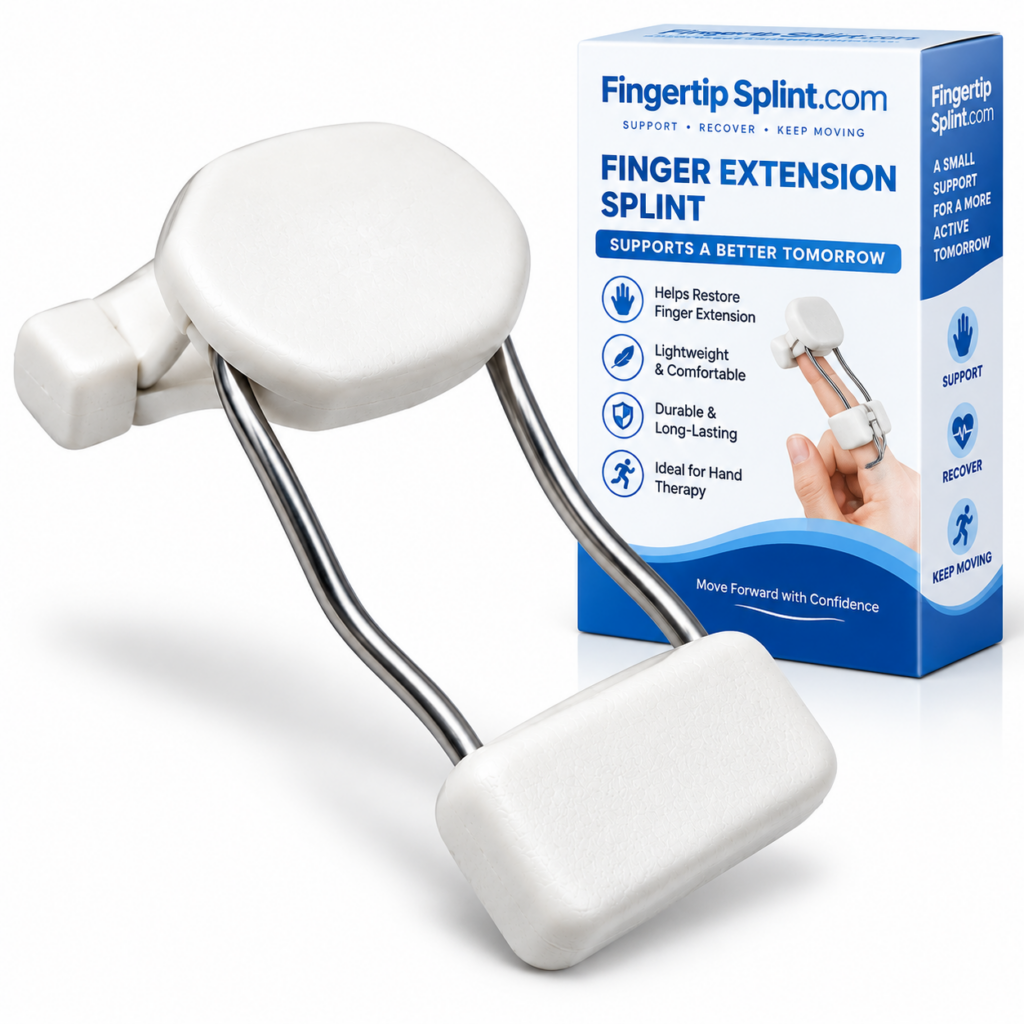
After understanding the buyer framework, here is a specific product to examine. The Dynamic Finger Extension Splint – Adjustable Finger Rehabilitation Trainer for Joint Support is one example of an adjustable dynamic finger-extension design. It is presented as a product to examine using the same criteria covered in this guide — not as “the best” splint.
Dynamic Finger Extension Splint
- Dynamic finger-extension design
- Adjustable construction
- Finger support and positioning
- Rehabilitation-oriented product positioning
- Full product specifications available on the product page
Evaluating the Product Using the Buyer Framework
Design
The product uses a dynamic finger-extension design. This places it in the dynamic-support category, where the design is oriented toward interacting with movement.
Support
Finger support is incorporated into the design. Review how the support structure contacts the finger and how the mechanism interacts with movement.
Adjustment
The adjustable construction allows positioning or tension to be modified. Check what can be adjusted and whether the manufacturer provides clear instructions.
Fit
Check the sizing information provided and compare your measurements against any stated range before relying on adjustment. Correct fit is essential for the mechanism to function as intended.
Construction
Review the product specifications for materials, support components, and dynamic components. Compare against the specification checklist in this guide.
Everyday Considerations
Consider whether the design matches your daily activities. Check whether the device allows the movements required for typing, writing, or other tasks.

Correct fit involves appropriate positioning, secure fastening without excessive tightness, and comfort during intended use. Always follow the manufacturer’s sizing and adjustment instructions for the specific product.
For a decision-framework guide, the reference what to consider when choosing a dynamic finger splint covers selection criteria in more detail. For a deep dive into fit and support, see dynamic finger extension trainer: a buyer’s guide to fit and support.
Questions to Ask Before You Buy
This section targets users who are almost ready to purchase. Asking these questions helps ensure you have the information you need.
Product Questions
- Which finger is this designed for? Confirm the device is designed for your intended finger.
- Which joint or area does it support? Understand exactly what the device is designed to support.
- How does the dynamic mechanism work? Look for specific information about the dynamic component.
- What can be adjusted? Understand what can actually be modified and how.
- What measurements determine the size? Check the sizing method and compare your measurements.
- What materials are used? Review the materials and construction information.
- What activities is it designed for? Check whether the design matches your daily activities.
- How should it be fitted? Review the manufacturer’s fitting instructions.
- How should it be cleaned? Check the manufacturer’s care instructions.
- What symptoms mean it should be removed? Understand warning signs such as numbness, tingling, significant discoloration, or persistent pain.
Interactive: Dynamic Splint Buyer Guide
Follow the three-step sequence below to identify what to inspect before purchasing. This is a buying tool, not a medical suitability calculator.
Dynamic Splint Buyer Guide
Step 1 — What are you researching?
Step 2 — What product information do you have?
Step 3 — What should you inspect next?
When Professional Guidance Matters
This section is written with an EEAT (Experience, Expertise, Authoritativeness, Trustworthiness) perspective. It does not provide individualized medical advice, but it does explain situations where professional assessment may be appropriate before purchasing.
Significant Trauma
Significant trauma warrants professional assessment rather than selecting a support device based on a product description.
Suspected Fracture or Dislocation
Suspected fracture or dislocation requires professional assessment and is not a situation for self-selecting a splint.
Visible Deformity
Visible deformity warrants professional assessment. A splint should not be used to manage a deformity without professional guidance.
Severe or Worsening Pain
Severe or worsening pain is a sign that warrants professional assessment rather than self-selecting a support device.
Substantial Swelling
Significant swelling affects fit and may indicate an underlying problem that requires professional assessment.
Numbness or Tingling
Numbness or tingling may indicate nerve involvement and should be assessed professionally.
Major Movement Loss
Significant loss of movement warrants professional assessment to determine the appropriate approach.
Persistent Symptoms
If symptoms are not improving or are worsening, do not simply choose a product online. Seek professional guidance.
Uncertainty About Which Support Design Is Appropriate
If you are unsure whether a dynamic, static, or another form of support is appropriate, professional assessment can help determine the right approach. A product description cannot replace an individualized assessment.
Warning Signs That Warrant Professional Assessment
- Severe or worsening pain
- Significant swelling
- Visible deformity
- Major loss of movement
- Persistent numbness or tingling
- Concerning skin or circulation changes
- Symptoms that are not improving
For general information about finger injuries and hand conditions, see the Mayo Clinic overview of finger injuries. For broader hand anatomy and condition information, the Cleveland Clinic hand anatomy resource provides useful context. For an orthopedic perspective, the AAOS hand and wrist conditions library is a widely referenced resource. For general public health information, the NHS hand pain guidance offers a practical overview. Additional medical reference information is available through MedlinePlus hand injuries and disorders. For clinical and anatomy-focused context, Johns Hopkins Medicine hand conditions provides further reading. General educational context is also available through WebMD’s overview of finger injuries and Healthline’s general finger injury information. For peer-reviewed literature, NCBI PubMed Central hosts open-access research where appropriate. For a broader orthopedic reference, Orthobullets provides structured clinical summaries.
Important: This article does not provide individualized medical advice. Always consult an appropriate healthcare professional regarding your specific situation.
Quick Buyer Tips
Quick Buyer Checklist
Before purchasing, check the following. Click each item to mark it as reviewed.
Frequently Asked Questions
A dynamic finger extension splint is a finger-support device designed with components that can provide an extension-oriented force or positioning while still allowing some controlled movement, depending on the construction. It is one category of designs within the broader finger-support product range. Not every dynamic finger splint is designed the same way — different products use different mechanisms, support structures, and adjustment systems.
Dynamic splints are designed around interacting with movement, while static splints are typically designed to maintain a relatively fixed position. Dynamic designs may use elastic, spring-like, or tension-based components, while static designs generally rely on a more rigid or fixed structure. Neither category is universally better — the appropriate choice depends on the specific situation. For a detailed comparison, see the dedicated dynamic vs static finger splints article.
Always use the manufacturer’s sizing instructions because sizing systems differ between products. Sizing may involve finger circumference, finger width, finger length, joint location, or device-specific measurements. Do not assume that your usual ring size corresponds to a splint size, and never choose a size simply because “medium” usually fits you in other products. Measure according to the manufacturer’s instructions and compare your measurements to the sizing chart.
Look for information about finger compatibility, joint coverage, the dynamic mechanism, the adjustment system, the support structure, the movement characteristics, the materials, the contact points, the intended use, and the manufacturer instructions. A well-documented product page should provide specific information about these factors. If the product page does not provide clear information, consider asking the manufacturer for more details before purchasing.
Adjustability can help accommodate different finger dimensions and positioning requirements, but it does not replace the need for correct sizing. An adjustable design may offer more customization, but adjustability is a feature, not a guarantee of suitability. A well-fitted simpler design can be more useful than a poorly-fitted adjustable one for its intended purpose. The appropriate choice depends on the specific situation and the product’s intended design.
A properly fitted splint should be secure and appropriately supportive without excessive pressure. It should be positioned according to the manufacturer’s instructions and comfortable enough to wear as intended. Excessive pressure, numbness, tingling, significant discoloration, or persistent pain are signs that the fit or adjustment may need to be reassessed. Follow the manufacturer’s instructions carefully. Secure is not the same as painfully tight.
Speak with a healthcare professional if there is significant trauma, suspected fracture or dislocation, visible deformity, severe or worsening pain, substantial swelling, numbness or tingling, major movement loss, or persistent symptoms. Also seek guidance if you are uncertain about which type of support is appropriate. A product description cannot replace an individualized assessment. Professional assessment can help determine whether a dynamic, static, or another form of support is appropriate for the specific situation.
Conclusion: Understand the Design Before You Buy
Dynamic finger extension splints are a category of designs, not one product. They vary in mechanism, support structure, adjustability, materials, and intended use. Understanding these differences helps buyers evaluate specific products, use them appropriately, and recognize when professional guidance may be appropriate.
This complete buyer’s guide has covered what dynamic finger extension splints are, how they differ, the types of designs, key features buyers should compare, fit and sizing, support and tension, adjustable vs fixed designs, comfort and contact points, materials, everyday use, product specifications, common buying mistakes, and a buyer tool for identifying what to inspect. The goal has been to provide a comprehensive starting point for researching the entire purchase — not to recommend a universal “best” splint.
Explore an Adjustable Dynamic Finger Extension Design
Review the product’s design, adjustment features, support structure, sizing information, and specifications before deciding whether it fits your purchasing requirements. The Dynamic Finger Extension Splint – Adjustable Finger Rehabilitation Trainer for Joint Support is one example of an adjustable dynamic finger-extension design.
View Dynamic Finger Extension SplintNeed information about other finger support products? Explore the FingerTipSplint shop. For general questions, see the FingerTipSplint FAQ. For B2B inquiries, see the medical finger splint supplier page or request a quote.