
How to Choose a Comfortable Finger Sleeve for Support
A finger sleeve may look simple, but choosing a comfortable one involves more than picking the softest material or loosest fit. Comfort comes from fit, material, pressure, flexibility, coverage, edges, activity, and duration working together. This guide focuses on the comfort experience — what actually makes a sleeve feel right, and how to spot what doesn’t.
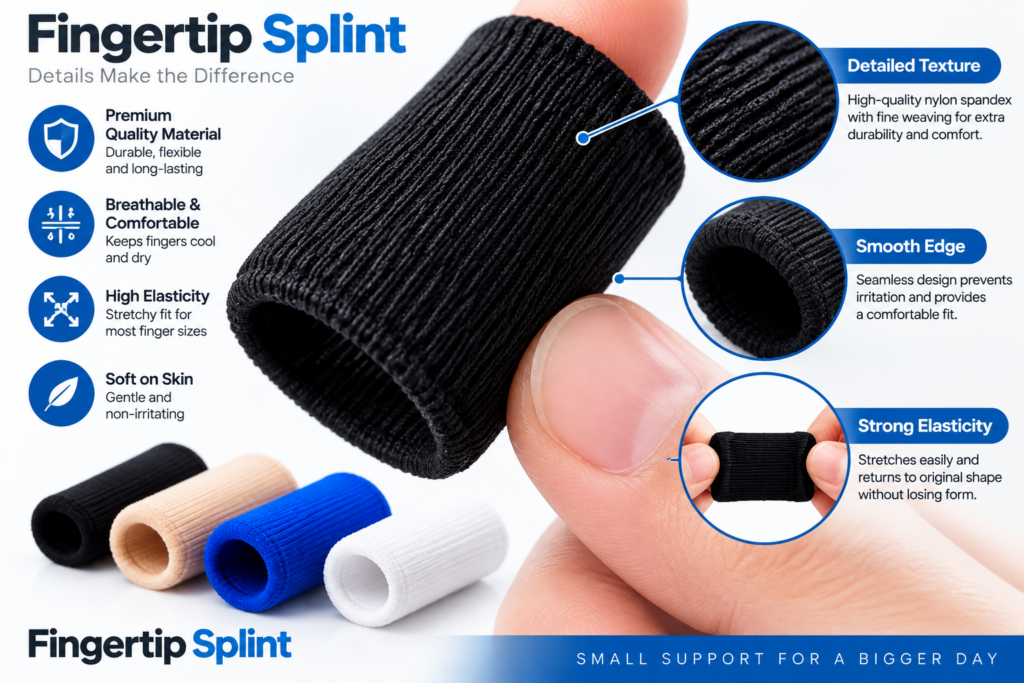
What This Guide Covers
- Quick Answer
- The 7 Factors of Comfort
- Start With the Right Fit
- How to Check Size
- Material & Skin Comfort
- Soft ≠ Comfortable
- Pressure: How Tight Is Too Tight?
- Flexibility & Comfort
- Coverage & Comfort
- Edges, Seams & Construction
- 3D Anatomy of Comfort
- Comfort During Activities
- Short-Term vs Extended Use
- Comfort Factor Slider
- Comfort Troubleshooter
- Comfort vs Support Myths
- Build Your Comfort Profile
- How to Test Comfort
- When Comfort Isn’t Everything
- Sleeve vs Splint (Brief)
- Product Spotlight
- Comfort Checklist
- FAQ
Quick Answer: How Do You Choose a Comfortable Finger Sleeve for Support?
A comfortable finger sleeve should have a suitable fit, appropriate coverage, manageable pressure, sufficient flexibility for the intended activity, and materials that feel suitable against the skin. The correct choice depends on the specific product, finger size, activity, and intended use rather than softness alone.
This is a comfort-first guide. It’s not a full buying guide and not a fit/coverage deep dive — those exist separately. Here, the focus is on the wearing experience: what makes a sleeve feel comfortable during actual use, and what can make it uncomfortable.
What Actually Makes a Finger Sleeve Comfortable?
Comfort isn’t one thing. It’s the result of seven factors working together. A sleeve that excels at one but fails at another can still feel uncomfortable in practice.
FIT
MATERIAL
PRESSURE
FLEXIBILITY
COVERAGE
EDGES & SEAMS
ACTIVITY & DURATION
Each of these factors is covered in detail below. If you’re already familiar with one, skip ahead — but the comfort experience depends on all seven working together.
Start With the Right Fit
Fit is the foundation of comfort. A sleeve with the softest material in the world can still feel uncomfortable if it doesn’t fit properly. Here’s how the three fit scenarios play out:
Too Loose
- May shift during movement
- Can bunch up
- Requires constant readjustment
- Coverage becomes inconsistent
Suitable Fit
- Remains positioned
- Allows intended movement
- Doesn’t create excessive pressure
- Comfortable during activity
Too Tight
- Feels restrictive
- Creates uncomfortable pressure
- May cause numbness or tingling
- Can cause discoloration
Key principle: Comfortable does not mean loose, and supportive does not mean tight. The right fit is somewhere in between — snug enough to stay in place, comfortable enough to wear for the intended duration.
For the complete fit framework, see Finger Sleeves for Support: A Guide to Fit, Comfort and Coverage.
How to Check Finger Sleeve Size
Correct measurement leads to appropriate size, which creates the conditions for comfortable positioning. This isn’t a full sizing guide — but here’s the connection between sizing and comfort.
Important: Sizing systems vary between manufacturers. Always use the specific manufacturer’s measurement instructions rather than applying a generic method. What works for one product may not work for another.
Material and Skin Comfort
Material affects how the sleeve feels against your skin, how it handles moisture, and how it holds up over time. Here’s what to examine in product information:
Material Composition
What the sleeve is made of — fabric type, elasticity, and construction.
Stretch
How the material conforms to finger shape and returns to form.
Texture
How the surface feels — smooth, soft, slightly textured.
Thickness
How much material surrounds the finger.
Surface Feel
Comfort against skin during extended wear.
Moisture Handling
How the material behaves when warm or during longer wear.
Careful wording: Avoid assuming a specific material is universally better. Material preference can vary between users and activities. What matters is whether the material suits your comfort requirements, not whether it’s “premium.”
Soft Doesn’t Automatically Mean Comfortable
This is one of the most common misconceptions about finger sleeves. Softness is only one factor in the comfort experience. Here’s how softness interacts with other factors:
Soft + Wrong Size = Uncomfortable
A soft sleeve that doesn’t fit will still slip, bunch, or create pressure.
Soft + Excessive Pressure = Uncomfortable
A soft material that’s too tight still causes pressure and discomfort.
Soft + Poor Positioning = Uncomfortable
A soft sleeve that doesn’t sit correctly still requires adjustment.
Soft + Restricted Movement = Inconvenient
A soft sleeve that limits finger movement doesn’t feel comfortable during activity.
Pressure: How Tight Is Too Tight?
A common misconception is that making a sleeve tighter increases its support. That’s not accurate — and it’s a source of discomfort. Here’s what to watch for:
Warning Signs
- Numbness
- Tingling
- Significant discoloration
- Persistent pain or discomfort
Appropriate Pressure
- Snug but not tight
- No numbness or tingling
- No deep marks after removal
- Comfortable during intended use
Stop using and seek advice: If any of the warning signs occur, discontinue use and seek appropriate professional advice. Persistent numbness, tingling, or discoloration shouldn’t be attributed to “getting used to” the sleeve. For reliable information, the NHS guide on hand pain and MedlinePlus hand injuries and disorders are useful starting points.
Flexibility and Comfort
Flexibility affects comfort during activity. If the activity requires frequent finger movement, a flexible sleeve accommodates it. If the sleeve restricts movement unnecessarily, comfort suffers.
Activities That Need Flexibility
- Typing
- Writing
- Smartphone use
- Studying
- Desk work
What to Check
- Does the sleeve accommodate natural finger movement?
- Does it stay positioned during movement?
- Does it feel restrictive during the intended activity?
- Is the flexibility appropriate for your main task?
For a fuller activity-based look, see Understanding Finger Support Sleeves for Everyday Activities.
Coverage and Comfort
Maximum coverage isn’t automatically ideal for comfort. Coverage should match the intended use while remaining comfortable during wear.
More Coverage
Potentially more surface coverage, but may affect movement depending on design. Can add bulk and feel more noticeable.
Less Coverage
May allow more freedom and dexterity, but may not cover the area the user expects. Support may be limited to a smaller region.
The key question: Does the coverage match the intended use while remaining comfortable? Coverage isn’t about maximum — it’s about appropriate.
Edges, Seams and Construction
Small design details often determine whether a sleeve feels comfortable over time. These aren’t obvious from product photos, but they matter during wear.
Edge Construction
How the sleeve terminates around the finger. Rough edges cause friction.
Seam Placement
Where seams sit during movement. Seams over joint creases can become noticeable.
Thickness
Consistent thickness matters. Uneven spots create pressure points.
Folding
Whether edges roll or fold during wear. Poorly finished edges can create discomfort.
Bunching
Whether the material bunches up during movement. Bunching creates pressure points.
Material Transitions
How different materials connect. Poor transitions create rough spots.
For a broader look at construction details, see Finger Support Sleeves Explained: Features, Uses and Design.
Interactive 3D: Anatomy of a Comfortable Finger Sleeve
Tap each component to see how it affects comfort
Material
What touches the skin. Material affects texture, softness, moisture handling, and how comfortable the sleeve feels during extended wear. Choose a material that suits your comfort requirements and activity.
Comfort During Different Activities
Comfort priorities shift depending on what you’re doing. Here’s the practical overview:
| Activity | Comfort Considerations |
|---|---|
| ⌨️ Typing | Flexibility + low interference |
| ✍️ Writing | Grip + movement |
| 📚 Studying | Long-use comfort + flexibility |
| 📱 Smartphone | Mobility + suitable coverage |
| 💼 Office work | Fit + repeated movement |
| ✈️ Travel | Comfort + portability |
| 🏠 Light daily tasks | Secure fit + movement |
This isn’t a medical recommendation — it’s a practical comfort framework based on the movement and contact each activity requires.
Short-Term vs Extended Use
Comfort can change with duration. A sleeve that feels comfortable initially may behave differently over longer periods.
Short Use
A product may feel comfortable initially. Basic fit, immediate pressure, and material feel are most noticeable.
Extended / Repeated Use
The user may notice pressure building, moisture accumulation, bunching, movement, or skin irritation over time.
Follow manufacturer instructions regarding wearing duration and care. If you notice discomfort developing over time, reconsider the fit or design rather than pushing through.
Interactive: What Is Affecting Your Comfort?
Adjust each factor to see what it means for comfort. This is educational guidance, not a medical diagnostic tool.
Adjust the factors above to see comfort guidance.
Comfort Troubleshooter
If a sleeve feels uncomfortable, here’s what to check for the most common issues:
Check the following:
- Size — verify against the manufacturer’s chart
- Position — confirm correct application
- Manufacturer instructions
Check the following:
- Size — too loose or wrong length
- Position — applied correctly
- Finger shape — matches the design
- Activity — more movement than the sleeve accommodates
Check the following:
- Fit — correct size
- Length/coverage — appropriate for finger
- Movement — whether the sleeve can accommodate it
Check the following:
- Material — suitability for your skin
- Moisture — accumulation during wear
- Fit — pressure points
- Care instructions — proper cleaning
Check the following:
- Flexibility — whether the sleeve allows your activity’s movement
- Coverage — whether excessive coverage is limiting movement
- Activity requirements — whether the sleeve matches them
- Whether a different type of support may be more appropriate for your situation
Comfort vs Support: Common Myths
These five myths cause a lot of unnecessary discomfort. Tap each card to reveal the reality.
“More pressure means more support.”
“The softest sleeve is always the most comfortable.”
“A loose sleeve is more comfortable.”
“More coverage is always better.”
“Flexible support is suitable for every situation.”
Interactive: Build Your Comfort Profile
Select your priority to see guidance. This is a product-selection education tool, not a medical recommendation engine.
Select your comfort priority above.
How to Test Comfort After Selecting
Once you’ve selected a sleeve, here’s how to test whether it’s actually comfortable for your intended use:
If concerning symptoms occur — such as numbness, tingling, significant discoloration, or persistent pain — remove the sleeve and seek appropriate professional advice. Don’t attribute these symptoms to “getting used to” the sleeve.
When Comfort Isn’t the Only Consideration
Comfort should be balanced with the actual purpose of the support. A very comfortable sleeve isn’t automatically appropriate for every situation.
If a specific type of support has been recommended, follow that guidance rather than choosing based on comfort preference alone. Professional advice may be appropriate for:
🩹 Significant injury
🦴 Visible deformity
📈 Severe or worsening pain
💧 Substantial swelling
⚡ Persistent numbness or tingling
🚫 Major movement loss
⏳ Symptoms that aren’t improving
For trusted guidance, see the AAOS OrthoInfo hand and wrist conditions library, NHS guide on hand pain, and MedlinePlus hand injuries and disorders. Additional perspectives are available from Mayo Clinic, Cleveland Clinic, and Johns Hopkins Medicine. The NIH provides research-based information, and if a neurological component is involved, NINDS is the specialist resource. For regulatory context on medical devices, the FDA is authoritative, and for general public health information, the CDC is a trusted source.
Finger Sleeve vs Finger Splint: Brief Context
This isn’t a full comparison — just enough context to clarify where a sleeve fits for comfort-focused buyers.
Finger Sleeves
Generally emphasize flexible coverage and everyday usability. Comfort is often a primary design consideration.
Finger Splints
Often provide more structure or movement control, depending on design. Comfort can still be optimized, but the design focus is different.
For the full comparison, see Finger Support Sleeve vs Finger Splint: What’s the Difference?
Explore Finger Sleeves for Finger Support
After working through the comfort framework, here’s what to check on the FingertipSplint product page:
Finger Sleeves for Finger Support
- Flexible sleeve-style design
- Intended for everyday finger support
- Product specifications available on the product page
- Designed for finger coverage and comfort
- Available to explore with current product details
Check the product page for material, size information, coverage, construction, intended use, care instructions, and manufacturer guidance. For quality considerations, see What Makes a Good Finger Support Sleeve for Daily Use?
Comfortable Finger Sleeve Checklist
Walk through each item before selecting. Tap to mark complete.
Frequently Asked Questions
Choose based on fit, material, pressure, flexibility, coverage, edges, and activity compatibility — not softness alone. Start with correct sizing per the manufacturer’s instructions, then evaluate whether the material feels suitable against your skin, whether the pressure feels appropriate, and whether the sleeve accommodates the movement your activity requires. A comfortable sleeve is one where all these factors work together for your specific use.
No — it should feel snug, not tight. A snug fit stays in place comfortably. A tight fit causes pressure, numbness, tingling, or leaves deep marks after removal. Tightness doesn’t equal better support. If a sleeve feels too tight, remove it and reconsider the size or design. Persistent numbness or tingling after removal warrants professional advice.
Comfort comes from several factors working together: appropriate fit, suitable material softness and texture, manageable pressure, adequate flexibility for your activity, appropriate coverage, well-finished edges, and suitability for the duration you’ll wear it. No single factor determines comfort — it’s the combination that matters.
No. Softness is only one factor. A soft sleeve that doesn’t fit properly, creates excessive pressure, restricts movement, or bunches during activity can still feel uncomfortable. Comfort requires fit, pressure, movement, and activity to work together — softness alone isn’t enough. Material preference also varies between users and activities.
A properly fitting sleeve should stay reasonably in place without constant adjustment. It should feel snug, not painful. It shouldn’t leave deep marks after removal, cause numbness or tingling, or require pushing through discomfort. It should allow your intended finger movement and match the manufacturer’s sizing guidance. If it slips, bunches, or feels excessively tight, the fit is wrong.
Yes. A sleeve that’s too tight can cause discomfort, restrict circulation, and lead to numbness or tingling. If your sleeve leaves deep marks, feels painful, or causes any of those symptoms, remove it and reconsider the fit or size. Don’t try to “break in” a tight sleeve — it won’t get better with wear. Persistent symptoms warrant professional advice.
Slipping usually comes from incorrect sizing (too loose or wrong length), incorrect positioning during application, material characteristics that don’t grip well for your activity, finger shape, or the sleeve being stretched improperly. Check the manufacturer’s application guidance, verify your size, and consider whether the material suits your activity. Don’t just “size down” by default — that could create excessive pressure.
Bunching usually comes from a length mismatch (the sleeve is longer than your finger requires) or a fit that doesn’t allow the material to stay smooth during movement. It can also happen if the material folds easily or if the sleeve is too loose. Check length, fit, and material. Bunching creates pressure points and reduces comfort, so it’s worth troubleshooting.
Yes, many people find them comfortable for typing. Prioritize low bulk, flexibility, secure fit, and appropriate coverage. A thick or loose sleeve can interfere with typing rhythm and accuracy. A thin, well-fitted sleeve designed for everyday use is usually a better match for keyboard work. Test during actual typing before committing to long sessions.
Yes, but consider grip and dexterity. A sleeve that’s too thick may interfere with pen control. A thin, flexible sleeve that allows natural finger movement is usually a better choice. If you write for extended periods, breathability and comfort during repeated movement become especially important.
Yes. More coverage can add bulk and feel more noticeable during wear, while less coverage preserves dexterity but may not cover the area you need. Neither extreme is universally more comfortable. The right coverage matches your intended use while remaining comfortable during wear. It’s about appropriateness, not maximum coverage.
Yes — especially during activities that require frequent finger movement. A flexible sleeve accommodates natural movement, which improves comfort during typing, writing, and phone use. A sleeve that restricts movement unnecessarily feels uncomfortable during these activities. Match flexibility to the movement your activity requires.
Remove it and check the cause. Possible factors include material sensitivity, moisture accumulation, incorrect fit, or improper cleaning. Follow the manufacturer’s care instructions carefully. If irritation persists after removal, consult a healthcare professional. Persistent skin irritation shouldn’t be attributed to “getting used to” the sleeve.
It depends on the specific product, material, and fit. Breathable, soft, well-fitting sleeves are generally more comfortable for extended wear. Follow the manufacturer’s recommendations for wear duration, and inspect your skin regularly for irritation. If you notice persistent redness, numbness, or discomfort, remove the sleeve and reassess.
No. A comfortable sleeve isn’t automatically appropriate for every situation. If you have a specific medical concern, significant injury, or if a particular type of support has been recommended, professional guidance should take priority over comfort preference alone. A comfortable sleeve is designed for everyday flexible support — it isn’t a substitute for professional assessment or a prescribed device.
Comfort Is a System, Not a Feature
Fit, material, pressure, flexibility, coverage, edges, activity, and duration all contribute to comfort. When they work together, the sleeve feels right. When one is off, comfort suffers. Fit → Material → Pressure → Movement → Coverage → Duration
The Bottom Line on Comfortable Finger Sleeves
Choosing a comfortable finger sleeve isn’t about finding the softest material or the loosest fit. It’s about finding a sleeve where fit, material, pressure, flexibility, coverage, edges, and activity all work together for your specific situation. A soft sleeve that doesn’t fit is still uncomfortable. A snug sleeve that restricts movement isn’t comfortable during activity. A well-designed sleeve that matches your requirements is comfortable — in the way that matters most, which is during actual use.
The most useful approach is to think about your comfort priorities, check the product against them, and test before extended wear. When a sleeve genuinely fits those priorities, comfort follows naturally.
For readers ready to apply this framework to a specific product, the Finger Sleeves for Finger Support product page is the natural next step. For the fit and coverage side, see Finger Sleeves for Support: A Guide to Fit, Comfort and Coverage. And for the selection process, see Select Finger Sleeves for Support. Explore the full FingertipSplint blog library for more guides.
This article is for general information only and is not a substitute for professional medical advice. Always consult a qualified healthcare provider for diagnosis and treatment of any medical condition.