
Thumb Support Brace Design: What Makes a Splint Comfortable?
Two thumb splints can both provide support but feel completely different to wear. Why? Because comfort depends on more than the word “soft.” A comfortable thumb splint isn’t simply soft — it is designed to work with the shape and movement of the hand. This guide explains how material, shape, contact, pressure, adjustment, and flexibility work together to make a splint comfortable.
What This Guide Covers
- Quick Answer
- Anatomy of a Comfortable Brace
- Material: Softness Isn’t the Whole Story
- Shape and Contouring
- Pressure Distribution
- Padding and Cushioning
- Adjustability and Comfort
- Strap and Fastening Design
- Flexibility and Structural Support
- Coverage: How Much Is Enough?
- Low Profile vs Bulky Design
- Edge and Seam Design
- Breathability and Moisture
- Weight and Bulk
- Comfort During Movement
- Comfort vs Support Balance
- Product Spotlight
- 3D Interactive: Design Anatomy
- Interactive Comfort Design Explorer
- How to Evaluate Comfort Before Buying
- Common Design Problems
- Comfort vs Medical Effectiveness
- Who Should Pay Extra Attention to Design
- What Healthcare Professionals Consider
- When Comfort Problems Shouldn’t Be Ignored
- Comfort by Design Checklist
- 7 Design Features to Look For
- FAQ
- Conclusion
Quick Answer: What Makes a Thumb Splint Comfortable?
A comfortable thumb support brace typically combines an appropriate fit with suitable materials, smooth contact areas, manageable pressure, practical adjustability, and a design that matches the wearer’s intended movement. Comfort also depends on correct sizing and positioning, so a soft or padded splint is not automatically comfortable if it fits poorly.
If you still need the foundational definition of what a thumb support splint is, the reference Adjustable Thumb Support Splint: What Is It and How Does It Work? covers that ground. This article focuses specifically on how design characteristics contribute to comfort.
Anatomy of a Comfortable Thumb Support Brace
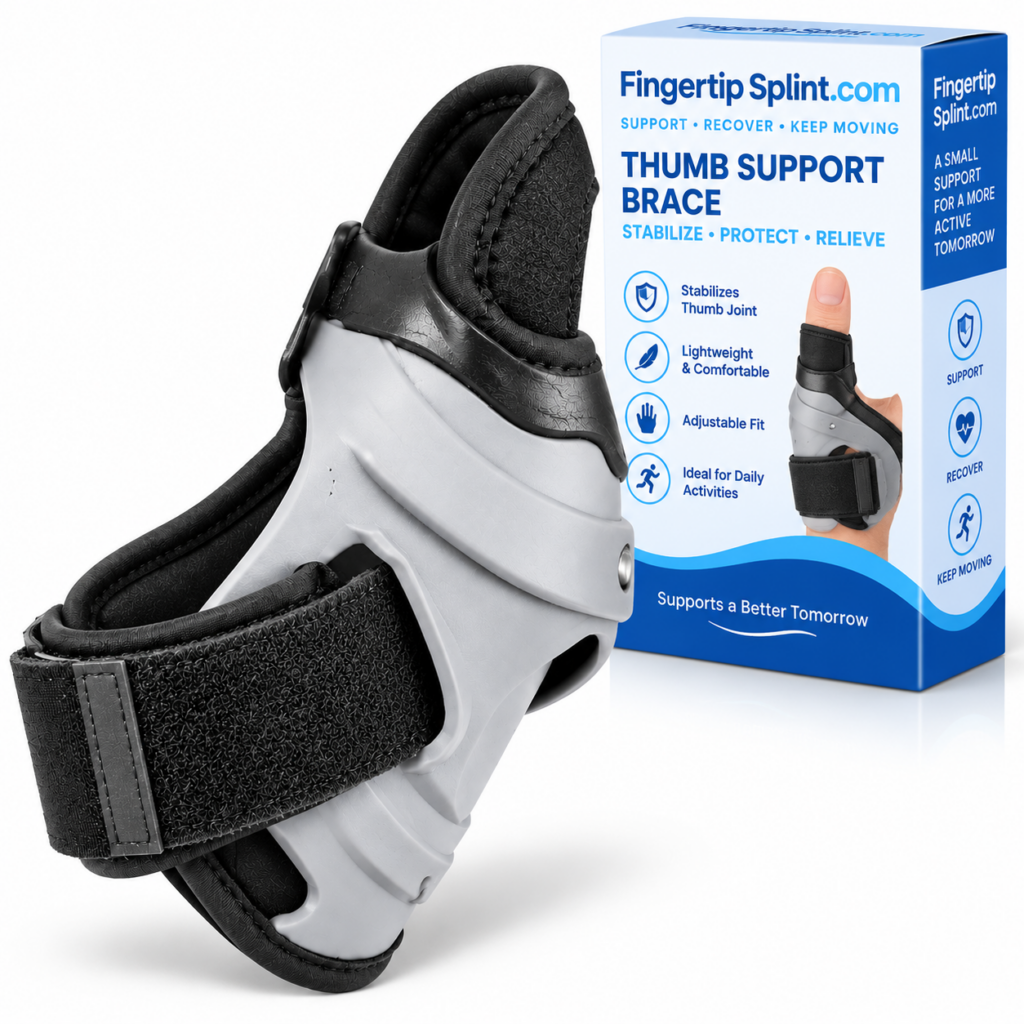
A thumb support brace has several components that each contribute to how it feels during wear. Understanding these components clarifies why some designs are more comfortable than others.
Interactive 3D: Design Anatomy
Tap each component to see how it contributes to comfort
Thumb Support Area
The primary area that contacts and supports the thumb. Its shape, material, and contouring determine how the splint sits against the thumb. A design that follows the thumb’s natural shape is generally more comfortable than one that forces the thumb into an unnatural position.
All components work together. Comfort comes from the interaction between them, not from any single component.
Material: Softness Isn’t the Whole Story
Material affects comfort, durability, and how the splint feels during extended wear. But different material characteristics contribute to comfort in different ways. Softness alone does not determine comfort.
Surface Softness
How the material feels against the skin. A soft surface may feel more comfortable initially, but softness must be combined with other characteristics to produce lasting comfort.
Flexibility
How the material bends and conforms. A flexible material may follow the hand’s contours more readily, but it still needs appropriate structure.
Thickness
How thick the material is. Thicker material may provide more cushioning but can increase bulk and affect movement.
Weight
How heavy the material feels. Lighter materials may feel less noticeable during extended wear and daily activities.
Breathability
How well air moves through the material. Breathable materials may reduce heat and moisture buildup during prolonged wear.
Moisture Handling
How the material behaves when exposed to sweat or moisture. Materials that wick or dry quickly may be more comfortable in warm conditions.
Durability
How the material holds up over time. A material that stretches or degrades may lose its fit and comfort characteristics.
Skin Contact
How the material interacts with skin. Smooth, non-irritating surfaces tend to feel more comfortable during extended contact.
Important concept: Softness and support are not opposites. A material can be soft against the skin while the overall product still provides structural support. The key is how the material and structure work together.
Shape and Contouring
The shape of a thumb splint determines how it fits against the hand and whether it follows the natural contours of the thumb and palm. A poorly shaped product may create pressure points, unnecessary bulk, movement interference, or shifting.
Thumb Shape
The splint should accommodate the thumb’s shape and position. A design that follows the thumb’s natural contours may be more comfortable than one that does not.
Thumb Base
The base of the thumb connects to the hand. The splint should account for this transition without creating pressure at the base.
Palm
If the design extends onto the palm, the shape should follow the palm’s contour. Coverage that does not follow the palm may create pressure or shift.
Wrist Transition
Designs that extend toward the wrist should account for the wrist’s shape and movement. Poorly shaped transitions may create pressure points.
Natural Hand Contours
The hand is not flat. A splint that follows natural contours is generally more comfortable than one that forces the hand into a specific shape.
Coverage Transitions
Where the splint transitions from one area to another, the shape should avoid abrupt changes that could create pressure points.
Pressure Distribution
Comfort is influenced by where pressure is applied, not simply how much pressure exists. A splint that concentrates pressure at a single point may feel uncomfortable even at low tension, while a splint that distributes pressure across appropriate contact areas may feel comfortable at a similar tension level.
Poor Pressure Distribution
- Small concentrated pressure points
- Pressure at strap edges
- Pressure at seams or closures
- Uneven contact across the hand
Better-Distributed Contact
- Pressure spread across appropriate contact areas
- Smooth transitions across coverage
- Even contact with the thumb and hand
- Strap pressure distributed appropriately
Practical insight: Discomfort at a specific point often indicates concentrated pressure. This can result from strap placement, edge construction, or how the splint sits against the hand. Small adjustments to positioning may redistribute pressure more evenly.
Padding and Cushioning
A common misconception is that more padding automatically means more comfort. This is not necessarily true. Excessive padding can increase bulk, change fit, affect movement, increase heat and moisture, and alter the intended position.
What Padding Can Do
- Cushion contact areas
- Distribute pressure more evenly
- Reduce friction at specific points
- Improve comfort at strap edges
What Excessive Padding Can Do
- Increase bulk
- Change the intended fit
- Affect movement
- Increase heat and moisture
- Alter the intended positioning
Adjustability and Comfort
Adjustable fastening can influence comfort by allowing the wearer to modify fit, positioning, and pressure distribution. However, adjustability helps only when the underlying size and design are appropriate.
Secure positioning
Fit personalization
Pressure modification
Stability during movement
Comfort fine-tuning
Repositioning after movement
Important: An incorrectly sized product cannot necessarily be fixed by repeatedly tightening the strap. Adjustment works within a specific range built around a base size. Correct sizing remains essential for comfort.
The fit reference Thumb Splint Fit Guide: Understanding Adjustability and Comfort covers fit and comfort in more depth.
Strap and Fastening Design
The fastening system determines how the splint stays in position and how pressure is distributed. Different fastening designs produce different comfort characteristics.
What to Evaluate
- Strap width
- Closure position
- Ease of adjustment
- Security during movement
- Edge construction
- Number of adjustment points
Comfort Question
Does the fastening distribute pressure appropriately, or does it create a concentrated pressure point? A wider strap distributes pressure over a larger area. A narrow strap may concentrate pressure at a single point.
Flexibility and Structural Support
Flexibility and structure exist in tension. A completely rigid structure isn’t automatically more comfortable, and maximum flexibility isn’t automatically better. The product needs to match its intended function.
| Design Characteristic | Potential Comfort Consideration |
|---|---|
| Flexible material | May conform more readily to hand shape |
| Structured material | May provide more positional resistance |
| Adjustable fastening | May allow fit modification within a range |
| Rigid construction | May feel more restrictive during movement |
| Thin construction | May feel less bulky but provide less cushioning |
| Thick construction | May provide more structure but increase bulk |
The mechanism reference How an Adjustable Thumb Splint Provides Flexible Support explains how flexibility and support work together.
Coverage: How Much Is Enough?
Coverage determines which parts of the thumb and hand are enclosed by the splint. Increased coverage may influence stability, bulk, movement, heat, and comfort.
Thumb-Only Coverage
Focuses on the thumb. May allow more hand movement but provide less overall stability.
Thumb-Base Coverage
Extends to the base of the thumb. Coverage in this area can affect how the thumb moves and how the splint sits.
Palm Coverage
Extends onto the palm. May provide more stability but increase bulk and heat.
Wrist Extension
Extends toward the wrist. May provide additional stability but occupy more area and affect movement.
Partial Coverage
Covers a specific portion of the thumb. May feel less bulky but provide less overall coverage.
Extended Coverage
Covers a larger section of the thumb and hand. May provide more structural contact but affect movement and comfort.
Low Profile vs Bulky Design
Profile refers to how bulky the splint is. Different profiles suit different activities, and neither is universally superior.
| Design Characteristic | Potential Comfort Consideration |
|---|---|
| Low profile | Less noticeable during daily activities |
| Thicker construction | May provide more structure but feel bulkier |
| Broad coverage | May improve contact but occupy more area |
| Narrow coverage | May feel less bulky but provide less coverage |
| Flexible structure | May allow more movement |
| More rigid structure | May feel more restrictive |
Practical insight: A lower-profile design may be easier to integrate into fine-motor activities like typing or writing. A more substantial design may be appropriate when more structure is needed. The right choice depends on the intended use.
Edge and Seam Design
Edges and seams are often overlooked, but they can significantly affect comfort. Where the product meets the skin matters as much as the main support structure.
Rough edges
Hard seams
Uneven stitching
Thick closures
Abrupt material transitions
Poorly finished edges
Design principle: A good design considers where the product meets the skin, not only the main support structure. Smoother edges and well-placed seams reduce the chance of rubbing or pressure points.
Breathability and Moisture
Comfort can change during prolonged use. Breathability and moisture management affect how the splint feels over time.
Material
Airflow
Surface contact
Moisture accumulation
Activity level
Environmental temperature
“Breathable” is a design claim that should be supported by actual product or material specifications. Do not assume a particular product is breathable unless verified from the manufacturer’s information.
Weight and Bulk
Even small differences in product weight and thickness can influence perceived comfort. Lighter products may feel less noticeable, particularly during extended wear or fine-motor activities.
What Contributes to Weight
- Overall product weight
- Material thickness
- Number of components
- Strap arrangement
- Profile around the thumb
When Weight Matters Most
- Typing and writing
- Smartphone use
- Extended daily wear
- Travel
- Activities requiring fine motor control
Comfort During Movement
Comfort should not only be evaluated while sitting still. A splint may feel comfortable at rest but different during activity. Understanding this difference helps you evaluate comfort more accurately.
Writing
Typing
Holding a phone
Reading
Light activities
Repeated hand positioning
For a deeper look at how comfort relates to daily activities, the reference Why Choose an Adjustable Thumb Support Splint for Daily Activities? covers everyday usability in more depth.
Comfort vs Support: Finding the Design Balance
Support, comfort, and mobility exist in tension. Optimizing one factor may affect another. Understanding this balance helps clarify why different designs feel different.
Support
How the product maintains its intended structure and position. More structure may provide more positional resistance but can increase bulk.
Comfort
How the product feels against the hand during intended use. More padding may cushion contact but can alter fit.
Mobility
How the product interacts with usable movement. More flexibility may allow more movement but can change support characteristics.
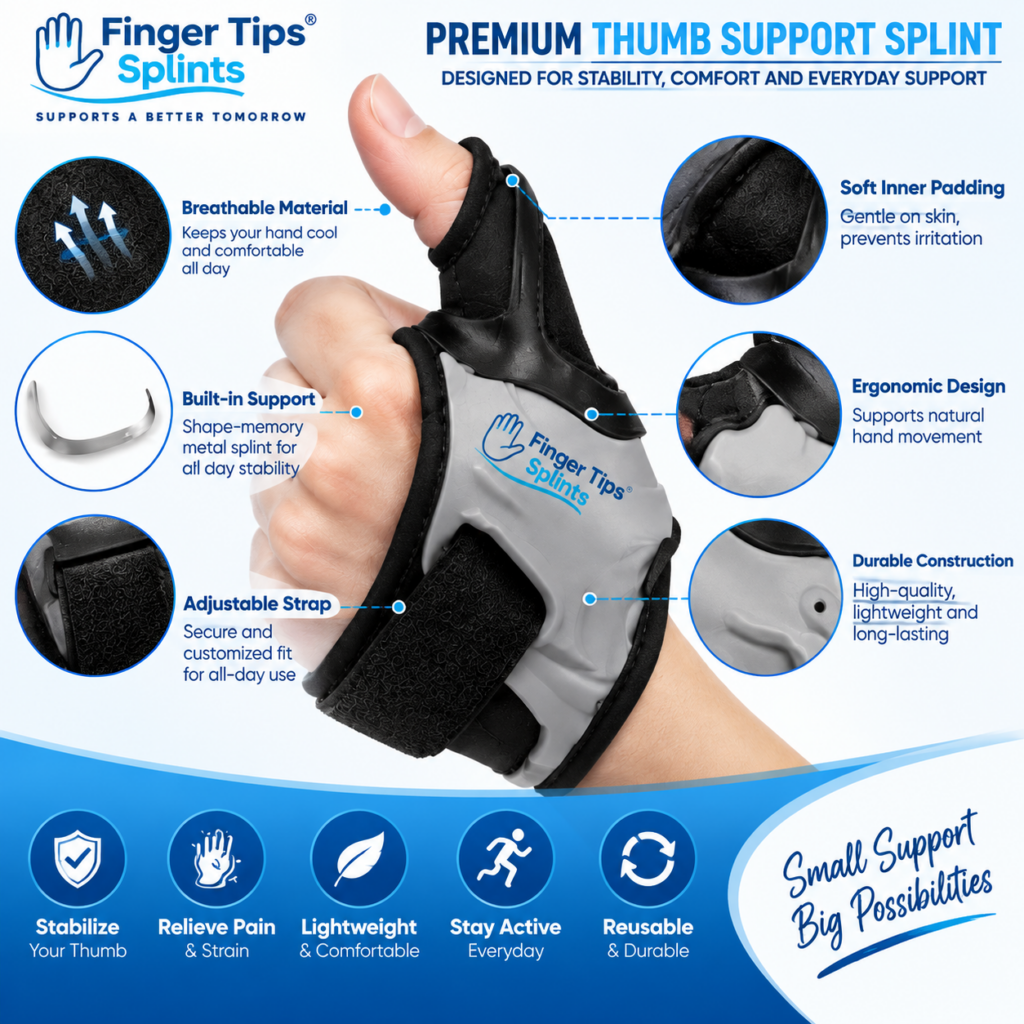
Product Spotlight: Adjustable Thumb Support Splint
After understanding the design principles behind comfort, here is a specific product to examine. The Adjustable Thumb Support Splint is one example of a thumb-focused adjustable design. It can be evaluated using the comfort framework discussed throughout this guide.
Adjustable Thumb Support Splint
- Adjustable design for customizable fit
- Thumb-focused support construction
- Designed for thumb coverage and positioning
- Full product specifications available on the product page
Applying the Comfort Design Framework
Material
Check the confirmed material on the product page. Review how the material characteristics relate to comfort and wear.
Shape
Review how the product is constructed around the thumb. Check the product images for contouring details.
Adjustment
Check how the user modifies the fit. Review whether the adjustment stays secure during movement.
Coverage
Review which thumb and hand areas are covered. Confirm coverage matches your intended purpose.
Fastening
Check how the product is secured. Review the fastening mechanism and how it distributes pressure.
Profile
Consider what the product design implies for everyday use. Review thickness and bulk characteristics.
For broader buying context, the reference Choosing a Thumb Support Splint: What Should You Consider? covers the decision framework. For a complete product reference, see Adjustable Thumb Support Splint: A Complete Buyer’s Guide.
Interactive Comfort Design Explorer
Tap each design element to see what to consider. This is educational guidance for product evaluation, not a medical recommendation.
Comfort Design Explorer
Tap each design element to see what to consider
MATERIAL
Softness and structure
SHAPE
Contouring and fit
STRAP
Fastening and pressure
PADDING
Cushioning balance
FLEXIBILITY
Movement and support
PROFILE
Bulk and practicality
COVERAGE
Area and trade-offs
EDGES
Seams and transitions
Material
What should you examine? Consider surface softness, flexibility, thickness, weight, breathability, moisture handling, durability, and skin contact. Look for specific material information in the product listing rather than relying on general terms.
How to Evaluate a Thumb Splint’s Comfort Before Buying
This practical evaluation framework helps assess comfort characteristics before purchase.
Comfort Evaluation Checklist
Tap each item as you confirm it for the product you are considering.
Check items to see your evaluation summary.
Common Thumb Brace Design Problems
These design problems come up frequently. Understanding them helps you evaluate products more critically.
Can interfere with everyday activities and feel more noticeable during fine-motor tasks.
Check: the product’s profile and whether it matches your intended activity.
May create discomfort at specific points. Often related to strap placement or edge construction.
Check: where the product applies pressure and whether it is distributed evenly.
Makes fine-tuning difficult. A limited adjustment range may not accommodate your hand well.
Check: how the adjustment works and whether it offers sufficient range.
Can undermine even a well-designed product.
Check: measure and compare to the manufacturer’s sizing chart before relying on adjustment.
Can cause rubbing or irritation during wear.
Check: the edge construction and whether edges sit smoothly against the skin.
May feel restrictive during activities requiring movement.
Check: whether the design allows the movement you need.
May not provide the structural characteristics intended by the design.
Check: whether the support characteristics match the product’s intended purpose.
Can increase bulk or alter fit. Padding should be appropriate for the design, not maximized.
Check: whether padding enhances comfort or creates new issues.
“Comfort” vs “Medical Effectiveness”
These are two different questions. Comfort is a user-experience characteristic. Medical appropriateness is a separate consideration that depends on the specific situation.
A comfortable brace isn’t automatically the correct device for: a fracture, significant injury, neurological symptoms, severe pain, or another specific medical situation. Comfort and medical appropriateness are separate questions.
If a healthcare professional has recommended a specific type of support, follow that guidance. A consumer thumb splint is not a substitute for prescribed medical support.
Who Should Pay Extra Attention to Design?
Design characteristics may be particularly noticeable for people who use their hands frequently for certain activities. This is a comfort consideration, not a medical recommendation.
Writing
Typing
Smartphone use
Reading
Office work
Studying
Travel
Light routine activities
Extended daily wear
What Should You Consider Beyond Comfort?
This section presents general principles. It does not claim that a doctor has personally endorsed a specific product.
What May Be Considered
- The reason for using the device
- Desired positioning
- Movement requirements
- Appropriate device type
- Fit
- Skin condition
- Duration of use
When to Seek Advice
Professional evaluation may be appropriate for significant injury, visible deformity, severe or worsening pain, major swelling, persistent numbness or tingling, significant movement loss, or symptoms that persist or worsen.
For authoritative general information about thumb, hand, and wrist conditions, the following resources provide evidence-based content:
- Mayo Clinic for condition overviews and patient education.
- WebMD for general thumb and hand concern overviews.
- Healthline for practical wellness information.
- AAOS OrthoInfo for orthopedic guidance from specialists.
- NHS guide on hand pain for UK-based clinical guidance.
- MedlinePlus hand injuries and disorders for a broad reference library.
- Cleveland Clinic for clear patient-oriented explanations.
- Johns Hopkins Medicine for clinical and research-based perspectives.
- FDA for regulatory context on medical devices.
- NIH for research-based health information.
These resources provide general information and do not replace individualized advice from a qualified healthcare professional.
When Comfort Problems Shouldn’t Be Ignored
Persistent discomfort should not be normalized. If a splint causes ongoing problems, that is a signal to reassess.
Do not assume that repeatedly changing strap tension will solve an underlying problem if you experience: significant pain, numbness, tingling, concerning discoloration, increasing swelling, significant loss of movement, or persistent symptoms. Remove the splint and seek appropriate professional advice if symptoms persist.
Quick “Comfort by Design” Checklist
Before purchasing or using a thumb support brace, check each item.
Comfort by Design
Tap each item to confirm it for the product you are evaluating.
7 Design Features to Look For
Frequently Asked Questions
A comfortable thumb support brace typically combines an appropriate fit with suitable materials, smooth contact areas, manageable pressure, practical adjustability, and a design that matches the wearer’s intended movement. Comfort also depends on correct sizing and positioning, so a soft or padded splint is not automatically comfortable if it fits poorly.
Not automatically. Excessive padding can increase bulk, change fit, affect movement, increase heat and moisture, and alter the intended position. The important factor is appropriate cushioning for the design, not maximum cushioning. Padding should address specific comfort needs rather than being added indiscriminately.
An adjustable strap can improve comfort by allowing the wearer to modify fit, positioning, and pressure distribution within the product’s intended range. However, adjustability helps only when the underlying size and design are appropriate. An incorrectly sized product cannot necessarily be fixed by repeatedly tightening the strap.
No. A comfortable splint should fit securely but not tightly. It should stay positioned during intended movement without creating excessive pressure or unnecessary discomfort. Tightness is not a measure of support or comfort. If you experience numbness, tingling, significant discoloration, or persistent discomfort, remove the splint and seek appropriate advice if symptoms persist.
Yes. Material characteristics such as surface softness, flexibility, thickness, weight, breathability, moisture handling, durability, and skin contact all influence how comfortable a splint feels during wear. However, material alone does not determine comfort — the overall design, including shape, contact, pressure, adjustment, and profile, also contributes.
Yes. Softness and support are not opposites. A well-designed splint can use comfortable materials while still providing the structural characteristics appropriate for its intended purpose. The key is how the material, shape, contact, adjustment, and structure work together. Comfort and support are design characteristics that can coexist when the design is well-balanced.
First, check positioning, sizing, and adjustment. Discomfort at a specific point may indicate a positioning or pressure distribution issue. Do not simply tighten the splint further. If discomfort persists or is accompanied by numbness, tingling, significant discoloration, or increasing swelling, remove the splint and seek appropriate professional advice.
Comfort Comes From Design, Not Softness Alone
A comfortable thumb support brace is not defined by softness alone. Its comfort comes from how the material, shape, contact areas, fastening system, adjustability, support structure, flexibility, and overall profile work together with the user’s hand and intended activity. Material → Shape → Contact → Pressure → Adjustment → Flexibility → Movement → Comfort
The Bottom Line on Thumb Support Brace Design
A comfortable thumb support brace is not defined by softness alone. Its comfort comes from how the material, shape, contact areas, fastening system, adjustability, support structure, flexibility, and overall profile work together with the user’s hand and intended activity. Each design element contributes to the experience of wearing the splint.
The framework in this guide — Material → Shape → Contact → Pressure → Adjustment → Flexibility → Movement → Comfort — explains why some splints feel comfortable and others do not. Understanding these design factors helps you evaluate products more critically and match the design to your specific needs.
If you want to continue exploring within this cluster, the mechanism article How an Adjustable Thumb Splint Provides Flexible Support covers how adjustability works, and the features guide Thumb Support Splints Explained: Features, Fit and Everyday Uses covers product features. For a wider reference, explore the full FingerTipSplint blog library.
This article is for general information only and is not a substitute for professional medical advice. Always consult a qualified healthcare provider for diagnosis and treatment of any medical condition.