
Why Choose an Adjustable Thumb Support Splint for Daily Activities?
Your day doesn’t stay the same. In the morning you might be writing, then typing, then checking your phone, then traveling, then handling light tasks. Each activity places a different demand on your thumb. An adjustable thumb support splint can give you more flexibility to fine-tune fit within the product’s intended design — instead of treating every activity exactly the same.
What This Guide Covers
- Quick Answer
- What Makes It Different?
- Why Daily Activities Need Different Considerations
- Morning Routine
- Studying and Writing
- Typing and Laptop Use
- Smartphone Use
- Reading and Tablet Use
- Travel
- Light Everyday Tasks
- How Adjustability Helps
- Comfort During Longer Use
- Support vs Freedom of Movement
- Adjustable ≠ One Size Fits Everyone
- A Day With an Adjustable Splint
- Interactive Daily Activity Explorer
- Product Spotlight
- Common Everyday-Use Mistakes
- Who May Value Everyday Adjustability
- When a Splint May Not Be Enough
- Daily Comfort Checklist
- Everyday Tips
- FAQ
- Conclusion
Quick Answer: Why Choose an Adjustable Thumb Support Splint for Daily Activities?
An adjustable thumb support splint can be useful for everyday activities because its fastening or positioning system may allow the fit to be fine-tuned around the thumb and hand. This can make the support more adaptable to normal routines, but the appropriate design depends on the intended activity, fit, comfort, and required thumb movement.
If you need the foundational definition of how an adjustable thumb support splint works, the reference Adjustable Thumb Support Splint: What Is It and How Does It Work? covers that ground. This article focuses specifically on how adjustability fits into changing daily routines.
What Makes an Adjustable Thumb Splint Different?
Before exploring daily activities, it helps to clarify what “adjustable” actually means in a thumb splint context. The adjustment feature is what separates an adjustable design from a fixed one.
Adjustable Fastening
Allows the fit to be modified after the splint is on the hand. The adjustment mechanism can change the circumference or positioning within the product’s intended range.
Thumb-Focused Construction
Keeps the support centered around the intended area. The shape is designed for the thumb and its relationship to the hand.
Fit Flexibility
Allows some personalization within the product’s size and design range. Useful when your hand dimensions fall between standard sizes.
Practical Usability
Can make everyday positioning easier to manage. Adjustment can be fine-tuned as your activities change through the day.
Important: Adjustable does not mean universally suitable. Adjustment works within a specific range built around a base size. It does not replace correct sizing, and it does not make the product appropriate for every activity or every thumb condition.
Why Daily Activities Need Different Considerations
Daily routines involve different hand positions, gripping patterns, thumb movements, durations, and activity levels. Typing and writing are not the same hand movement. Holding a phone differs from carrying a lightweight object. Understanding these differences helps you evaluate fit against the activity you actually perform.
| Activity | Main Thing to Consider |
|---|---|
| Writing | Fine hand movement and pen grip |
| Typing | Repeated hand positioning |
| Smartphone use | Thumb interaction and repeated tapping |
| Reading | Holding and repositioning |
| Travel | Comfort over routine changes |
| Light tasks | Stability and movement during handling |
Key principle: Evaluate the activity, not just the product label. The characteristics that matter most can shift from one activity to another.
Morning Routine — Starting With the Right Fit
The day should begin with correct fit. A well-positioned splint at the start of the day provides a better baseline for whatever comes next.
Morning Fit Check
Tap each item as you confirm it before starting your day.
The fit reference Thumb Splint Fit Guide: Understanding Adjustability and Comfort covers fit and comfort in more depth.
Studying and Writing
Studying and writing involve holding a pen, writing notes, turning pages, using notebooks, and switching between writing and typing. Each of these activities places specific demands on the thumb and hand. This is a highly relevant daily-use context for many people.
Movement
Can the thumb perform the movements required by the activity? Writing involves fine hand coordination, and the splint should not prevent the movements you need.
Comfort
Does prolonged writing create pressure or rubbing? Pen grip and sustained hand position can reveal comfort issues that aren’t noticeable at rest.
Stability
Does the splint remain in its intended position? Repositioning during writing may indicate a fit issue.
Realistic expectation: An adjustable thumb splint is not intended to improve writing performance. The goal is to allow writing to continue as normally as possible while the splint provides its intended support.
Typing and Laptop Use
Typing involves repeated hand positioning. Keyboard, trackpad, and mouse interaction all place the thumb in different positions and require different movements. The way you type — the specific keyboard layout, mouse use, and hand position — affects how the splint behaves.
Before You Start Typing
Tap each item as you confirm it before typing.
If the splint’s position or profile interferes with the thumb movements required for your keyboard setup, that is a signal to reassess fit or consider whether the design suits this activity.
Smartphone Use
Smartphone interaction can involve scrolling, tapping, one-handed use, two-handed typing, and holding the phone. These movements require frequent thumb action, and the splint needs to allow these movements without slipping or interfering with touchscreen interaction.
What to Check
- Does the splint allow the thumb movements required?
- Does it interfere with touchscreen contact?
- Does it slip during rapid tapping or scrolling?
- Does it remain comfortable during extended phone use?
Questions to Ask
- Does the design allow the movement required for my normal phone use?
- Does the splint’s profile affect how I hold the phone?
- Does the fastening stay secure during one-handed use?
Important: Do not assume a splint is “perfect for phone use” without testing. Whether it works well depends on your specific phone use and the splint’s design.
Reading and Tablet Use
Reading involves holding a book, turning pages, holding a tablet, and repositioning the hand. Repeated changes in hand position can affect how the splint feels and whether it stays in place.
Holding a book or tablet
Turning pages
Repositioning the hand
Sustained hold
Grip changes
Comfort over time
The key question is how the splint feels during repeated changes in hand position. If holding or repositioning creates pressure or the splint shifts, check the fit and positioning.
Travel and Being Away From Home
Travel places different demands on a splint. Long periods of sitting, carrying lightweight personal items, smartphone use, reading, and different hand positions all come together. Easy adjustment becomes particularly relevant during travel.
Travel Questions
- Is the product easy to put on?
- Is the fastening easy to manage?
- Can the fit be checked during the day?
- Is it comfortable for the activities planned?
What to Check Before Travel
- Fit and fastening
- Comfort
- Care instructions
- Whether the design suits the activities planned
Light Everyday Tasks
Light everyday tasks include organizing belongings, handling books, folding clothes, preparing study materials, and similar routine activities. These tasks place moderate demands on the thumb but still require the splint to stay positioned.
Important: An everyday support product is not automatically protective equipment for hazardous tasks, heavy lifting, sharp tools, heat, or chemicals. A general thumb support should not be used as protection in these situations unless specifically designed and rated for that purpose.
The reference Thumb Support Splints Explained: Features, Fit and Everyday Uses covers everyday use in more depth.
How Adjustability Helps Across Different Activities
Adjustability plays four practical roles across daily activities. Understanding these roles helps clarify why an adjustable design can be useful for varied routines.
1. Fit Adjustment
Allows fine-tuning. Adjustment works within the product’s intended range to accommodate small variations in hand size and shape.
2. Position Maintenance
Can help keep the product positioned as designed. This matters when your activities change through the day.
3. Comfort Management
Allows adjustment without assuming tighter is always better. Comfort can be improved by small adjustments rather than more pressure.
4. Routine Flexibility
Makes it possible to reassess the fit when moving between activities. Different tasks may benefit from slight fit adjustments.
Comfort During Longer Daily Use
Comfort can change over time. Repeated movement, prolonged contact, hand position, moisture, pressure points, and strap placement all affect how the splint feels over the course of a day.
The “Pause and Check” Method
After a period of normal activity, check position, pressure, comfort, and movement. If something feels wrong, follow the manufacturer’s instructions rather than simply tightening the device.
Practical note: Fit can feel different after several minutes or hours of activity. What seems comfortable at first may need re-evaluation once you begin moving your hand.
Support vs Freedom of Movement
More restriction is not automatically better for everyday use. Different activities require different thumb movements, and the appropriate balance depends on what you need to do.
| Activity | Movement Consideration |
|---|---|
| Writing | Fine thumb and hand coordination |
| Typing | Repeated hand positioning |
| Smartphone use | Frequent thumb interaction |
| Reading | Holding and repositioning |
| Light tasks | Grip and hand positioning |
| Travel | Varies by activity |
Why Adjustability Doesn’t Mean “One Size Fits Everyone”
This is an important distinction. A product can have adjustable straps while still having a defined size range, specific dimensions, particular coverage, and a specific construction.
What Adjustability Can Do
- Fine-tune fit within a range
- Accommodate small variations in hand size
- Allow repositioning
- Provide comfort adjustment
What Adjustability Cannot Do
- Fit hands significantly outside the size range
- Replace correct size selection
- Make the product appropriate for every activity
- Substitute for professional assessment
A Day With an Adjustable Thumb Support Splint
This timeline shows how the fit and comfort considerations might change through a typical day. Tap each point to see what to check.
Interactive: Daily Timeline
Tap each point in the day to see what to check
8 AM
Getting ready
10 AM
Studying
1 PM
Smartphone
3 PM
Laptop work
6 PM
Travel / tasks
Evening
Remove & check
8:00 AM — Getting Ready
What to check: Confirm correct sizing, correct positioning, secure fastening, and no excessive pressure. This establishes a good baseline for the day.
Interactive Daily Activity Explorer
Choose an activity to see what to check. This is educational guidance for product evaluation, not a medical recommendation.
Daily Activity Explorer
Tap each activity to see what to check
WRITING
Fine hand movement
TYPING
Repeated positioning
SMARTPHONE
Thumb interaction
READING
Holding and repositioning
TRAVEL
Changing positions
LIGHT TASKS
Stability and movement
Writing
What to check: Thumb movement during pen grip, strap placement, comfort during prolonged writing, and whether the splint stays in its intended position.
Product Spotlight: Adjustable Thumb Support Splint
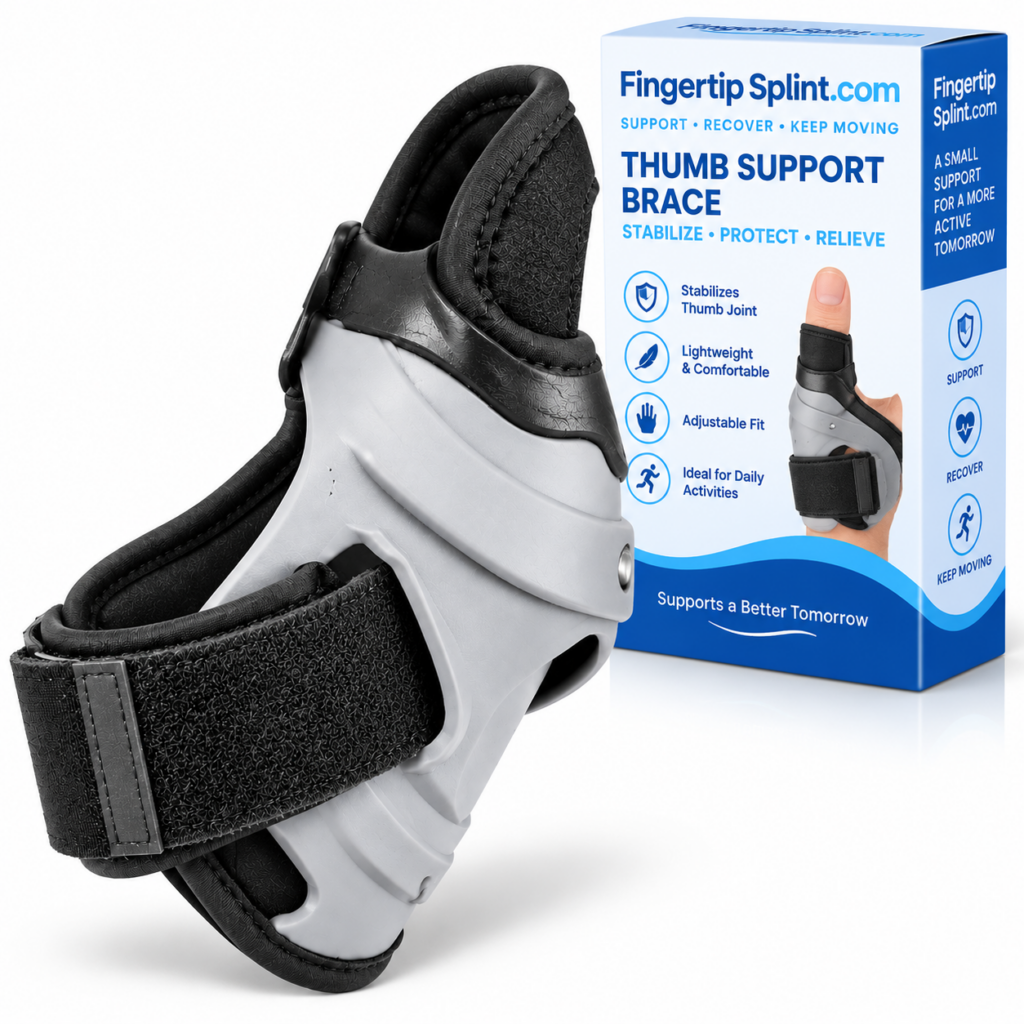
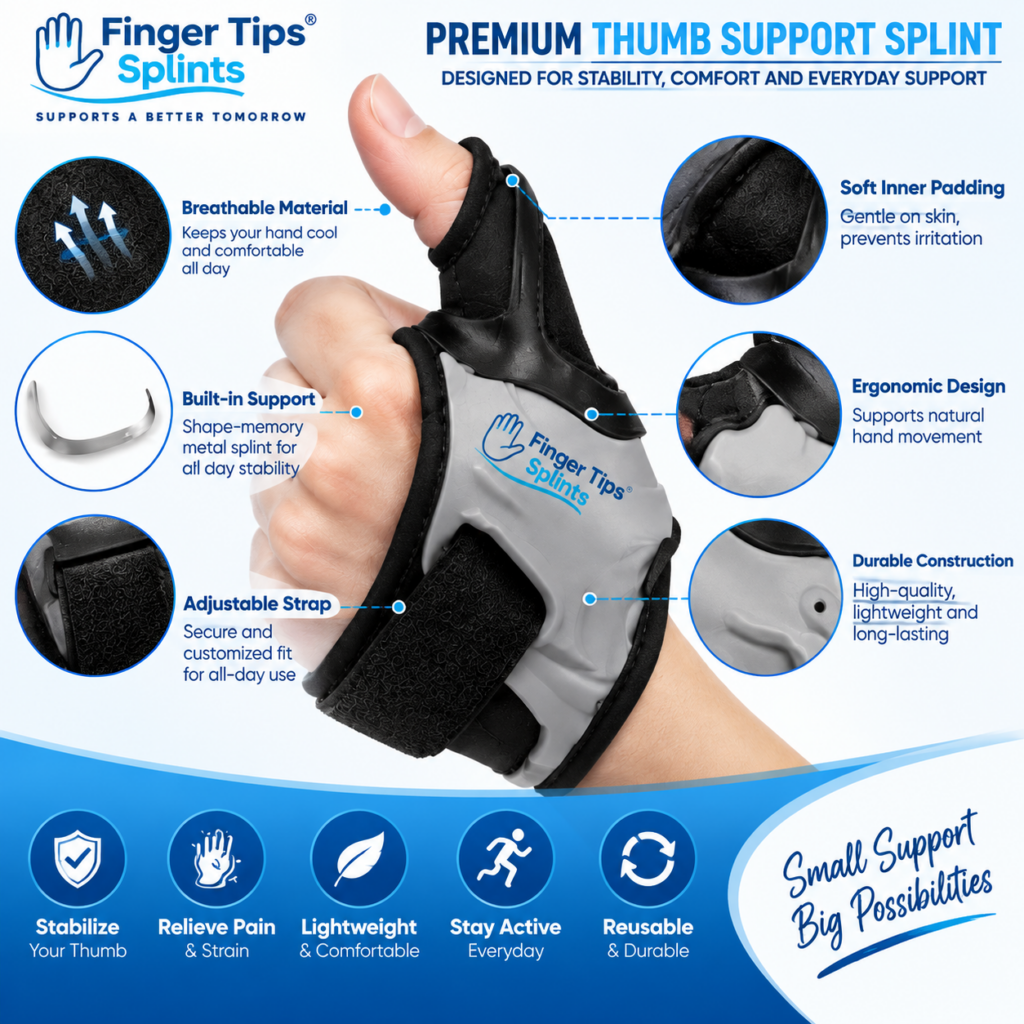
After understanding how adjustability fits into daily activities, here is a specific product to examine. The Adjustable Thumb Support Splint is one option if customizable fit and thumb-focused support are among your priorities for everyday use.
Adjustable Thumb Support Splint
- Adjustable design for customizable fit
- Thumb-focused support construction
- Designed for thumb coverage and positioning
- Full product specifications available on the product page
Connecting the Product to the Everyday Framework
Adjustable Fit
Review the adjustment mechanism on the product page. Check how the adjustment works, what changes when adjusted, and whether it stays secure during movement.
Thumb-Focused Design
Confirm the coverage area matches your needs. Check that the product is designed around the thumb and its relationship to the hand.
Everyday Practicality
Consider how the splint’s characteristics match the activities you do most. Review the care instructions and product information.
Fit and Comfort
Review the sizing information and any comfort-related details. For deeper fit guidance, see the thumb splint fit guide.
For the broader buying framework, the reference Choosing a Thumb Support Splint: What Should You Consider? covers the selection process in more depth. For the complete purchasing resource, see Adjustable Thumb Support Splint: A Complete Buyer’s Guide.
Common Everyday-Use Mistakes
These mistakes come up repeatedly when people use adjustable thumb splints during daily activities. Avoiding them improves the experience.
More activity doesn’t automatically mean more tension is needed. Excessive tightness can cause discomfort and other concerns.
Check: adjust for appropriate fit, not maximum pressure.
Sizing still matters. Adjustment works within a range built around a base size.
Check: the size range and adjustment range before relying on adjustment.
A design that feels fine at rest may feel different during repetitive tasks.
Check: how the splint behaves during the activity you do most.
Position matters as much as tightness. A poorly positioned splint may not function as intended.
Check: that the splint sits where the manufacturer’s instructions indicate.
Reassess rather than tolerating increasing discomfort. Small adjustments may resolve the issue.
Check: position, pressure, and comfort after extended wear.
A support product isn’t automatically protective equipment against hazards.
Check: the manufacturer’s intended use for the product.
Some symptoms require professional assessment rather than another adjustment.
Check: seek appropriate advice for significant or persistent symptoms.
Movement may shift the splint and change fit. Recheck after periods of activity.
Check: recheck the fit after activity and after extended wear.
Who May Value Everyday Adjustability?
This is a use-case list, not a diagnostic list. People whose routines involve frequent hand use may appreciate an adjustable design because it provides greater control over fit within the product’s intended range.
Students
Office workers
Remote workers
People who type frequently
Smartphone users
Travelers
People performing light daily activities
People with varied routines
People whose activities change through the day
This list describes use cases, not medical conditions. An adjustable design is one option among several. The category reference Adjustable Thumb Splint vs Finger Support: What’s the Difference? explains how thumb-specific designs compare to other support types.
When an Adjustable Thumb Splint May Not Be Enough
A consumer adjustable support may not be sufficient for every situation. Some circumstances require professional evaluation rather than product selection.
Seek appropriate professional evaluation for: significant injury, visible deformity, severe or worsening pain, major swelling, persistent numbness or tingling, significant movement loss, or symptoms that persist or worsen.
A support product should not be used as a substitute for evaluation when the underlying problem is unclear or significant. If a healthcare professional has prescribed a specific type of support, follow that guidance.
For authoritative general information about thumb, hand, and wrist conditions, the following resources provide evidence-based content:
- Mayo Clinic for condition overviews and patient education.
- WebMD for general thumb and hand concern overviews.
- Healthline for practical wellness information.
- AAOS OrthoInfo for orthopedic guidance from specialists.
- NHS guide on hand pain for UK-based clinical guidance.
- MedlinePlus hand injuries and disorders for a broad reference library.
- Cleveland Clinic for clear patient-oriented explanations.
- Johns Hopkins Medicine for clinical and research-based perspectives.
- FDA for regulatory context on medical devices.
- NIH for research-based health information.
These resources provide general information and do not replace individualized advice from a qualified healthcare professional.
Daily Comfort Checklist
Before daily use, check each item.
Before Daily Use
Tap each item to confirm it for the splint you are using.
7 Everyday Tips
Frequently Asked Questions
An adjustable thumb support splint can be useful for daily activities because its fastening or positioning system may allow the fit to be fine-tuned around the thumb and hand. This can make the support more adaptable to normal routines that involve different activities. The appropriate design depends on the intended activity, fit, comfort, and required thumb movement. Adjustability is a practical design feature, but it does not automatically make a product suitable for every person or activity.
Many people can use an adjustable thumb splint while writing, provided the splint stays positioned, allows the thumb movements required for pen grip, and does not create pressure points during prolonged use. Check thumb movement, pen grip, strap placement, and comfort. If writing feels more difficult or the splint shifts, reassess the fit. An adjustable splint is not intended to improve writing performance — the goal is to allow writing to continue as normally as possible.
Many people can wear a thumb support splint while typing, provided the splint’s position and profile do not interfere with the thumb movements required for their keyboard setup. Check thumb position, strap placement, and comfort before typing. Consider whether the design interferes with your normal movement. If discomfort develops, reassess the fit rather than assuming typing is not possible. Different keyboard setups may require different approaches.
Whether a thumb splint works well for phone use depends on the specific product’s design and your normal phone use. Smartphone interaction can involve scrolling, tapping, and holding the phone — all of which require frequent thumb movement. Check whether the splint allows the movements required and whether it interferes with touchscreen contact. Do not assume a splint is “perfect for phone use” without testing with your own device.
Adjustability can help improve comfort when used appropriately, because it allows the fit to be fine-tuned within the product’s intended range. However, adjustability does not automatically make a splint more comfortable. Comfort depends on correct sizing, proper positioning, appropriate adjustment, and how the product behaves during your activities. Adjusting for comfort means avoiding excessive tightness, not increasing pressure.
Not automatically. More activity does not necessarily mean more tension is needed. Tightness is not a measure of support. If the splint shifts during more active periods, check positioning and sizing first. If it still feels loose, adjust gradually according to the manufacturer’s instructions. Do not simply tighten as a default response — that may create pressure problems rather than solving the fit issue.
Seek professional advice if you have significant injury, visible deformity, severe or worsening pain, substantial swelling, major loss of movement, persistent numbness or tingling, significant discoloration, or symptoms that are not improving. Also seek advice if a specific type of support has been recommended. A consumer thumb splint is not a substitute for professional medical assessment or prescribed medical support.
One Thumb Splint, Many Activities
An adjustable thumb support splint can be practical for everyday routines because its fit can be fine-tuned within the limits of its design. The important question is not simply whether a splint is adjustable, but whether its size, positioning, comfort, movement, and construction fit the activities you actually perform. Daily Routine → Activity → Movement Requirement → Fit → Adjustment → Comfort → Reassessment
The Bottom Line on Adjustable Thumb Support Splints for Daily Activities
An adjustable thumb support splint can be practical for everyday routines because its fit can be fine-tuned within the limits of its design. Different activities — studying, typing, smartphone use, reading, travel, and light tasks — place different demands on the thumb. An adjustable design gives the wearer more flexibility to respond to those changing demands without replacing the product.
The important question is not simply whether a splint is adjustable, but whether its size, positioning, comfort, movement, and construction fit the activities you actually perform. Adjustability is a practical design feature, but it works within specific limits. Correct sizing, proper positioning, and appropriate adjustment remain essential.
If you want to continue exploring within this cluster, the mechanism article How an Adjustable Thumb Splint Provides Flexible Support covers how adjustability works, and the fit guide Thumb Splint Fit Guide: Understanding Adjustability and Comfort covers fit in more detail. For a wider reference, explore the full FingerTipSplint blog library.
This article is for general information only and is not a substitute for professional medical advice. Always consult a qualified healthcare provider for diagnosis and treatment of any medical condition.